Dynamics 365 Customer Service for consistent, accountable support
Dynamics 365 Customer Service turns scattered support requests — inbox threads, phone notes and sticky reminders — into managed cases with owners, priorities and history. Econix helps organizations design, implement, integrate and support Dynamics 365 Customer Service so customer issues are tracked, routed to the right person and resolved with context. Serving organizations across Canada and the United States.
Dynamics 365 Customer Service — managed cases, not lost threads
What Is Dynamics 365 Customer Service?
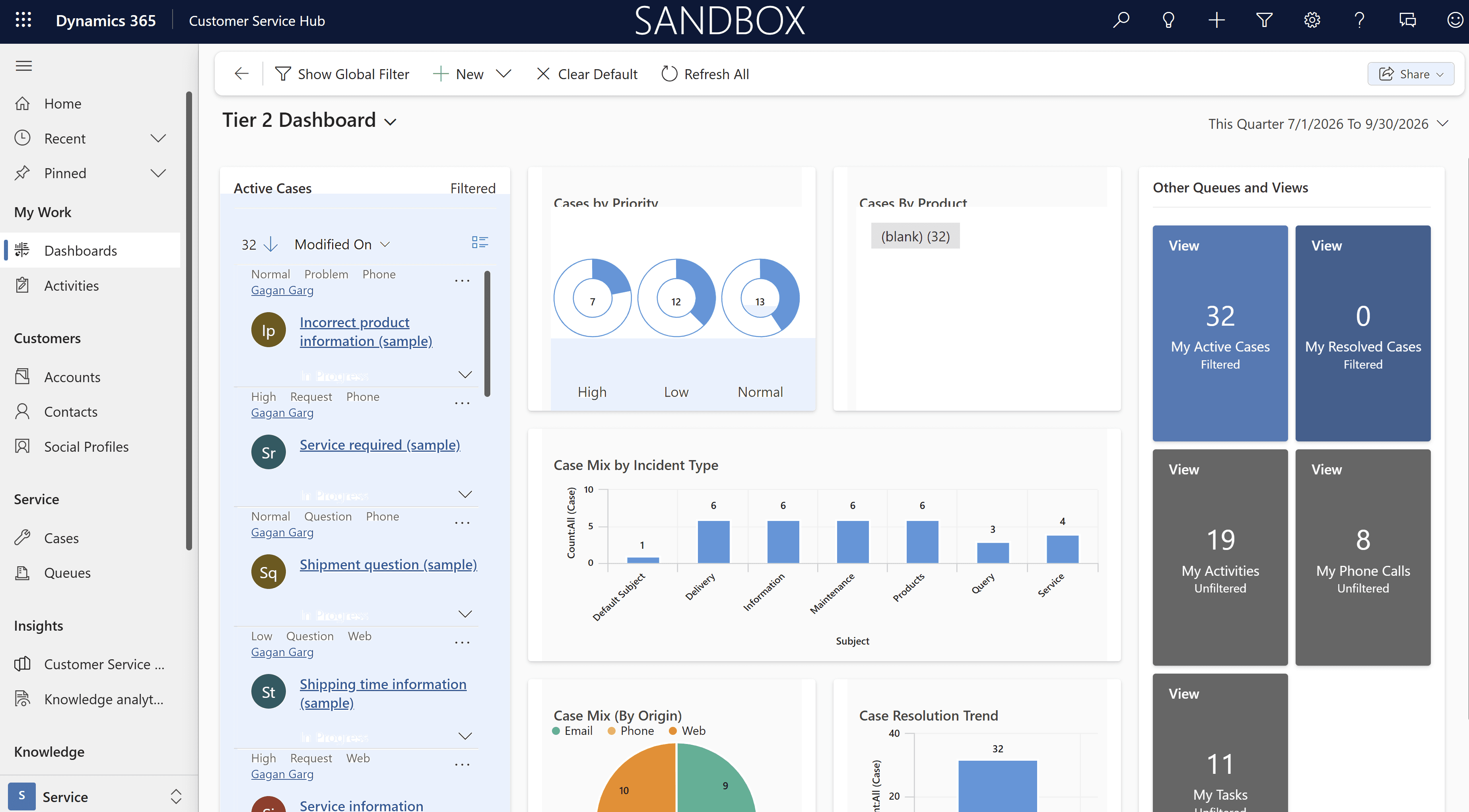
Dynamics 365 Customer Service is Microsoft's application for managing customer support — from case creation through routing, resolution and follow-up. Core case management turns requests arriving through supported email and web intake into structured cases with clear ownership and service-level expectations, and agents work from a single workspace showing the customer's history, entitlements and relevant knowledge articles. Chat, digital messaging, SMS and voice can be added through Dynamics 365 Contact Center and applicable channel licensing where those capabilities are selected. Because it shares the Dataverse foundation with Dynamics 365 Sales, sales and service see the same customer — not two disconnected versions of the relationship.
Core Capabilities
Structured support from intake to resolution — with every request owned and accounted for.
Case management
Every request becomes a tracked case with an owner, priority, category and activity timeline.
Email and web intake
Supported intake channels that turn incoming requests into structured cases in one queue with consistent handling.
Digital and voice channels
Chat, messaging, SMS and voice can be added through Dynamics 365 Contact Center and applicable channel licensing, creating a unified agent experience where those capabilities are selected.
Routing and queues
Cases route to the right team or specialist based on rules you define, not on who saw the email first.
Service-level agreements and entitlements
Response and resolution targets tracked per customer or contract, with escalation when they are at risk.
Knowledge management
A curated knowledge base so agents resolve issues consistently and customers can self-serve where appropriate.
Reporting and insights
Case volumes, resolution patterns and recurring-issue analysis that turn support data into operational improvement.
Copilot assistance
AI-assisted case summaries and draft responses, reviewed by the agent before anything reaches a customer.
Business Scenarios
The support realities — SLA commitments, shared-inbox overload and repeat issues that never get analyzed — that move teams to structured case management.
Manufacturers and distributors
Warranty claims, returns and product support where cases must connect to orders and items in the ERP.
Services firms
Client request management with service-level commitments and accountable follow-through.
Organizations with contractual support obligations
Anywhere entitlements and response targets are part of what customers pay for.
Public-sector and member-based organizations in Canada
Structured intake and tracking of citizen, member or stakeholder requests with clear accountability.
Support run from a shared inbox
Teams with no reliable way to know what is open, what is overdue and what was silently dropped.
Repeat issues never analyzed
The same root causes generating the same tickets month after month because case data was never categorized.
How Econix Helps With Dynamics 365 Customer Service
Case-model design, rollout, ERP and Sales integration, and continuous SLA and knowledge-base tuning — everything a support desk needs to stay accountable as volumes grow.
Assessment
Reviewing your support process, volumes and tooling to design a case model that fits how support works in your organization — including which intake channels you need and what they require.
Implementation
Configuration of cases, queues, routing, SLAs and agent workspaces, with delivery direction from design through go-live.
Migration
Moving open tickets, customer records and history from legacy helpdesk tools into Dynamics 365 Customer Service.
Integration
Connecting service to Business Central or Dynamics 365 Finance so agents see orders, invoices and warranty context, and to Dynamics 365 Sales for a single customer record.
Rescue and stabilization
Repairing service environments with broken routing, unusable queues or configurations that agents work around.
Support and optimization
Ongoing functional support, SLA tuning, knowledge base development, automation of repetitive case handling and reporting that surfaces recurring root causes.
Licensing & Subscription Assistance
Econix supplies Dynamics 365 Customer Service subscriptions through the Microsoft Cloud Solution Provider program: requirements assessment, licence inventory review based on customer-provided records and reports, right-sizing across Customer Service licence tiers, subscription selection and fulfilment, additions and reductions, renewals and co-terming, with term options where eligible and currently available. Channel capabilities delivered through Dynamics 365 Contact Center carry their own licensing — confirming which channels you need, and what they require under current Microsoft programs, is part of the licensing assessment.
Request a QuoteConnected to the Microsoft Ecosystem
A service desk is only as useful as the context it can see. Econix connects Dynamics 365 Customer Service to the systems that hold that context: Business Central or Dynamics 365 Finance for order, invoice and warranty data; Dynamics 365 Sales for shared accounts and ownership; Microsoft Teams for internal collaboration on difficult cases; Power BI for service performance reporting; and Power Automate for notifications, escalations and case-handling automation. Role-based access, business-unit separation and audit logging are configured as part of implementation, with identity protection inherited from Microsoft Entra ID.
Econix is a Microsoft Solutions Partner — Business Applications; its senior team carries 20+ years of Microsoft delivery experience in case resolution, knowledge management and SLA-driven support. Econix's integration depth — connecting Dynamics applications to Business Central, Dynamics 365 Finance and third-party systems — means your service desk is designed as part of a connected operation, not a standalone ticket tool.
Frequently Asked Questions
We run support from a shared mailbox today. Is Dynamics 365 Customer Service a big jump?
It is a meaningful step up in structure, and that is the point — but it does not have to be disruptive. Email remains a supported intake channel; the difference is that each email becomes a tracked case with an owner and a deadline instead of an unread thread. A phased approach can begin with core case management and add SLAs, knowledge management and further channels as the team matures.
Can we offer chat, SMS or voice support through Dynamics 365 Customer Service?
Yes, as an addition. Chat, messaging, SMS and voice are delivered through Dynamics 365 Contact Center and applicable channel licensing rather than through the base Customer Service licence alone. Econix helps you determine which channels justify their cost and configures them into a unified agent experience where those capabilities are selected.
Can agents see ERP data like orders and invoices from a case?
Yes, with integration. Econix connects Dynamics 365 Customer Service to Business Central or Dynamics 365 Finance so agents see relevant order, invoice, shipment or warranty context directly from the case — without switching systems or asking finance.
Does Dynamics 365 Customer Service work together with Dynamics 365 Sales?
Yes. Both applications share the same underlying customer data in Dataverse. Sales sees open service issues before walking into a renewal conversation; service sees the account relationship before responding to a complaint. Econix implements the two together or adds one to an existing deployment of the other.
Can we track service-level commitments to specific customers?
Yes. Entitlements and SLAs let you define response and resolution targets per customer, contract or service tier, with timers and escalations built into case handling. Econix configures these to match the commitments you have made.
Related Solutions
Explore the Microsoft platforms that connect to Dynamics 365 Customer Service.
Dynamics 365 Field Service
Turn cases that need a site visit into scheduled work orders.
Dynamics 365 Sales
One customer record from first contact through support.
Professional Services
Service organizations running on Dynamics 365 and BC.
Microsoft Copilot
AI that drafts responses and summaries for service agents.
Give every customer request an owner and a deadline.
Talk to Econix about implementing, integrating or improving Dynamics 365 Customer Service.