Tire & automotive distribution ERP on Microsoft Dynamics 365 Business Central
Econix Tire & Automotive Distribution is a fully functional ISV solution for Business Central, built for tire wholesalers, wheel distributors and automotive aftermarket suppliers that run multiple locations and sell to dealers, retailers and fleets — from fitment to fulfilment, in one system.
Available now for Microsoft Dynamics 365 Business Central
Where tire and automotive distributors outgrow their ERP
Generic ERP treats a tire like any other SKU. If your team is living with any of these, the system is costing you sales, margin and time.
Tire size lookups in spreadsheets
Counter and inside-sales staff hunt through price sheets for 225/65R17 102H instead of searching the ERP by size, load, speed and season.
Fitment lives outside the ERP
Year, make, model and trim lookups happen in a separate tool, so quotes are re-keyed and wrong-fit returns creep in.
Stock stranded across locations
One branch is out of a size another branch has on the rack, and nobody sees it until the customer has gone elsewhere.
No DOT or tire-age visibility
Manufacture dates are not tracked by lot, so old stock ages on the shelf and customer age requirements are missed.
Recalls traced by hand
When a manufacturer issues a recall, finding affected DOT lots, locations and customers takes days of manual digging.
Mixed tire, wheel and parts orders
Tires, wheels, lubricants and accessories are managed in different ways, so one order means several screens and workarounds.
Warranty claims in email
Warranty and adjustment claims are tracked in inboxes, with no queue, decision history or link back to the original sale.
Legacy GP or NAV at its limits
An older Dynamics system that was never built for tire attributes, fitment or multi-location availability.
How tire and automotive distribution runs on Business Central
One connected flow from the vehicle in front of your customer to the posted invoice — on standard Business Central documents.
- Select vehicleYear · make · model · trim
- Verify fitmentTires & wheels that fit
- Choose productPrice & availability
- Quote / orderStandard BC documents
- AllocateReserve or transfer
- Pick & shipBC warehouse
- Invoice & analyzeMargin by brand
Tire distribution software built inside Business Central
Explore the solution by function — the problem it removes, what Econix adds to Business Central, and how we deliver it.
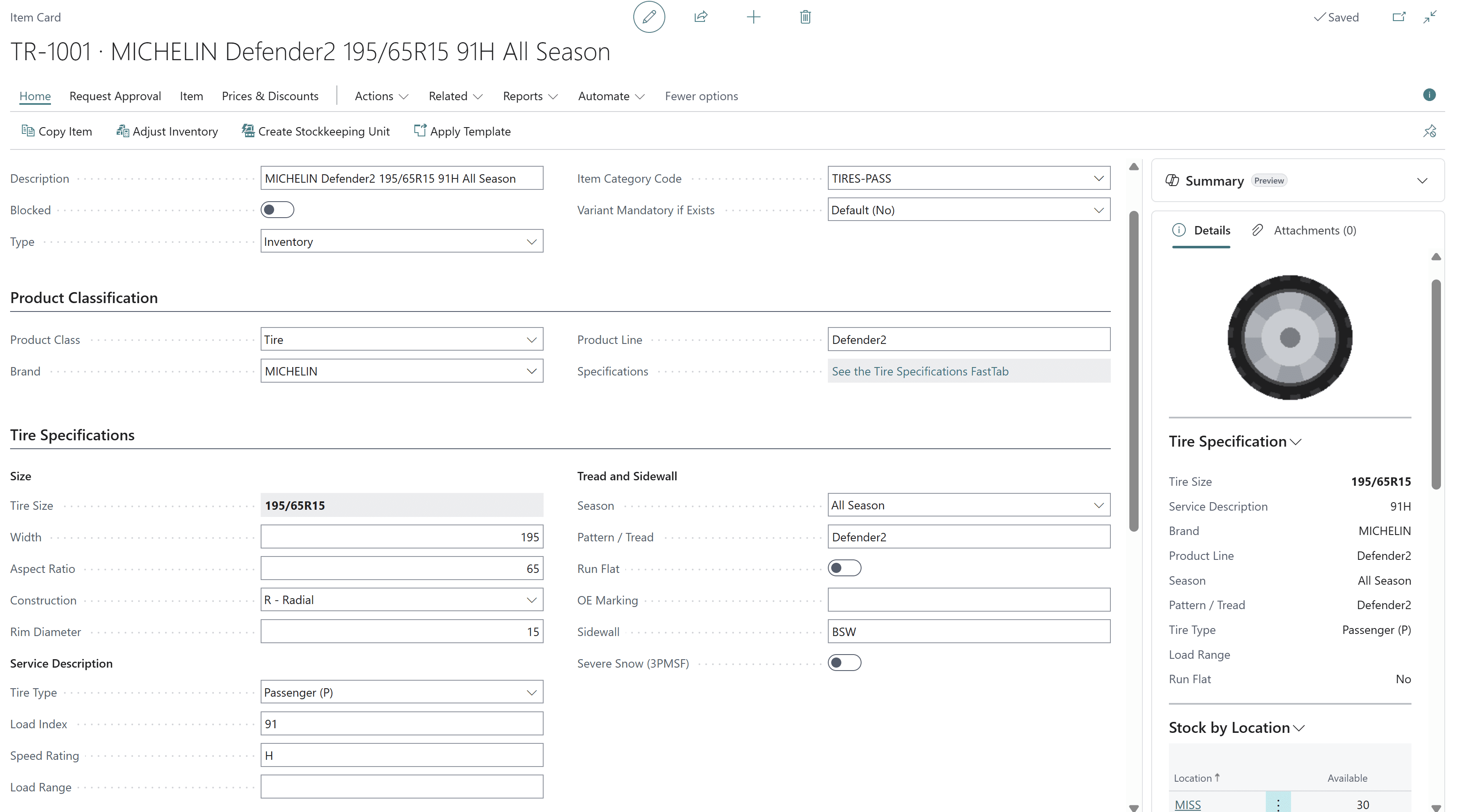
Tire search by size, brand, season, load and speed rating
Tire specifications buried in item descriptions make every lookup slow and every substitution risky.
- Structured tire data on the standard Business Central item
- Size, width, aspect ratio, construction and rim diameter
- Load index, speed rating, load range and tire type
- Season, 3PMSF, run-flat, OE marking and sidewall
- Brand, product line and tread pattern
- Stock by location right on the item card
How Econix delivers it: Econix maps your tire catalogue into structured fields, so sales can search by 225/65R17 or by brand and season and see live availability without leaving Business Central.
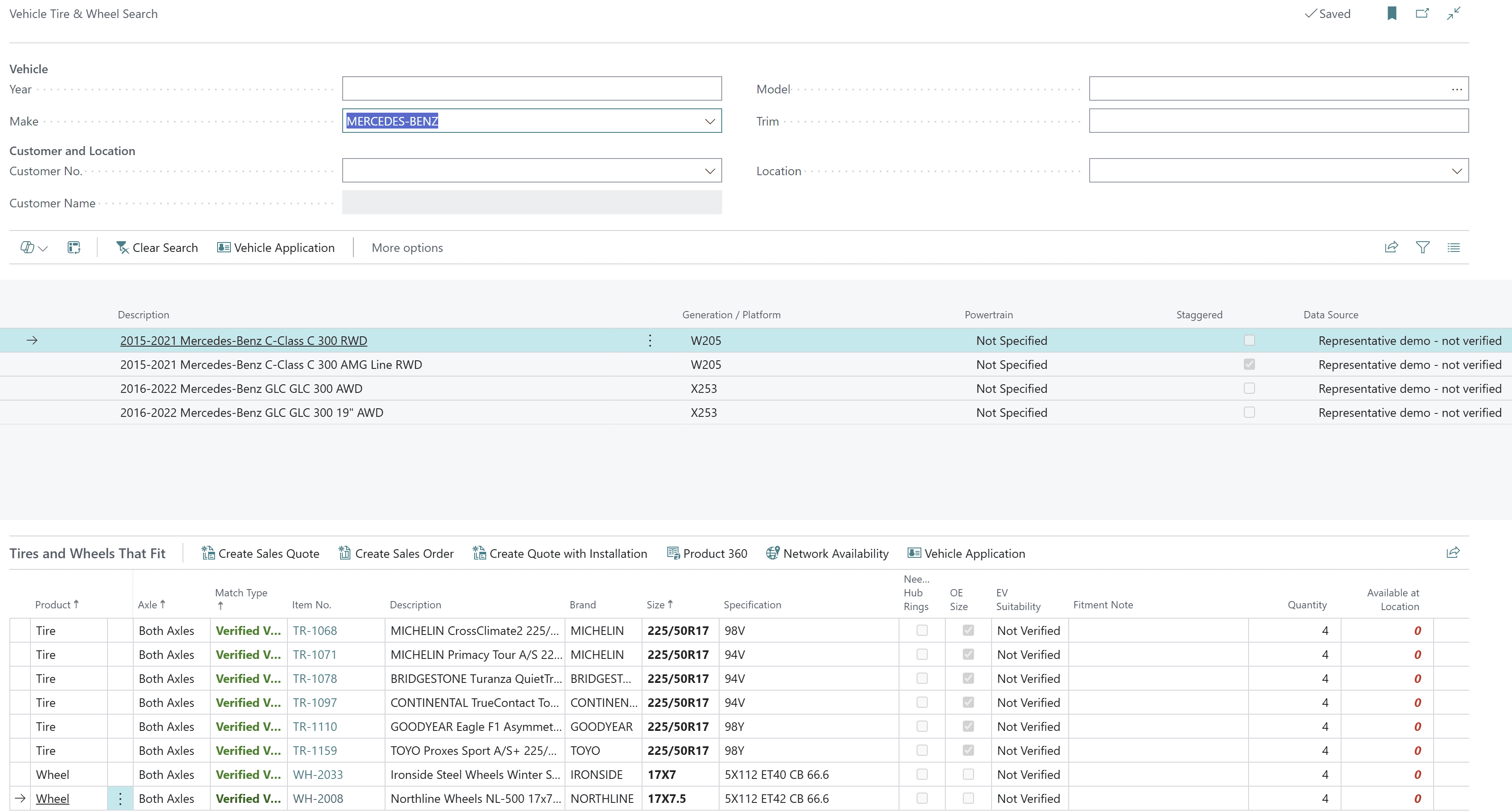
Vehicle tire and wheel search by year, make, model and trim
When fitment lives in a separate tool, quotes are re-keyed and wrong-fit returns follow.
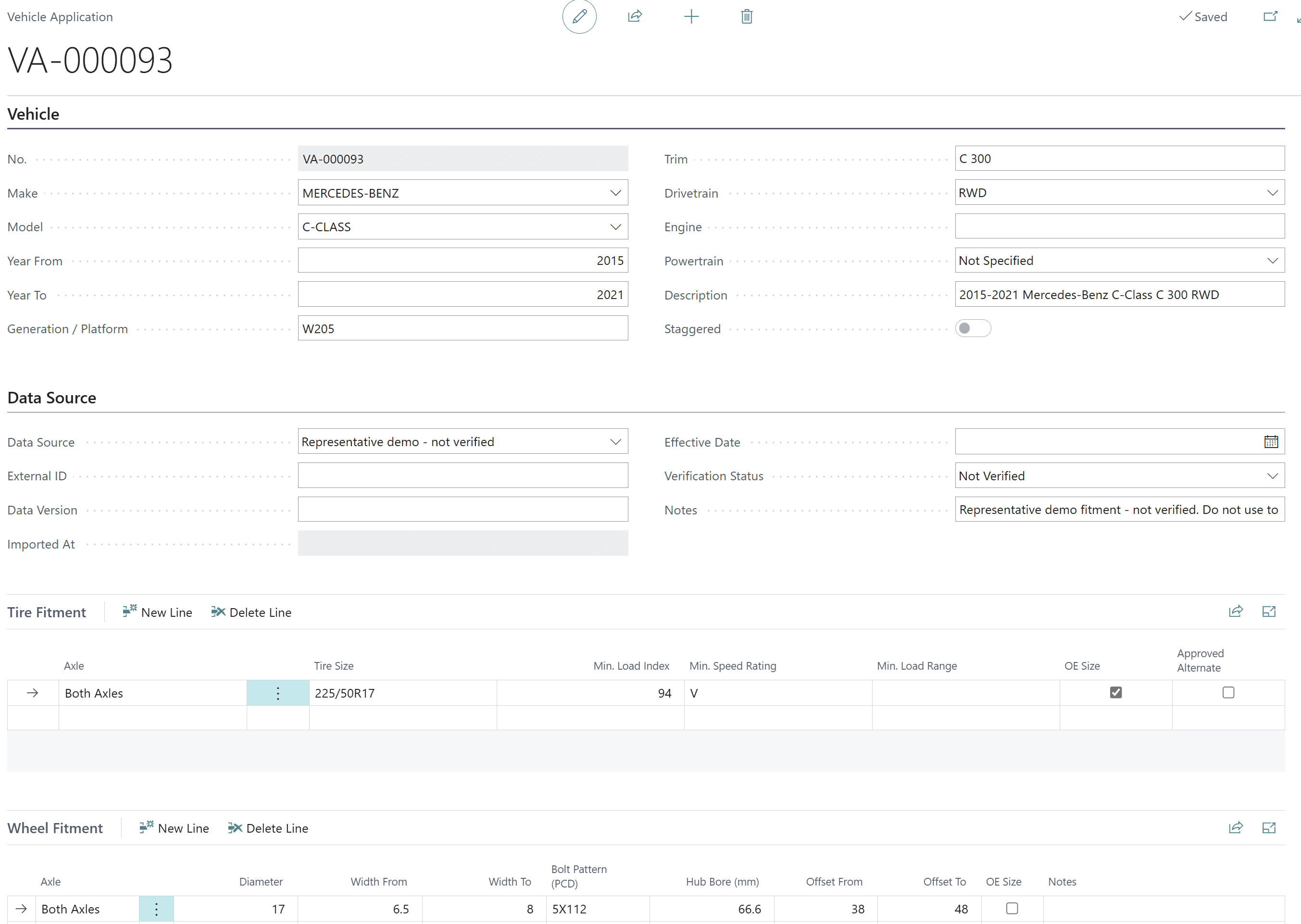
- Vehicle applications with tire and wheel fitment rules
- OE and approved alternate sizes, including staggered setups
- Minimum load index, speed rating and load range
- Wheel fitment by diameter, width, bolt pattern, hub bore and offset
- Create a quote or sales order straight from the results
- Vehicle catalogue with fitment import and verification tracking
How Econix delivers it: Econix sets up your vehicle catalogue and fitment rules in Business Central, so counter and inside-sales staff go from vehicle to the tires and wheels that fit to a quote in one screen.
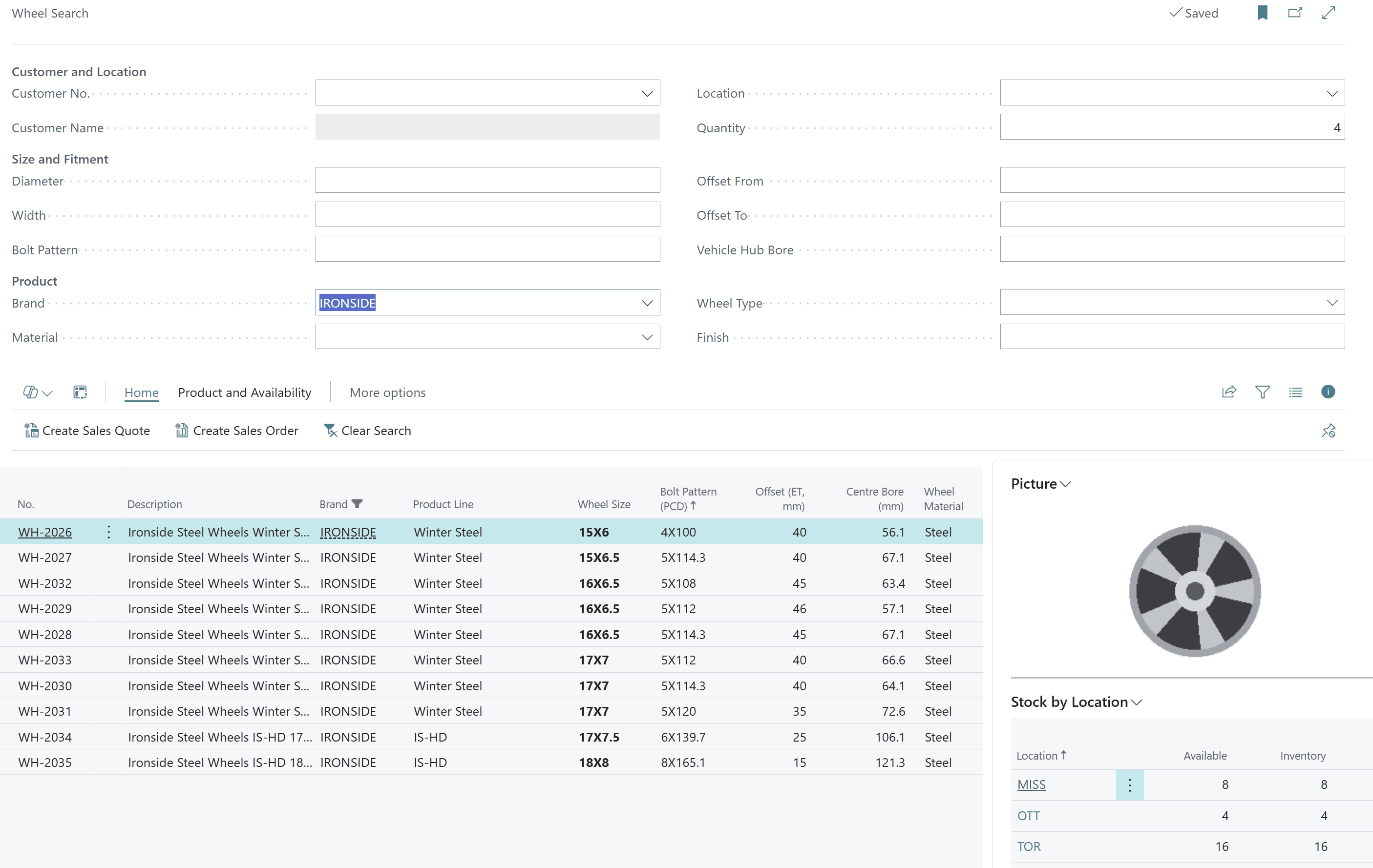
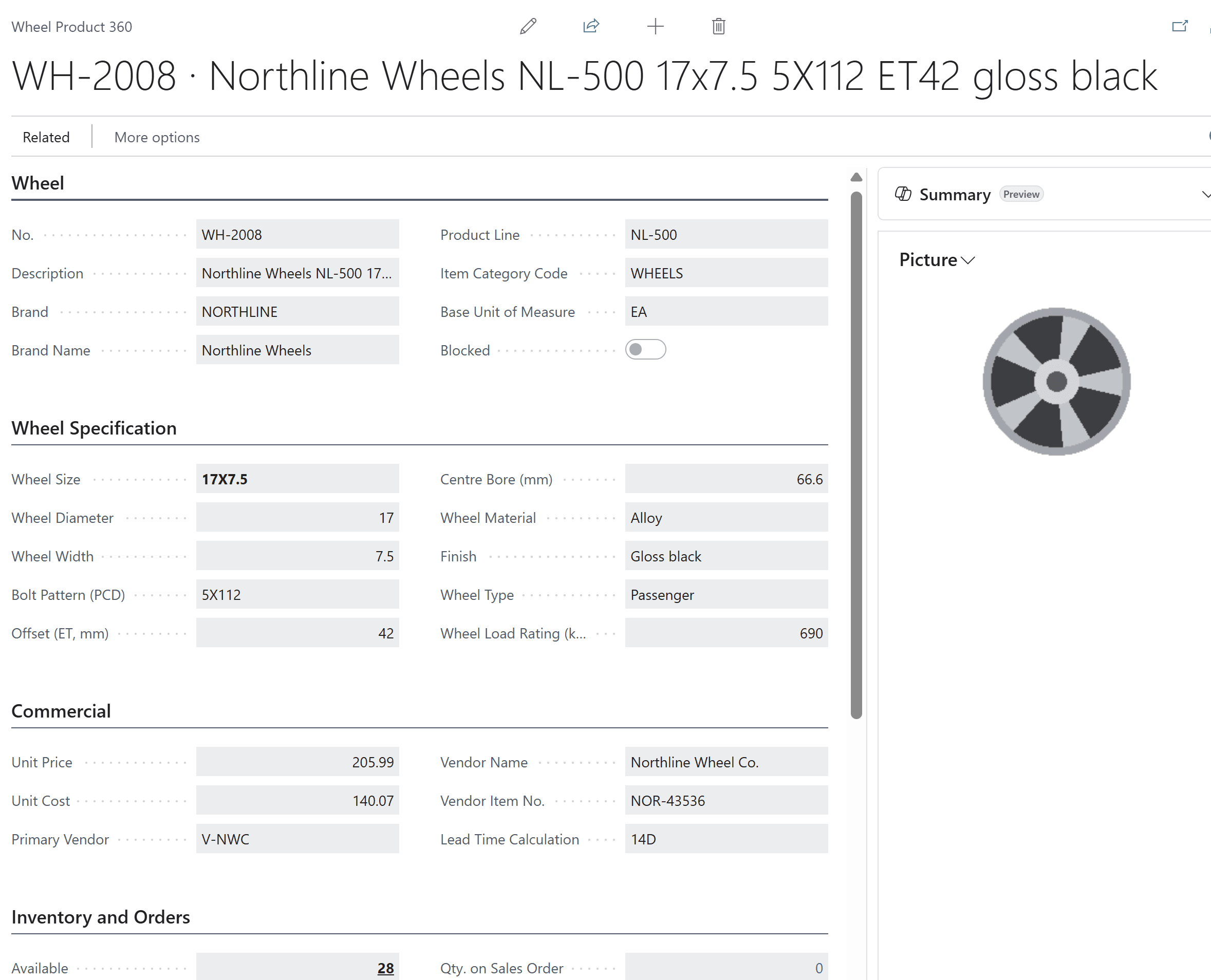
Wheel and rim data: bolt pattern, offset, centre bore and finish
Wheels sold from descriptions alone lead to bolt-pattern and offset mistakes that only show up at install.
- Wheel size, diameter and width
- Bolt pattern (PCD), offset (ET) and centre bore
- Material, finish, wheel type and load rating
- Wheel Product 360 with vendor, cost and lead time
- Search by size and fitment, filtered by brand or finish
- Stock by location and one-click quote or order
How Econix delivers it: Econix structures your wheel catalogue so sales can filter by bolt pattern, offset and hub bore and sell the right wheel with confidence.
Multi-location tire inventory, transfers and backorders
Stock stranded in the wrong branch means lost sales in one place and ageing inventory in another.
- Network availability across every location
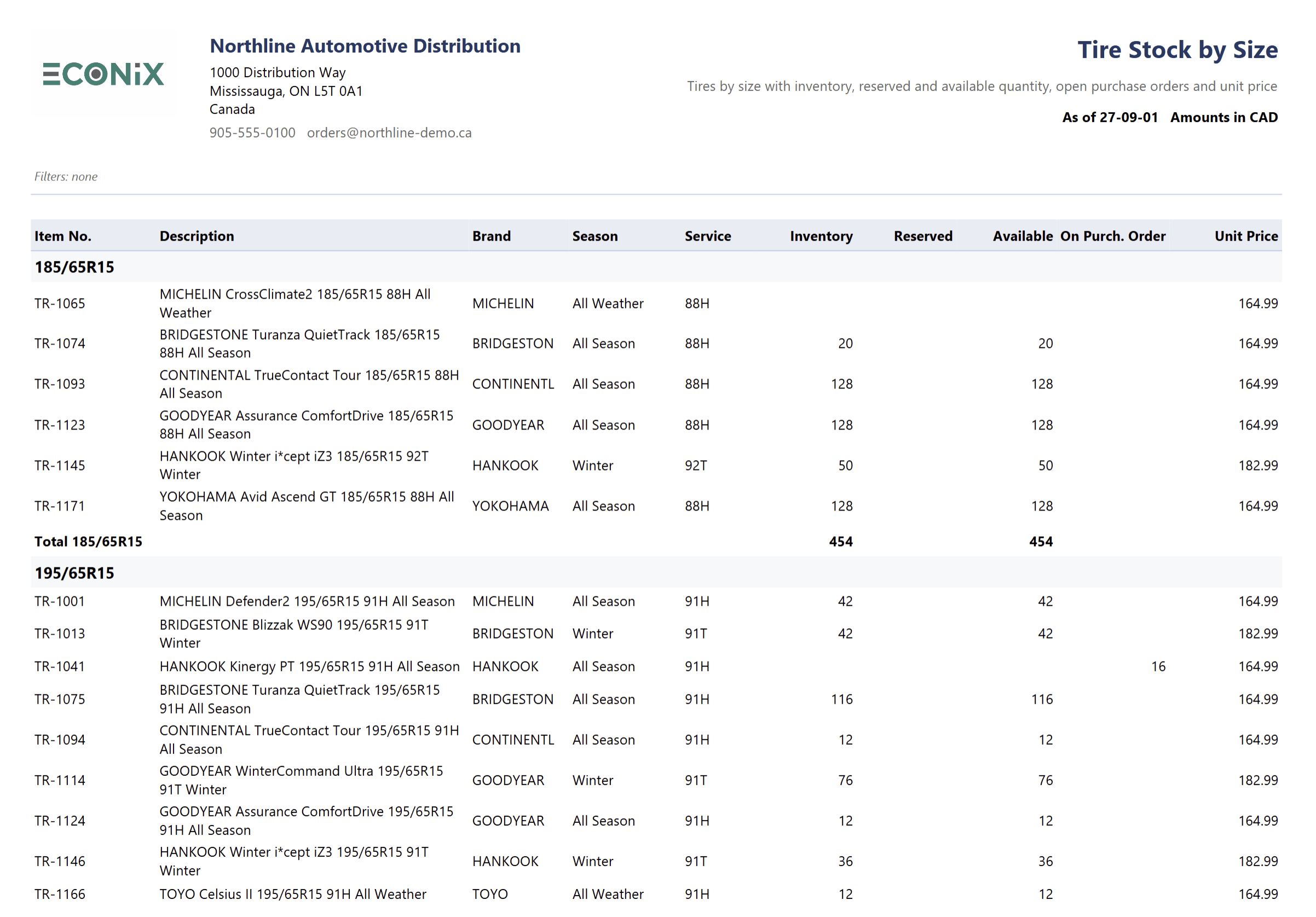
- On-hand, reserved, available and on purchase order by tire size
- Transfers required and open transfer orders
- Backorder and allocation workbench
- Incoming supply and overdue purchase lines
- Standard Business Central reservations — no parallel ledger
How Econix delivers it: Econix gives sales and operations one live view of tire inventory across branches and warehouses, so shortages are covered by a transfer or a backorder decision rather than a phone call.
DOT/TIN tracking, tire age, quality holds and recall management
Without DOT tracking by lot, old stock ages unseen and recalls turn into days of manual investigation.
- DOT/TIN details captured through standard item tracking
- DOT age inventory and manufacture-date age bands
- Quality holds that block outbound use of affected lots
- Forward and backward traceability to supplier and customer
- Recall exposure: on-hand, locations, shipments and customers
- Exportable recall impact list
How Econix delivers it: Econix configures lot and DOT capture at receiving so tire age, holds and recalls are answered from Business Central records in minutes.
DOT traceability and recall flow
- ReceiveCapture DOT / lot
- Age bandsManufacture week
- HoldQuality status
- TraceForward & backward
- RecallCustomers & invoices
DOT details ride on standard Business Central item tracking, so age, holds and recall exposure are calculated from posted ledger entries — not from a separate database.
Tire warehouse operations on standard Business Central
Paper pick lists and no tire context on the warehouse floor cause wrong-size and wrong-DOT picks.
- Standard Business Central receipts, put-away, picks, shipments and counts
- Tire size and DOT context on warehouse documents
- Barcode labels for tire and wheel stock
- Transfers between branches and warehouses
- Compatible with Business Central mobile and scanning options
- Room to add advanced WMS later without rework
How Econix delivers it: Econix keeps Microsoft’s warehouse engine intact and adds the tire context your team needs, so there is nothing proprietary to maintain or unpick later.
From receiving to fulfilment
- ReceiveIncoming supply
- TransferAcross locations
- AllocateBackorders
- PickWith tire context
- ShipStandard posting
- CountStay accurate
Every step uses standard Business Central warehouse documents and posting, enriched with tire size and DOT context.
Warranty claims and adjustments
Warranty claims tracked in inboxes are slow to decide and impossible to report on.
- Warranty claims linked to the original sale
- Claims-to-decide and claims-to-hand-off queues
- Decision history and customer details
- Warranty claim summary reporting
How Econix delivers it: Econix brings warranty handling into Business Central with clear queues, so claims are decided quickly and every outcome is recorded against the customer and product.
Warranty claim flow
- ClaimLinked to the sale
- DecideApprove or reject
- Hand offVendor / credit
- ResolveHistory retained
Tire distribution analytics: margin by brand, stock by size and KPIs
Margin by brand, stock by size and late orders are built in spreadsheets every month.
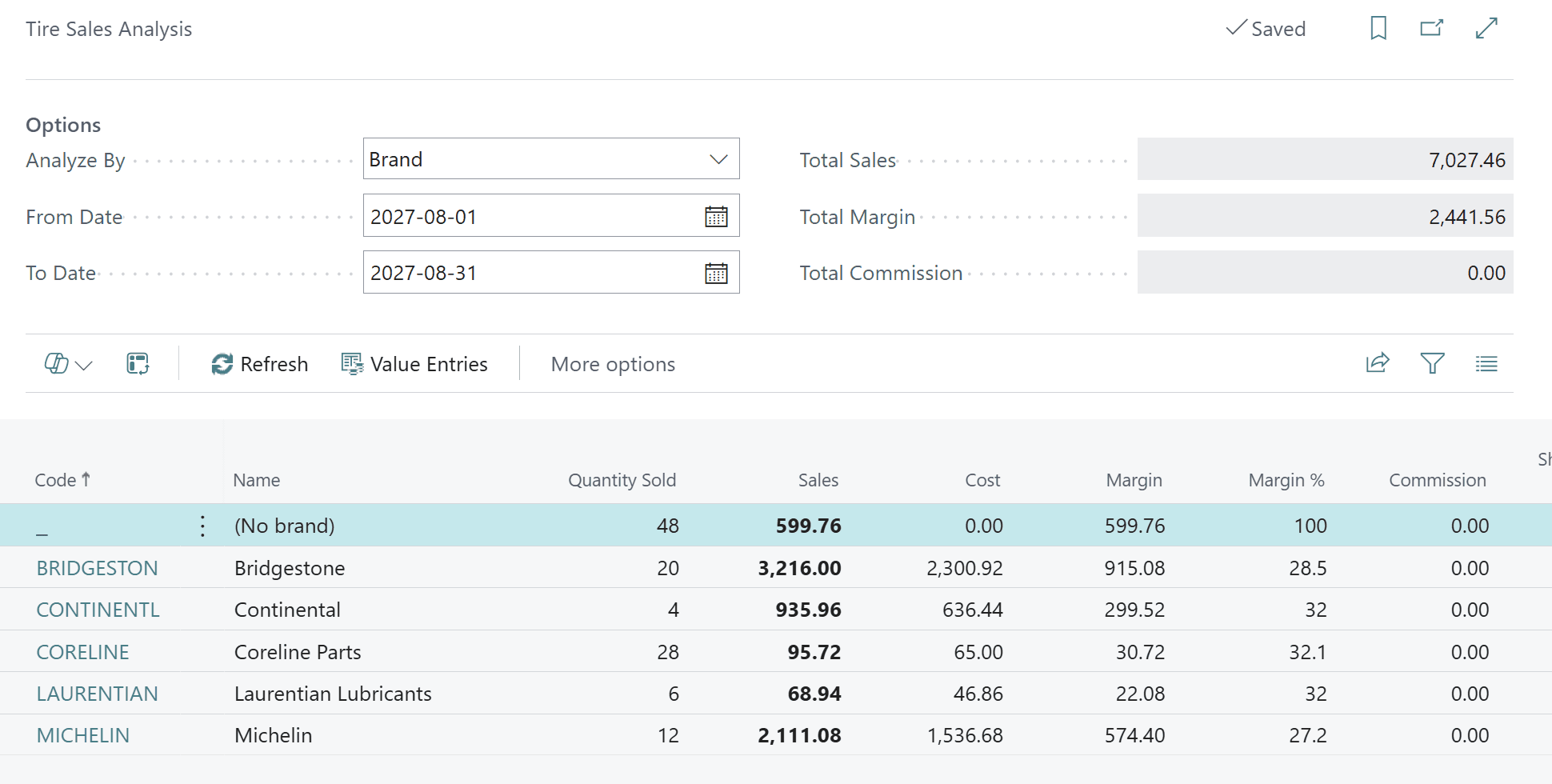
- Tire sales analysis by brand, product line, customer or period
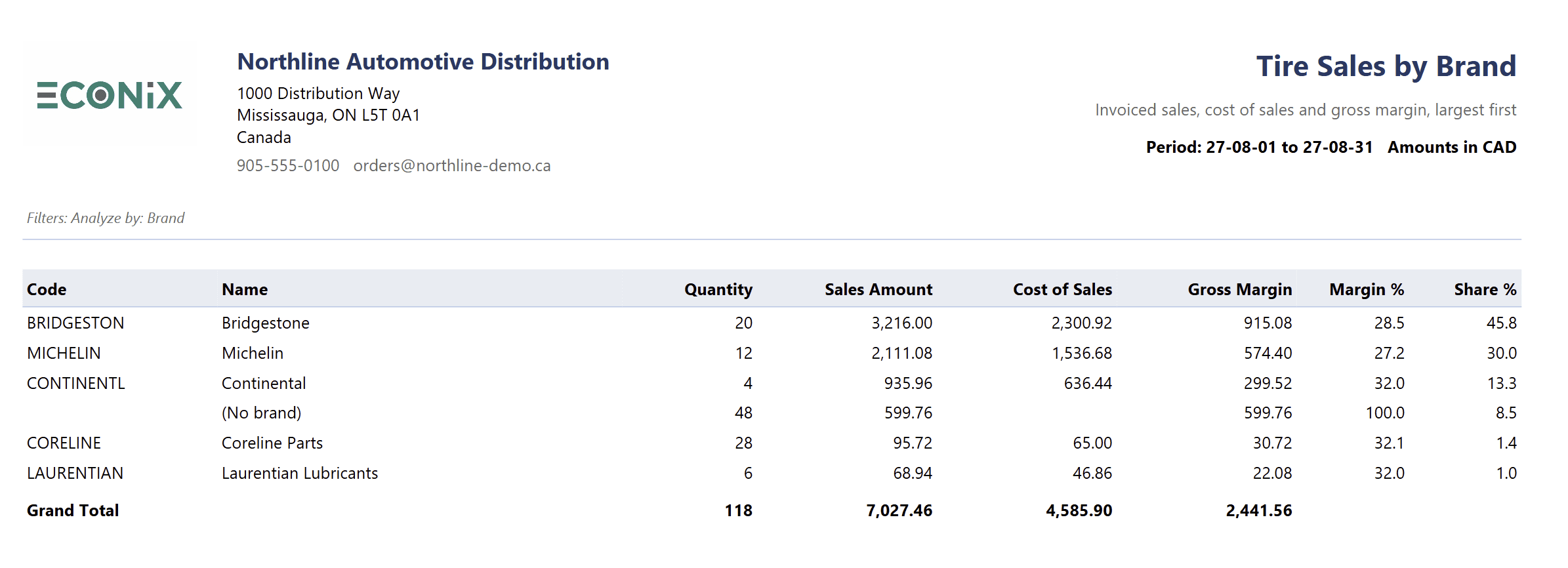
- Tire sales by brand with cost, gross margin and share
- Tire stock by size with reserved and on-order quantities
- Inventory by season, DOT age inventory and landed cost analysis
- Salesperson and commission reporting
- Role centre KPIs: margin, inventory value, turns, days of supply, late lines
How Econix delivers it: Econix delivers tire-specific reports and role-centre KPIs on posted Business Central data, with Power BI available for deeper management reporting.
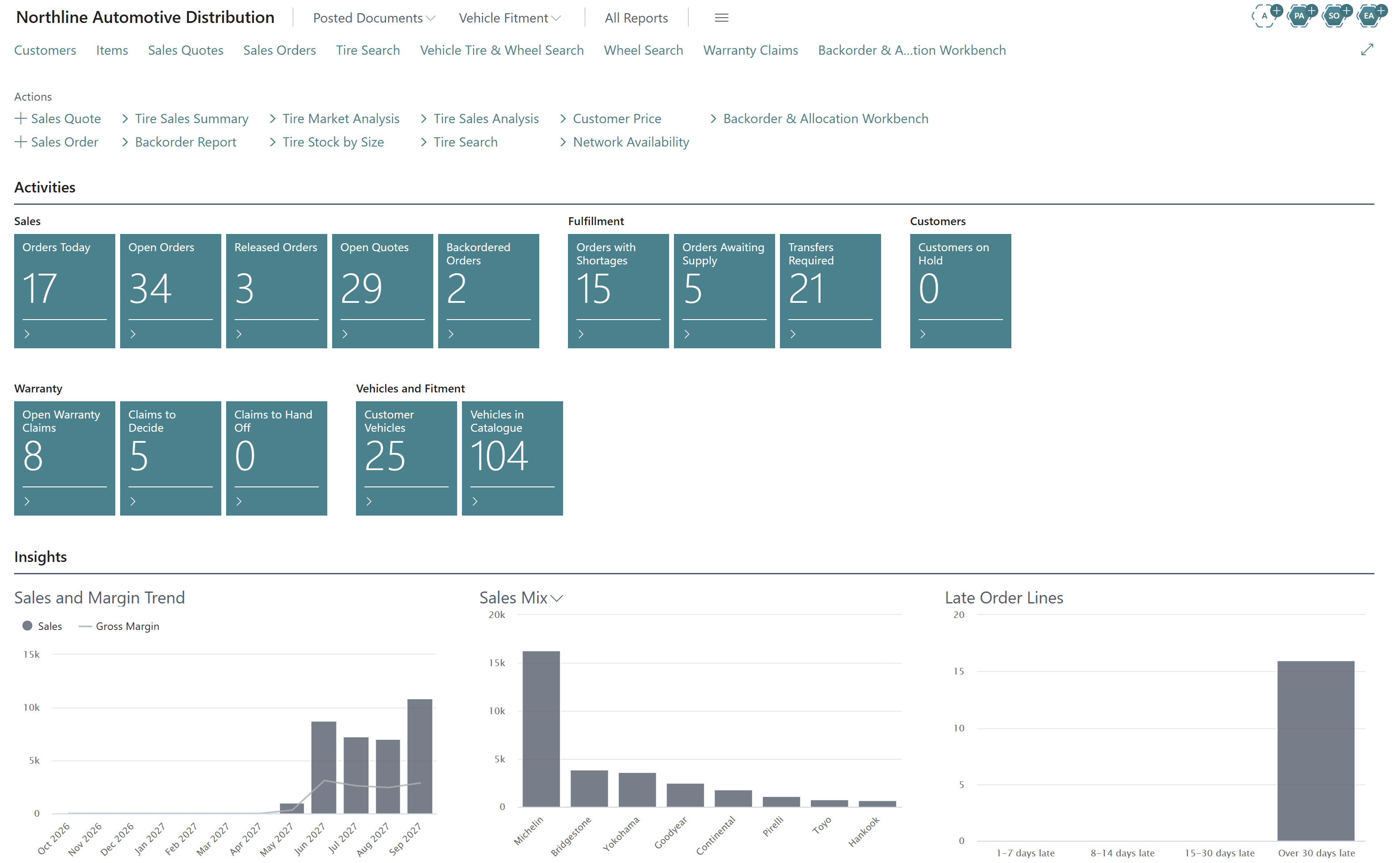
Role centres for tire distribution managers and inside sales
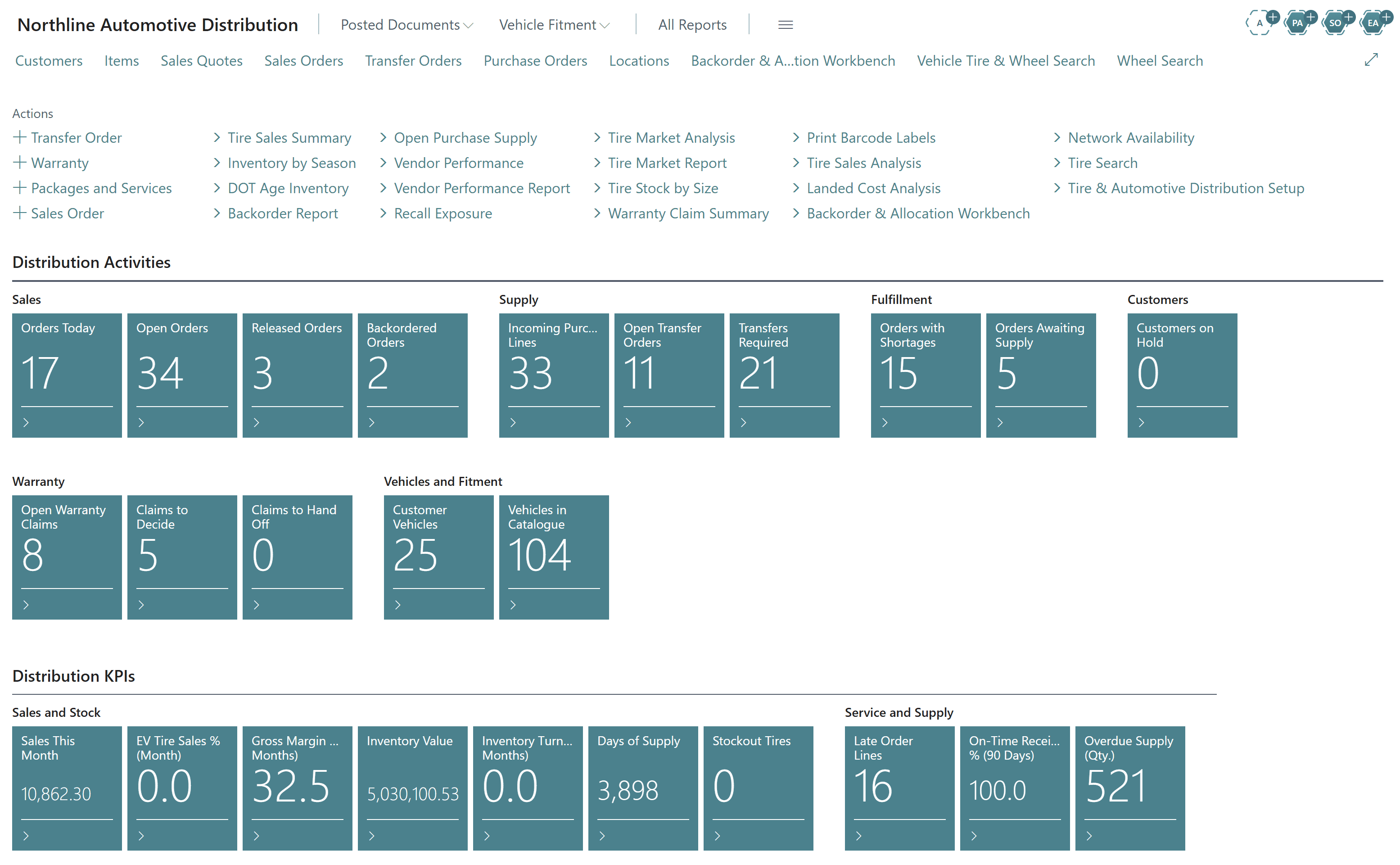
Business Central opens on a workspace that already speaks tire: orders with shortages, transfers required, warranty claims to decide, vehicles in the catalogue and margin by brand.
Automotive aftermarket and parts distribution
Most tire distributors also sell wheels, lubricants, accessories and services. Econix handles the mixed basket: tire-specific checks appear only on tire lines, wheels carry their own fitment data, and parts and consumables flow through standard Business Central items and attributes.
- Tires, wheels, lubricants and accessories on one sales order
- Packages and services, such as installation, on quotes
- Customer-specific pricing and price lists from standard Business Central
- Landed cost analysis with standard item charges
- Vendor performance and overdue supply tracking
Vehicle fitment data inside your ERP
Vehicle fitment is built into Econix Tire & Automotive Distribution. Vehicle applications hold year, make, model, trim, drivetrain and platform, with tire fitment (OE and approved alternate sizes, minimum load index, speed rating and load range, staggered setups) and wheel fitment (diameter, width range, bolt pattern, hub bore and offset range).
Customer vehicles are stored against the customer for repeat business. Fitment catalogues can be imported with source, version and verification tracked on every record, and industry formats such as ACES and PIES can be mapped through Business Central integration.
Why Business Central for tire distributors
Native, not a wrapper
Everything runs inside Business Central on standard items, sales and purchase documents, ledgers and posting — no second system of record.
Upgrade-safe
Delivered as Business Central extensions that follow Microsoft’s update cadence, with the standard warehouse engine left intact.
Room to grow
Finance, purchasing, Power BI and Microsoft 365 are already connected; advanced WMS, mobile or eCommerce can be added when you need them.
Your whole supply chain, in Business Central
Purchasing and replenishment, vendor pricing, multi-location inventory, transfers, warehousing and landed cost are all delivered in Business Central. Econix adds the tire-specific layer — network availability, backorder and allocation, DOT age and recall control — so there is no second system to run. See how it fits the wider distribution & wholesale picture.
Econix Tire & Automotive Distribution at a glance
Open any brochure at full size to see the solution in more detail.
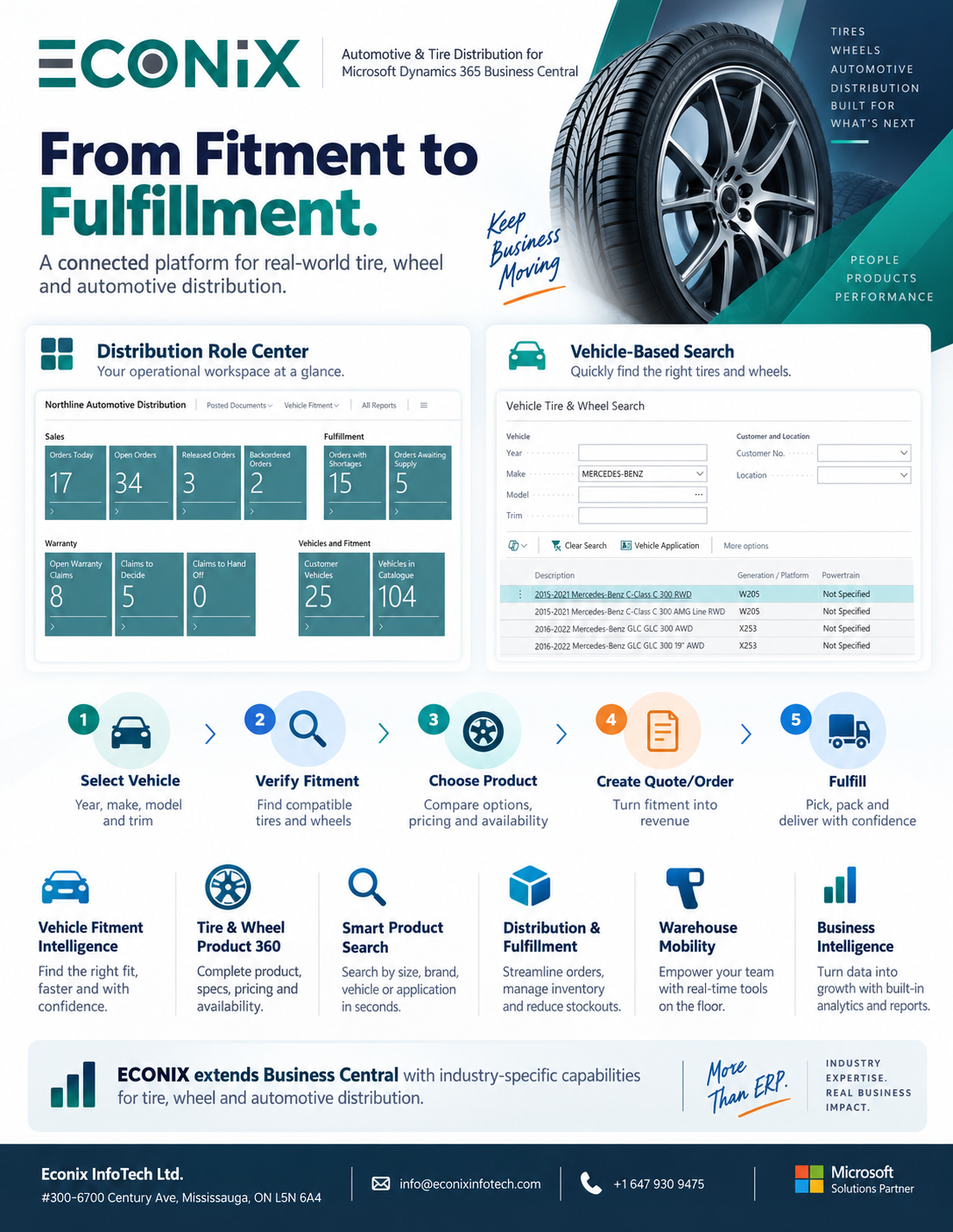
From Fitment to Fulfillment
The connected flow from vehicle selection to verified fitment, quote, order and delivery.
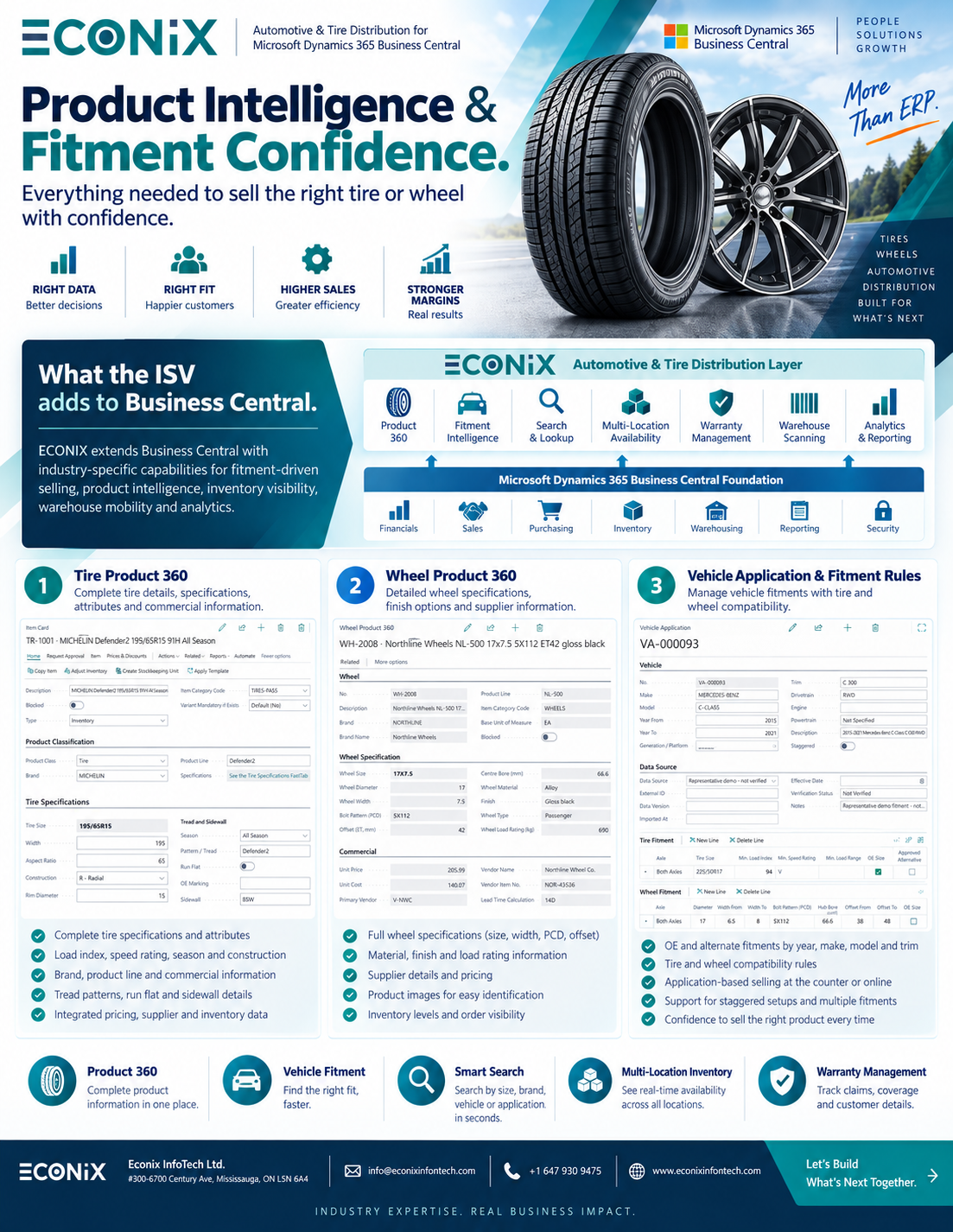
Product Intelligence & Fitment Confidence
Tire Product 360, Wheel Product 360 and vehicle application fitment rules.
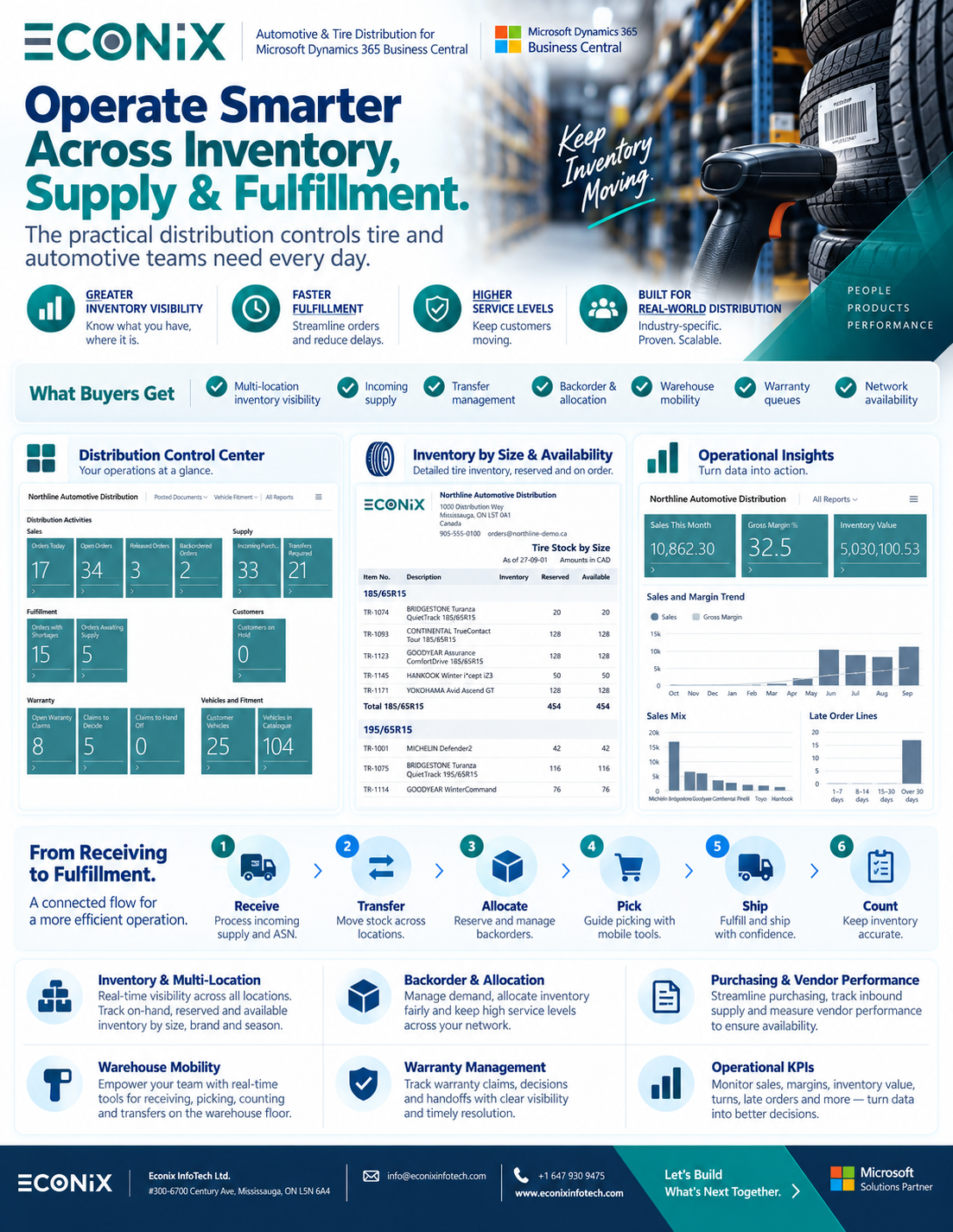
Tire Distribution Intelligence
Inventory, supply and fulfilment controls across every location.
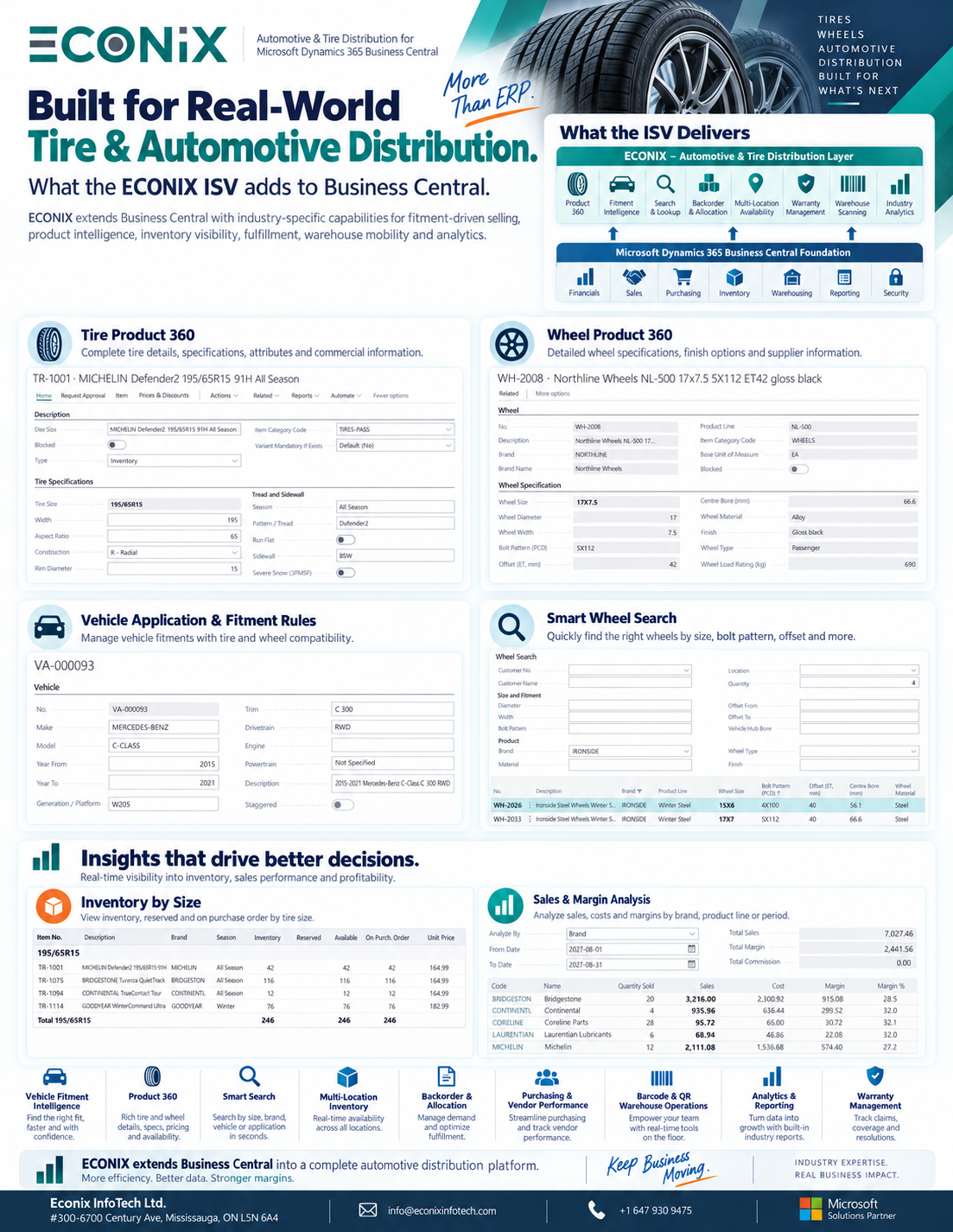
Built for Real-World Tire & Automotive Distribution
What the Econix ISV adds on top of the Business Central foundation.
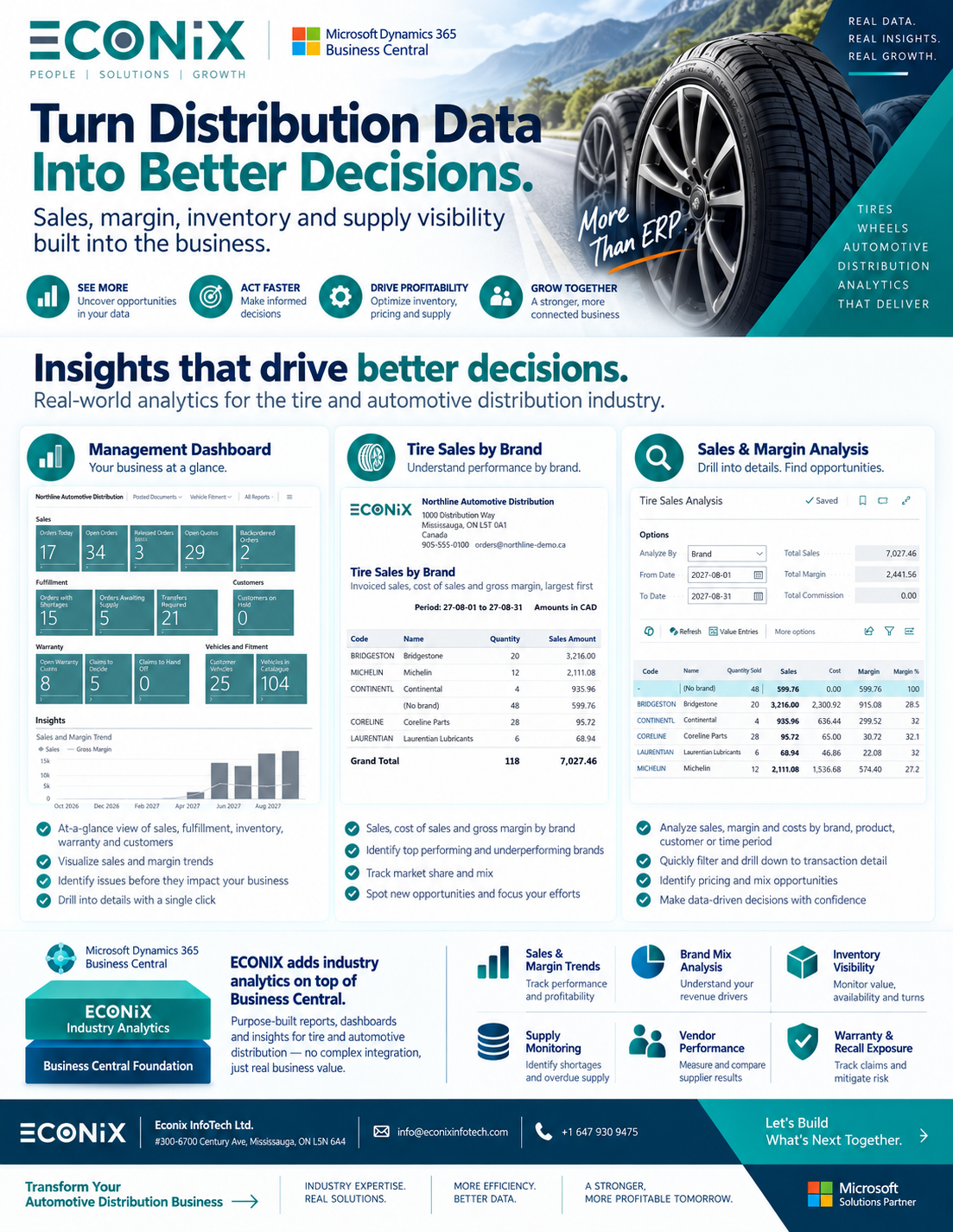
Automotive Distribution Analytics
Management dashboard, tire sales by brand and sales and margin analysis.
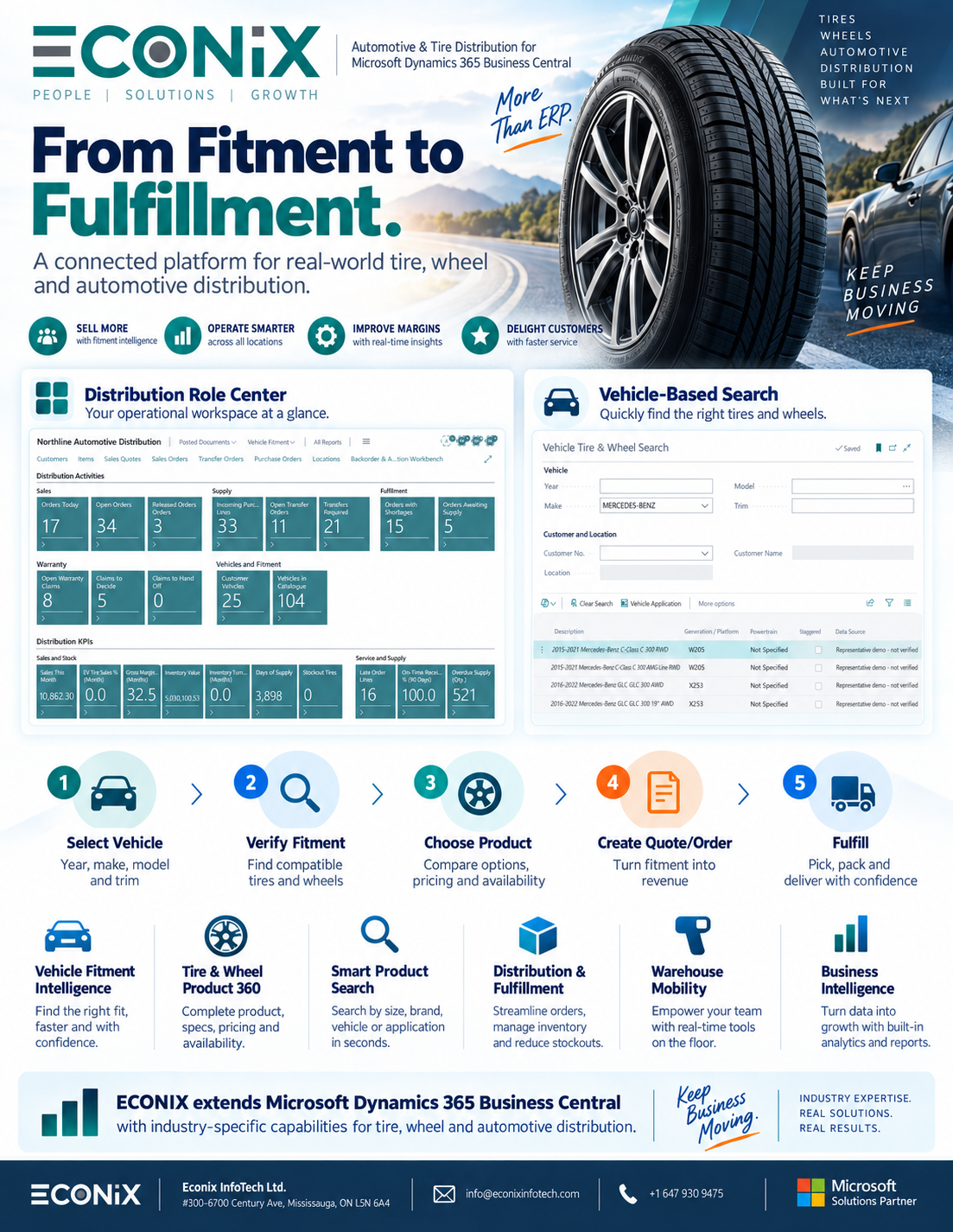
Tire Distribution Brochure
Econix Tire & Automotive Distribution for Business Central at a glance.
Tire and wheel distribution terms
The industry data Econix structures in Business Central.
- DOT code / TIN
- The Tire Identification Number moulded on the sidewall, identifying the plant, size code and week and year of manufacture.
- Tire size (225/65R17)
- Section width in millimetres / aspect ratio / construction (R = radial) / rim diameter in inches.
- Load index & speed rating
- The service description (for example 102H): the maximum load per tire and the maximum speed category.
- Load range
- The ply-rating equivalent for light-truck and commercial tires, such as C, D or E.
- 3PMSF
- Three-Peak Mountain Snowflake — the symbol for tires that meet severe-snow performance requirements.
- Fitment
- The match between a vehicle (year, make, model, trim) and the tire and wheel sizes that are approved for it.
- Bolt pattern (PCD)
- Number of lug holes and the diameter of the circle they sit on, for example 5x112.
- Offset (ET) & centre bore
- How far the wheel mounting face sits from its centreline, and the diameter of the hole that centres the wheel on the hub.
- Staggered fitment
- Different tire or wheel sizes on the front and rear axles of the same vehicle.
- ACES / PIES
- Auto Care Association standards for exchanging vehicle fitment (ACES) and product information (PIES) data.
Distribution guides & insights
See Econix Tire & Automotive Distribution
Tell us how your operation runs — locations, product lines, how you handle fitment, DOT and warranty today, and the system you are on. A senior Econix consultant will walk you through the solution on Business Central and map a practical path to go-live.
- Tire, wheel and vehicle fitment search
- Multi-location inventory, transfers and backorders
- DOT age, quality holds and recall exposure
- Canada & USA delivery, senior-led
Request a tire & automotive walkthrough
We typically respond within one business day.
Tire & Automotive Distribution ERP — Frequently Asked Questions
What is tire distributor ERP?
Tire distributor ERP is an ERP system that understands tire-specific data — size, load index, speed rating, season, DOT/TIN and manufacture age — on top of standard finance, sales, purchasing and inventory. Econix Tire & Automotive Distribution is a fully functional ISV solution available now for Microsoft Dynamics 365 Business Central, so distributors keep one system of record instead of bolting a tire tool onto a generic ERP.
Can Microsoft Dynamics 365 Business Central handle tire and wheel distribution?
Yes. Business Central already covers finance, sales, purchasing, inventory, transfers and warehouse documents. The Econix extension adds structured tire and wheel data, tire and wheel search, vehicle fitment, multi-location availability, DOT age and recall tools, warranty queues and tire-specific analytics — all working on standard Business Central records and posting.
Does it support vehicle fitment by year, make, model and trim?
Yes. Vehicle applications hold tire fitment (OE and approved alternate sizes, minimum load and speed ratings, staggered setups) and wheel fitment (diameter, width, bolt pattern, hub bore and offset range). Sales staff select a vehicle and see the tires and wheels that fit, with availability at their location, then create a quote or sales order in one click. Customer vehicles are saved for repeat business.
How do tire distributors track DOT codes in Business Central?
DOT/TIN details are captured through standard Business Central item tracking when tires are received. The DOT then follows the inventory through transfers, picks, shipments and returns, which drives DOT age inventory, manufacture-date age bands, quality holds and full forward and backward traceability.
How are tire recalls managed?
Recall exposure identifies the affected DOT lots, current on-hand quantity by location, historical shipments, and the customers and invoices involved. Remaining stock can be placed on hold so it cannot be shipped, and the impact list can be exported for customer notification.
How does multi-location tire inventory work?
Network availability shows on-hand, reserved, available and on-order quantities for every location while the order is being entered. Shortages are covered with standard Business Central transfer orders or managed in the backorder and allocation workbench — there is no separate inventory or allocation ledger to reconcile.
Is it only for tires, or also automotive aftermarket parts?
It is built for tire, wheel and automotive aftermarket distribution. A single order can mix tires, wheels, lubricants, accessories and services. Tire-specific functions appear only where they apply; other products flow through standard Business Central.
Does it replace our warehouse management system?
No. It runs on standard Business Central warehouse receipts, put-away, picks, shipments and counts, and adds tire and DOT context to those documents. That keeps the solution upgrade-safe and leaves room for advanced WMS or mobile scanning later without rework.
Does Business Central cover the full supply chain for a tire distributor?
Yes. Business Central delivers purchasing and replenishment, vendor pricing, multi-location inventory, transfers, reservations, item tracking, warehousing and landed cost in one system. Econix Tire & Automotive Distribution adds the tire-specific layer on top — network availability, backorder and allocation, DOT age and recall control — so the whole supply chain runs in Business Central.
We run Dynamics GP or NAV — can we move to Business Central?
Yes. Econix migrates items, customers, vendors and open balances from Dynamics GP and NAV to Business Central and maps your tire and wheel attributes into structured fields during the move, so you go live with searchable product data rather than long item descriptions.
Related Solutions
Explore the Microsoft platforms and services behind our tire and automotive distribution work.
Dynamics 365 Business Central
The ERP platform underneath Econix Tire & Automotive Distribution.
Distribution & Wholesale
Dynamics 365 for distributors across every product category.
Upgrade GP to Business Central
Move off Dynamics GP with a validated migration.
Power BI
Management dashboards on your tire sales, margin and inventory data.
Struggling With Your ERP System?
Don't let a broken ERP hold your business back. Our experts will diagnose your system, stabilize critical processes, and build a roadmap to full optimization.