If you run a tire, wheel or automotive aftermarket distribution business on spreadsheets, an ageing Dynamics GP or NAV system, or an ERP that treats a tire like a box of screws, Microsoft Dynamics 365 Business Central is almost certainly on your shortlist.
It should be. Business Central is a modern, cloud ERP trusted by distributors worldwide, and it brings finance, sales, purchasing, inventory and warehousing into one system your whole team can use.
But there is a gap between a great distribution ERP and a great tire distribution ERP. This guide shows you exactly where Business Central fits, the eight gaps standard Business Central leaves for tire distributors, and how Econix Tire & Automotive Distribution closes every one — natively, inside Business Central.
The Fit: Why Business Central Is the Right Foundation
Tire distribution is a volume, margin and service business. You need a platform that is strong on the fundamentals, easy to adopt and ready to grow. Business Central delivers all three.
| Business Central foundation | Why it matters to a tire distributor |
|---|---|
| Finance, tax and banking | GST/HST and US sales tax, payables, receivables and bank reconciliation for a multi-branch business |
| Sales and pricing | Quotes, orders, returns and customer-specific price lists for dealers, retailers and fleets |
| Purchasing and landed cost | Vendor pricing, purchase orders and item charges so freight and duty land in the true cost of every tire |
| Multi-location inventory | Locations, transfer orders and reservations across branches and warehouses |
| Item tracking | Lot and serial tracking — the right foundation for DOT codes |
| Warehousing | Receipts, put-away, picks, shipments, bins and counts |
| Microsoft cloud | Microsoft 365, Power BI and Copilot built in; secure, always current |
That foundation is why Econix chose Business Central for tire and automotive distribution. Everything a tire distributor needs beyond it is industry-specific — and that is exactly what an industry solution should add.
The Gaps: Where Standard Business Central Stops
Standard Business Central was designed for distribution in general. Tire and wheel distribution brings eight requirements it does not cover out of the box:
| Gap in standard Business Central | What it costs a tire distributor |
|---|---|
| Tire specifications live in the description | Slow, error-prone search; no reporting by size, load or speed rating |
| No tire size search | Reps miss stock that is on the shelf; sales walk to competitors |
| No vehicle fitment | Fitment looked up elsewhere and re-keyed; wrong-fit returns |
| No structured wheel data | Bolt pattern and offset mistakes found at install time |
| No DOT age or recall view | Old stock ages unseen; recalls take days of manual tracing |
| Branch stock on separate screens | Shortages covered by phone calls instead of transfers |
| No warranty workflow | Claims handled in email with no queue, decision or history |
| Generic analytics | Margin by brand and stock by size rebuilt in spreadsheets every month |
None of these is a Business Central weakness. They are industry requirements — and trying to close them with one-off customizations is how distributors end up with a fragile system that is expensive to upgrade.
Closing the Gaps: The Econix Tire & Automotive Layer
Econix Tire & Automotive Distribution is a fully functional ISV solution for Business Central, available now. It adds nine tire and automotive capability modules on top of the standard Business Central foundation.
Econix Tire & Automotive Distribution
- Tire & Wheel Product 360
- Vehicle Fitment
- Tire, Wheel & Vehicle Search
- Network Availability
- Backorder & Allocation
- DOT Age & Recall Exposure
- Warranty Claims
- Tire Analytics & KPIs
- Tire Role Centres
Microsoft Dynamics 365 Business Central foundation
- Financials
- Sales
- Purchasing
- Inventory
- Transfers
- Warehouse
- Item tracking
- Reporting
- Security
Here is what each module delivers.
1. Tire & Wheel Product 360
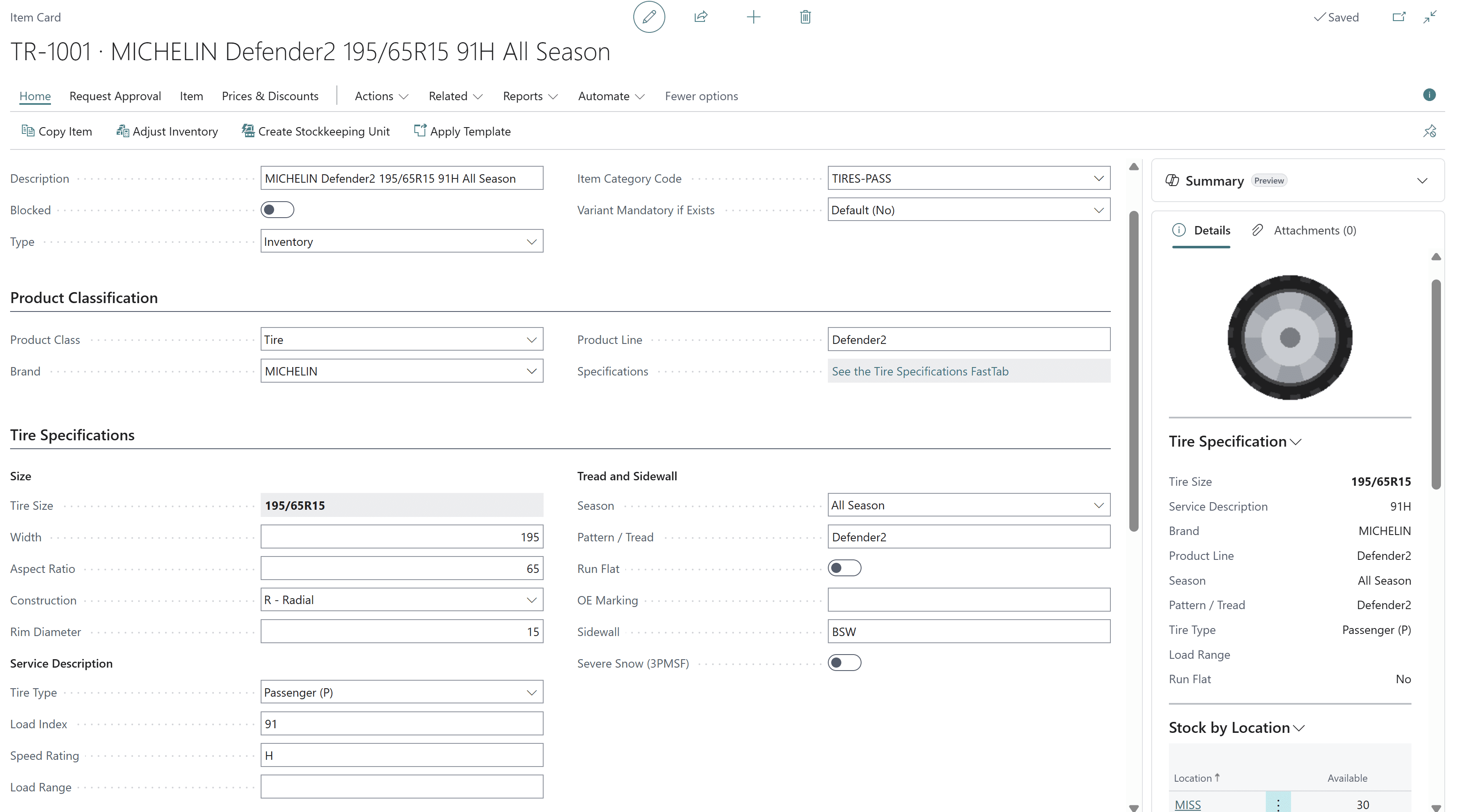
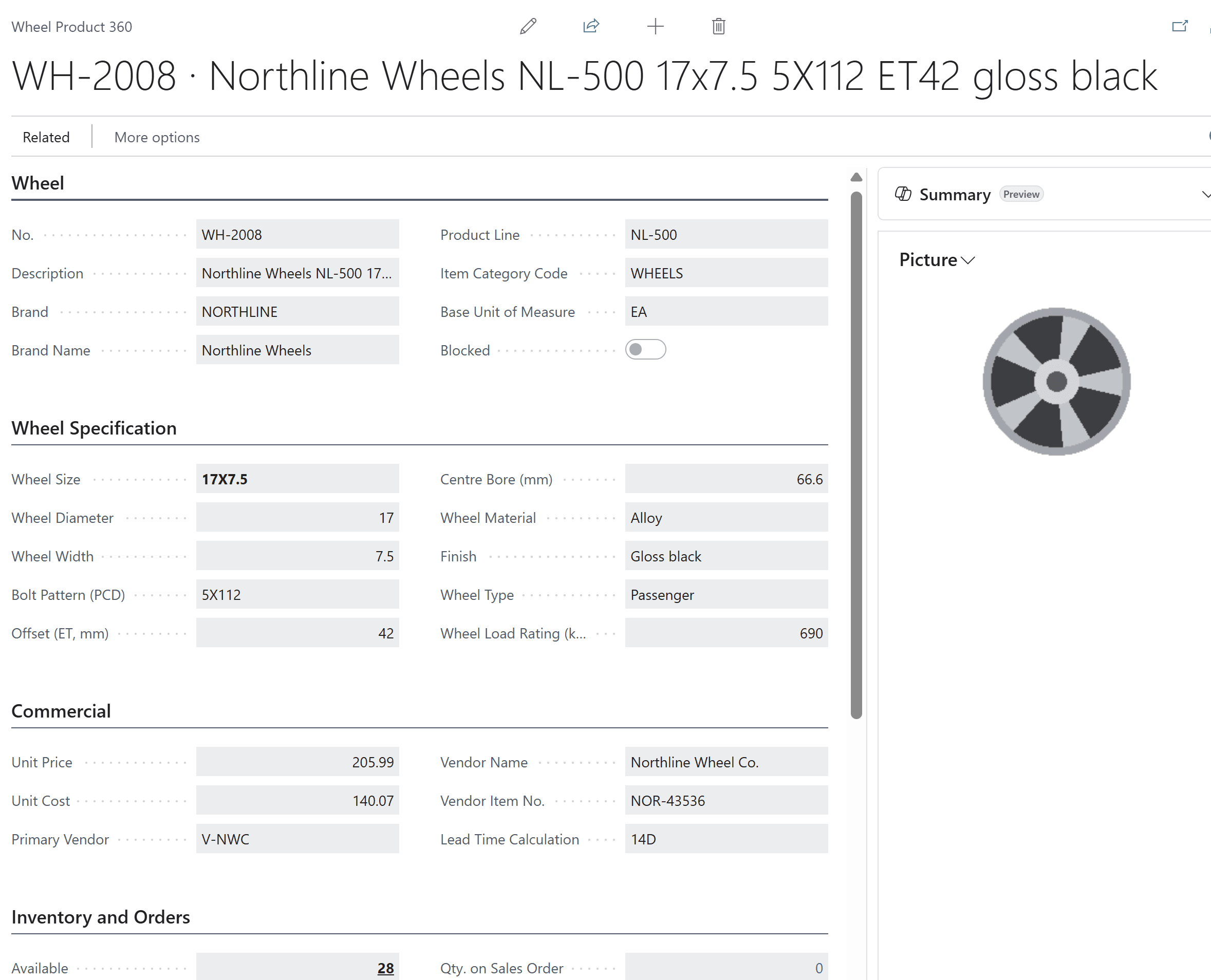
Every sidewall code becomes a structured field on the standard Business Central item: width, aspect ratio, construction, rim diameter, load index, speed rating, load range, season, 3PMSF, run-flat, OE marking and sidewall. Wheels carry diameter, width, bolt pattern, offset, centre bore, material, finish and load rating. One page shows specifications, pricing, vendor and stock by location.
2. Vehicle Fitment
Select a year, make, model and trim and see every tire and wheel that fits — with OE and approved alternate sizes, minimum load index and speed rating, staggered setups and wheel fitment by bolt pattern, hub bore and offset range. Create the quote or order straight from the results, and save the vehicle to the customer for next time.
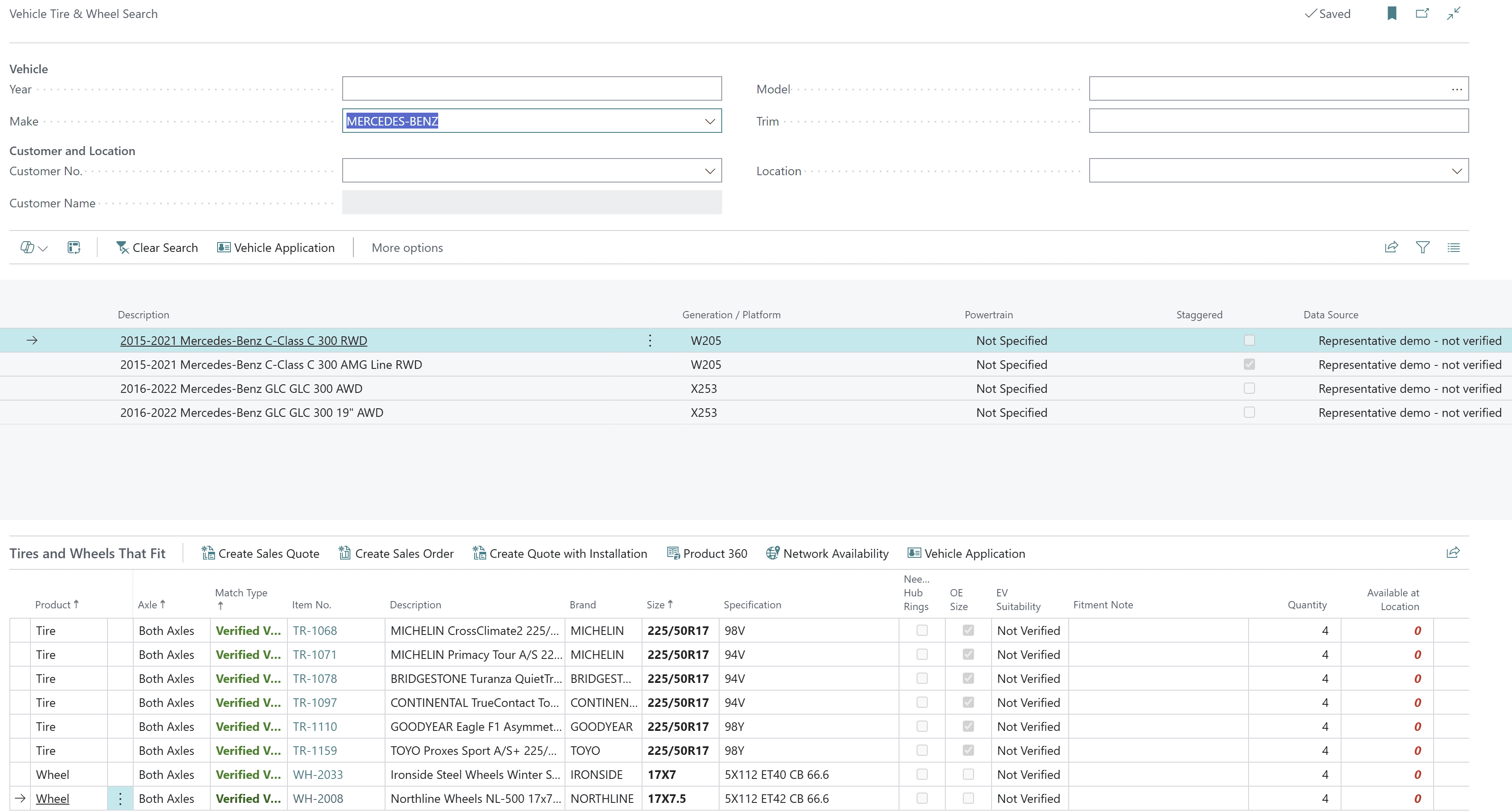
3. Tire, Wheel & Vehicle Search
Search the way your customers ask: by size code, brand, season, load and speed rating for tires; by bolt pattern, offset, hub bore and finish for wheels; by vehicle for both. Availability at your location and across the network appears in the results.
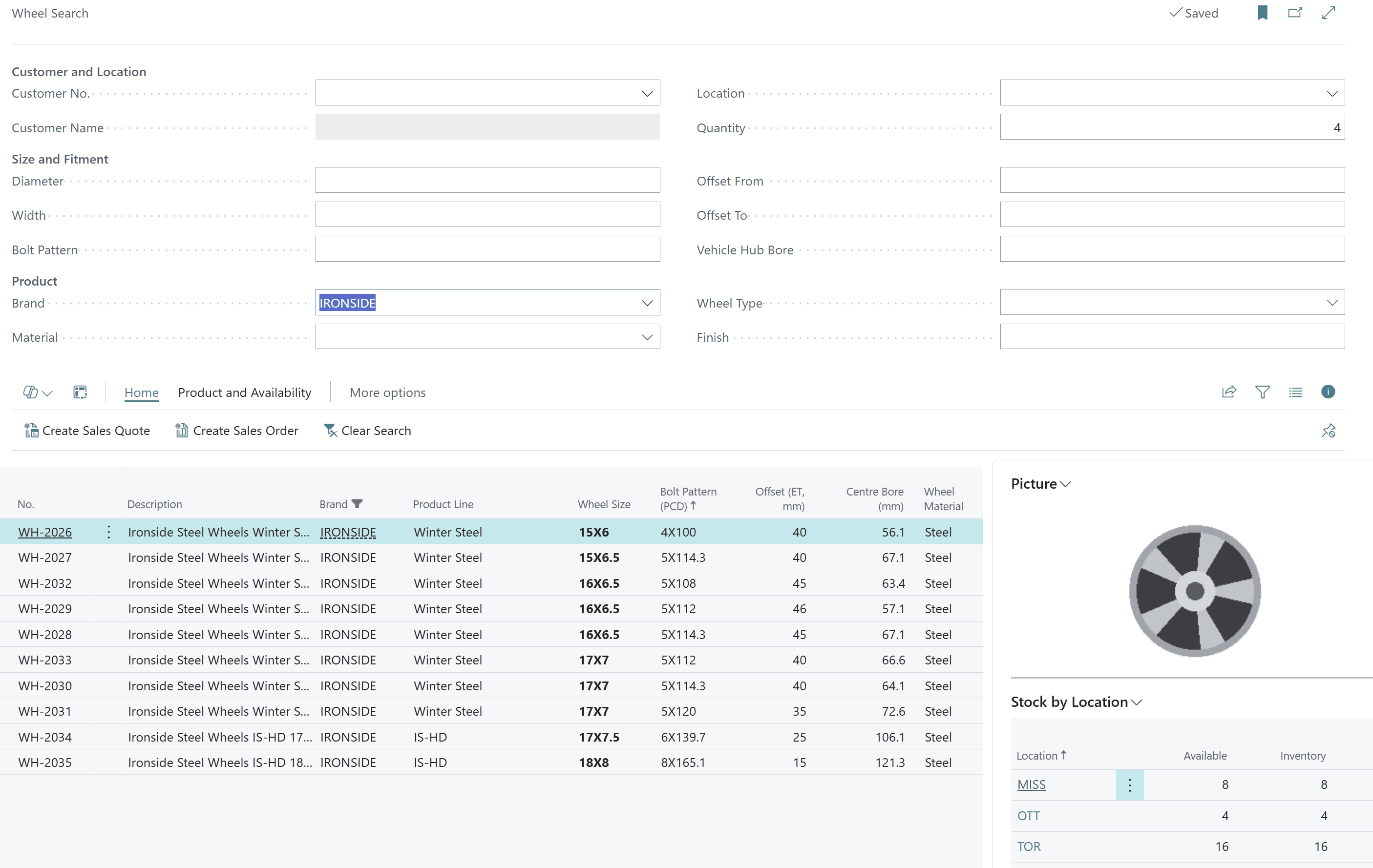
4. Network Availability and Backorder & Allocation
See on-hand, reserved, available and on-order stock for every branch while the order is being entered. Cover shortages with standard Business Central transfers, and manage every short line in one backorder and allocation workbench — with no separate allocation ledger to reconcile.
5. DOT Age & Recall Exposure
Capture DOT/TIN at receiving through standard item tracking. See DOT age inventory by size and location, place quality holds, trace any lot forward to customers and backward to the supplier, and answer a recall with on-hand stock, shipments, affected customers and invoices in minutes.
6. Warranty Claims
Log claims against the original sale, work them through claims-to-decide and claims-to-hand-off queues, and keep a complete history by customer and product. A warranty claim summary shows the whole picture.
7. Tire Analytics & KPIs
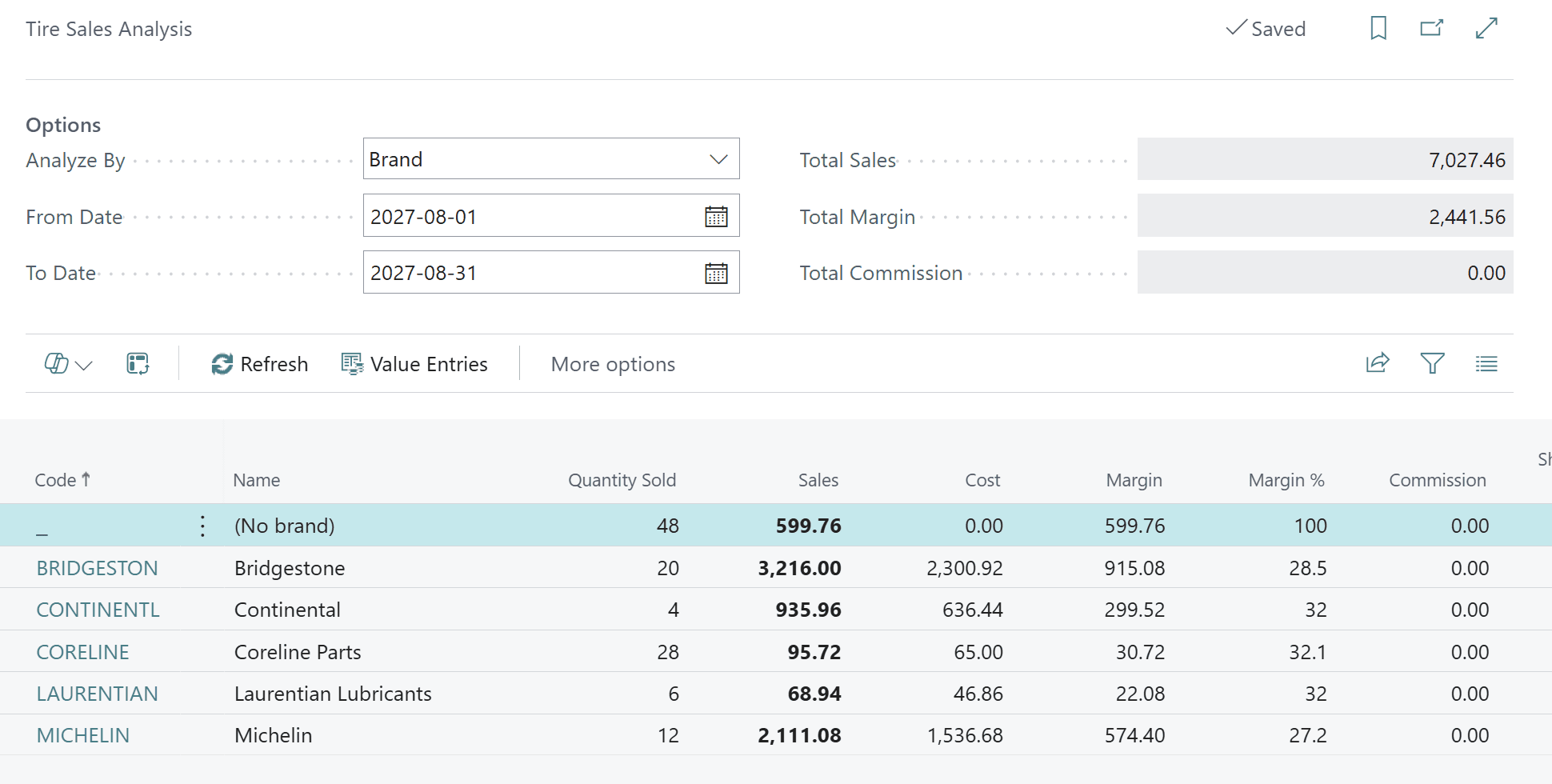
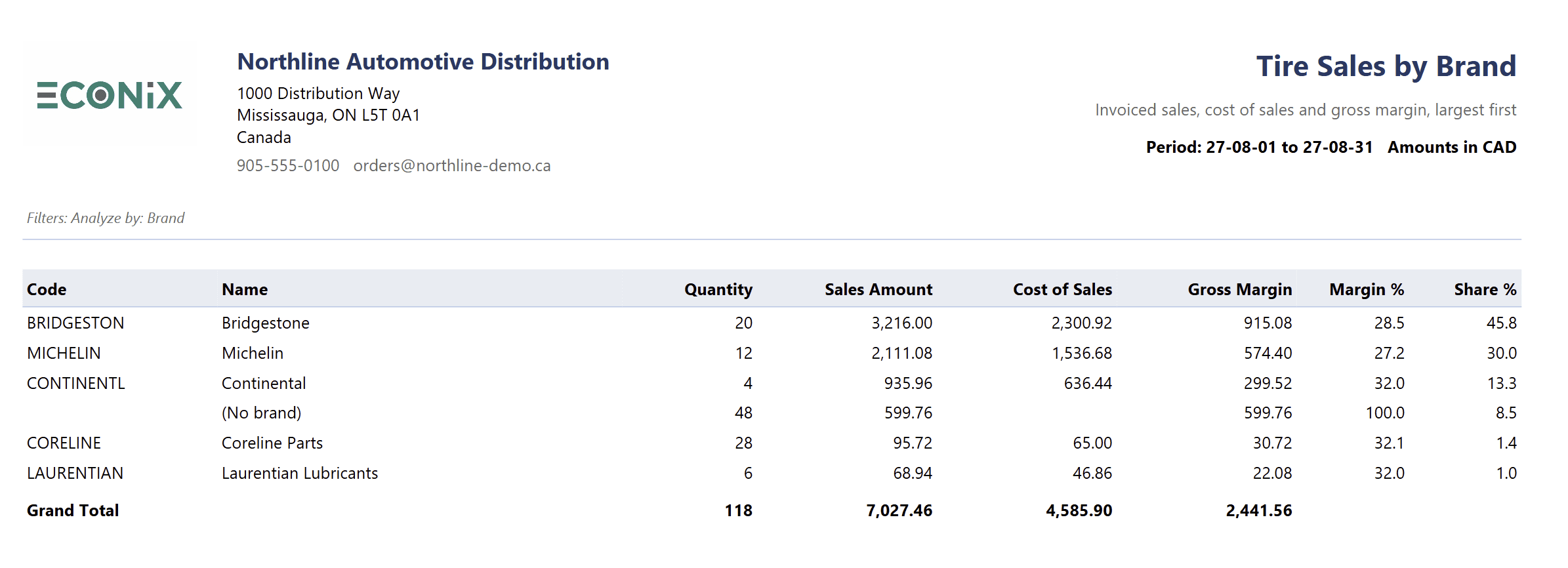
Tire sales analysis by brand, product line, customer or period; tire sales by brand with cost, gross margin and share; tire stock by size; inventory by season; DOT age inventory; landed cost analysis; salesperson and commission reporting — all on posted Business Central data.
8. Tire Role Centres
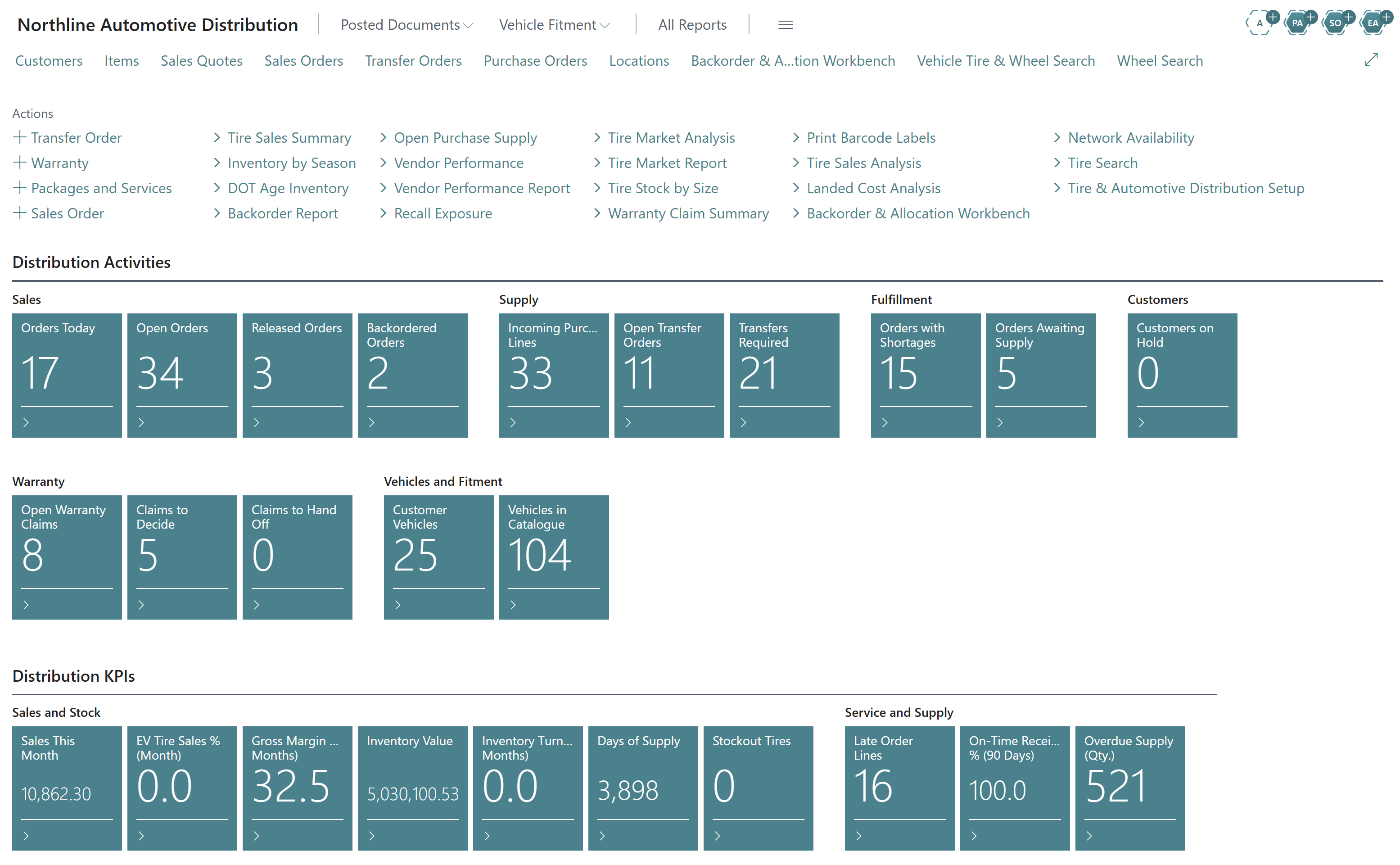
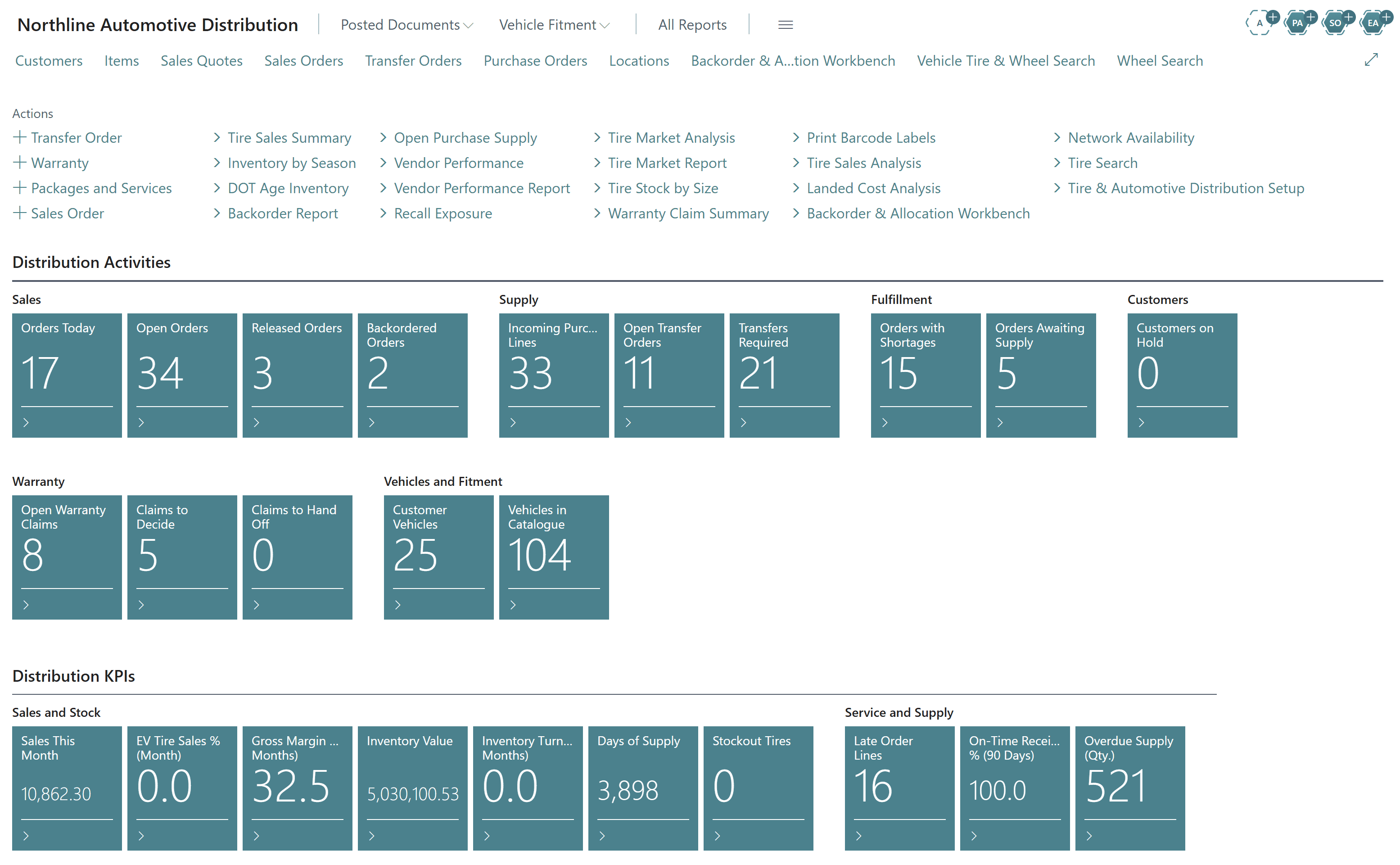
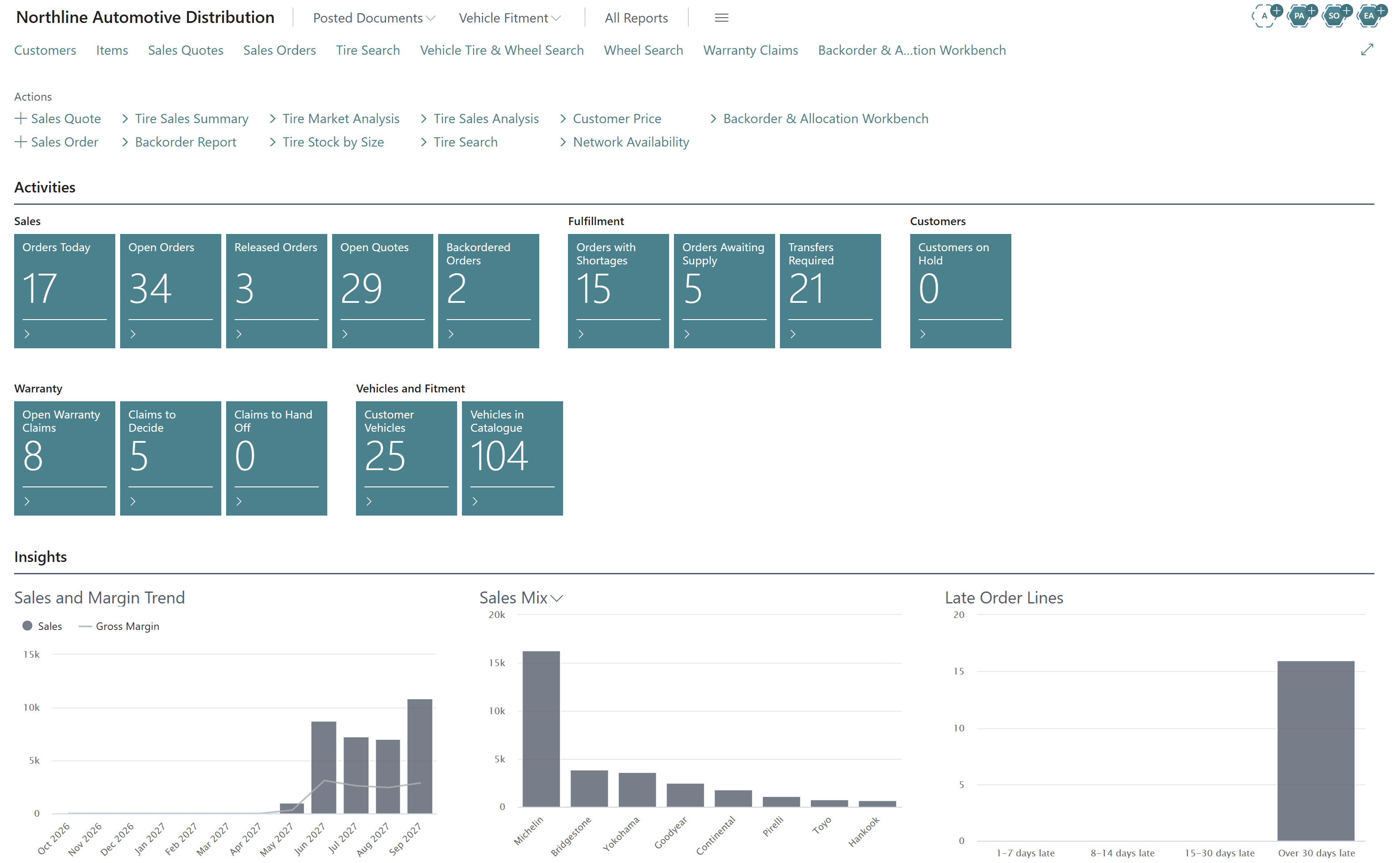
Business Central opens on a workspace that already speaks tire. Distribution managers see orders today, backorders, incoming supply, transfers required, warranty claims and KPIs such as gross margin, inventory value, turns and days of supply. Sales and customer service see open quotes, tire search, vehicle search, network availability and the sales mix by brand.
9. Mixed-Basket Selling
Tires, wheels, lubricants, accessories and installation services go on one order. Tire-specific checks appear only on tire lines; everything else flows through standard Business Central.
Built Inside Business Central — Not Bolted On
Many tire systems sit alongside the ERP and sync data back and forth. Econix took the opposite approach: every capability runs inside Business Central, on Business Central's own items, documents, ledgers and posting.
Why native matters on upgrade day
Because Econix is delivered as Business Central extensions and never replaces Microsoft's standard engines, Microsoft's regular updates flow through without re-integration projects. Your tire features stay current along with the rest of Business Central.
What Every Team Gets
Counter & inside sales
- Vehicle tire & wheel search
- Tire search by size, load, speed, season
- Stock at every branch on screen
- Quote or order in one click
Purchasing & inventory
- Incoming and overdue supply
- Transfers required across branches
- Tire stock by size and season
- Vendor performance
Warehouse
- Tire size and DOT on picks and receipts
- Barcode labels
- Standard BC warehouse documents
- Accurate counts
Quality & compliance
- DOT captured at receiving
- DOT age inventory
- Quality holds
- Recall exposure and impact list
Management
- Margin by brand and product line
- Inventory value, turns, days of supply
- Late order lines, on-time receipts
- Warranty claim summary
From Evaluation to Go-Live: What Econix Delivers
A tire distribution implementation succeeds or fails on data and scenarios, not on software alone. Every Econix engagement follows five phases, each with clear deliverables.
- Phase 1
Fit workshop
- Scenario scripts from your operation
- Live walkthrough on Business Central
- Fit and scope summary
- Phase 2
Data preparation
- Tire & wheel attribute mapping
- Fitment catalogue load plan
- DOT and tire-age policies
- Phase 3
Configure & migrate
- Locations, pricing, warehouse setup
- Role centres and permissions
- Items, customers, vendors, balances
- Phase 4
Test
- End-to-end order-to-margin tests
- Recall drill
- User acceptance sign-off
- Phase 5
Go live & support
- Cutover plan and training
- Hypercare
- Ongoing Support 365
Moving from Dynamics GP or NAV? Econix migrates items, customers, vendors and open balances to Business Central and splits tire attributes out of long item descriptions into structured fields as part of the move — so you go live with searchable product data from day one. See our GP to Business Central and NAV to Business Central upgrade paths.
The Bottom Line
Business Central gives tire and automotive distributors a first-class ERP foundation. Econix Tire & Automotive Distribution turns it into a tire distribution ERP — with fitment, search, network availability, DOT and recall control, warranty and tire analytics built in, and nothing to bolt on.
Related Reading
- Tire & Automotive Distribution ERP — the solution overview, brochures and FAQ
- Tire Distribution ERP Requirements Checklist (2026) — 60+ requirements, scorecard and demo script
- Dynamics 365 Business Central — the platform in depth
- Integrating Business Central With Third-Party Applications — eCommerce, EDI and fitment catalogue feeds
See Business Central Run a Tire Distributor
Book a walkthrough of Econix Tire & Automotive Distribution — role centres, vehicle fitment, network availability, DOT and recalls, warranty and analytics — live in Business Central. Book a 30-minute session.
Referenced In
- Tire Distribution ERP Requirements Checklist (2026): What Tire and Wheel Distributors Should Demand
- Integrating Business Central Cloud With Third-Party Applications: REST APIs, Logic Apps and Enterprise Integration Patterns
- Business Central or Dynamics 365 Finance? How to Tell Which Microsoft ERP Fits
- How to Choose a Dynamics 365 Implementation Partner in Canada
- Business Central vs QuickBooks: When It's Time to Upgrade Your Accounting Software