Most Microsoft Dynamics projects that get into trouble do not fail in a single dramatic moment. They drift. A go-live date slips by a month, then by a quarter. Change requests pile up faster than they are delivered. Finance starts keeping a shadow spreadsheet "just until the system is ready". Eventually the steering committee realises that nobody can say, with confidence, when the project will finish or what it will cost.
If that sounds familiar, the good news is that a stalled Business Central or Dynamics 365 project is almost always recoverable. The configuration, data mapping, integrations and process decisions already made have real value. What is usually missing is not effort but clarity: an honest view of where the project stands, a short list of the problems that actually matter, and a plan that the business, the IT team and the partner all believe.
This playbook sets out the structured method we use on ERP rescue engagements: triage, stabilise, re-plan and execute over 90 days. It includes a project health scorecard, a phase-by-phase action plan, a decision tree for choosing between fixing, refactoring or re-implementing, and a checklist for changing partners without losing what you have paid for.
What you will get from this guide
- A clear definition of what "stalled" means, so you can tell a rough patch from a genuine rescue situation
- An eight-dimension health scorecard with suggested weightings and the red flags to look for in each area
- A 30-60-90 day recovery plan with concrete actions, owners and deliverables for each phase
- A decision framework for choosing whether to fix, refactor or re-implement what has been built
- A partner-transition checklist covering access, code, documentation and data
- Governance habits that stop a recovered project from sliding back
What "Stalled" Really Means
Every ERP implementation has difficult weeks. Data migration rehearsals uncover surprises, user acceptance testing produces long defect lists and key people go on holiday at the worst possible time. None of that, on its own, means a project needs rescuing. A project is stalled when the normal mechanisms for getting back on track have stopped working: the plan is re-baselined repeatedly without the underlying causes changing, and confidence among sponsors and users is falling faster than progress is rising.
There is also a second category that executives often overlook: the project that went live but never really landed. The system is technically in production, yet month-end takes longer than it did on the old platform, inventory figures are not trusted, integrations fail silently and users have built workarounds outside the system. A live-but-broken Business Central or Dynamics 365 environment needs a rescue just as much as a project that never reached go-live, and it often carries more operational risk because the business depends on it every day.
If you are unsure which situation you are in, our article on the 7 signs an ERP implementation is failing is a useful self-check. The patterns below are the ones we see most often when a Dynamics project genuinely stalls.
The moving go-live
The date has been re-baselined more than once, and each new plan repeats the same assumptions as the last.
Requirements that never closed
Scope is still being debated in build or test, so configuration keeps changing and testing never converges.
Data that does not reconcile
Migration rehearsals produce trial balances, inventory or open items that finance cannot sign off.
Fragile integrations
Interfaces to e-commerce, banking, payroll or warehouse systems work in demos but fail under real volumes.
Customisation creep
Extensions have multiplied to replicate the old system, increasing cost, test effort and upgrade risk.
Lost confidence
Users, sponsors and the partner no longer trust each other's status reports, so decisions stall too.
Before Day One: Ground Rules for a Rescue
The first instinct in a troubled project is to push harder: more consultants, longer hours, a tighter deadline. That usually makes things worse, because it adds activity without adding clarity. A rescue starts by deliberately slowing down for a short period so that everyone can see the project as it really is. That means agreeing a few ground rules before any diagnostic work begins.
First, appoint a single accountable executive sponsor with the authority to make scope, budget and resourcing decisions quickly. Second, agree that the triage period is a no-blame exercise; the goal is to understand the facts, not to assign fault. Third, freeze non-essential change requests so the team is not chasing a moving target while the assessment is under way. Finally, make sure the rescue team has full, read-level access to environments, code repositories, project documentation and issue logs from the very first day.
Do not terminate your current partner on day one
It is tempting to end a frustrating relationship immediately, but doing so before you have secured access, source code, documentation and environment ownership can leave you unable to support your own system. Secure the assets first, run the triage, and then decide on the partnership with full information. Many projects recover with the original partner once the real problems are visible and the governance is reset.
Step 1: Triage the Project With a Health Scorecard
Triage is about replacing opinions with evidence. In the first two to three weeks, the rescue team reviews the project across eight dimensions, interviews key users and the partner, and inspects the actual environments rather than relying on status reports. A structured ERP health check provides this view, and for projects facing a board-level decision a formal ERP risk assessment adds a documented risk register and mitigation options.
Each dimension is rated red, amber or green, with evidence recorded for every rating. The scorecard below lists what to examine and the red flags that most often indicate a deeper problem. The aim is not a perfect score; it is a shared, evidence-based picture that the sponsor, the business and the partner can all accept as the starting point for recovery.
| Dimension | What to examine | Red flags |
|---|---|---|
| Scope and requirements | Signed-off process designs, fit-gap log, change request history | Requirements still open in testing; no agreed definition of done |
| Solution design | Configuration versus customisation balance, extension inventory | Heavy custom code replicating legacy screens; no design authority |
| Data migration | Mapping documents, rehearsal results, reconciliation reports | Trial balances or stock values that do not reconcile after rehearsals |
| Integrations | Interface inventory, error handling, volume testing | Point-to-point scripts with no monitoring or retry logic |
| Testing | Test scripts, defect trends, UAT participation | Defect counts rising week over week; users not testing real scenarios |
| People and adoption | Key-user availability, training plans, change readiness | Key users seconded part-time or not at all; no training environment |
| Governance | Steering cadence, decision log, RAID log, budget tracking | Decisions revisited repeatedly; no single accountable sponsor |
| Partner and delivery | Team continuity, skills mix, delivery method | High consultant turnover; status reports disconnected from reality |
Not every dimension carries equal weight. In our experience, data, solution design and governance problems are the ones most likely to derail a recovery if they are not addressed early, so we weight them more heavily when calculating an overall health score. The split below is a suggested starting point; adjust it to reflect your project's specific risks.
The 30-60-90 Day Recovery Plan
With the triage complete, the recovery plan runs in three phases. The first 30 days stabilise the project and establish the facts. Days 31 to 60 rebuild the plan and the team around those facts. Days 61 to 90 prove the new plan works by delivering visible, tested progress. Each phase ends with a steering decision, so the sponsor is never committing to more than one phase at a time without evidence.
- 1Triage and stabiliseDays 1–30
- Health scorecard and evidence pack
- change freeze and access secured
- critical defects and data issues prioritised
- 2Re-plan and resetDays 31–60
- Fix, refactor or re-implement decision
- re-baselined scope, budget and plan
- governance and team reset
- 3Execute and proveDays 61–90
- Priority fixes delivered and tested
- full data migration rehearsal reconciled
- go-live readiness criteria agreed
Days 1–30: Triage and Stabilise
The first month is about control and visibility. The rescue lead runs the health scorecard, but the team also takes immediate action on anything that is actively damaging the business. For a project that has not gone live, that usually means stopping configuration churn and protecting test environments. For a live-but-broken system, it means stabilising the processes that touch customers, cash and compliance before anything else.
Secure the assets
Confirm administrative access to every Business Central or Dynamics 365 environment, source code repositories, Azure DevOps or equivalent backlogs, and all project documentation.
Freeze and triage change
Pause non-critical change requests and sort the existing backlog into must-fix, should-fix and can-wait categories with the business owners.
Run the scorecard
Assess all eight health dimensions with evidence, interviewing key users, the partner and the IT team separately.
Stabilise critical processes
For live systems, address issues affecting invoicing, payments, payroll interfaces, inventory accuracy or tax first.
Report the facts
Present the scorecard, the root causes and the immediate risks to the steering committee in plain business language.
Days 31–60: Re-plan and Reset
The second month turns findings into a plan that people can believe. The central decision is whether the existing solution should be fixed in place, partly refactored or re-implemented; the framework for that decision is covered in the next section. Once that is settled, scope is re-baselined to what the business genuinely needs for go-live, with nice-to-have items moved into a post-go-live roadmap.
This is also when governance is reset. A weekly working session with clear decision rights, a fortnightly steering meeting with a live RAID log, and a single source of truth for the plan make an enormous difference. If key users were stretched too thin in the original project, now is the time to backfill their day jobs. Our ERP implementation guide describes the governance model in more detail, and the ERP rescue guide covers the commercial side of re-planning, including how to structure the remaining budget.
Days 61–90: Execute and Prove
The final phase is where credibility is rebuilt. Rather than promising a new go-live date and hoping, the team delivers a defined set of priority fixes, runs a full data migration rehearsal with reconciliation signed off by finance, and executes end-to-end test scenarios with real users. Progress is measured against agreed readiness criteria, not activity. If you need a reference point for migration quality, our ERP data migration best practices set out the reconciliation standard we expect.
By day 90, the steering committee should be able to make a confident go or no-go decision based on evidence: defect trends heading down, data reconciling, integrations tested at realistic volumes and users trained in their own processes. For a live system, the equivalent milestone is a stable month-end close inside the target timeline and a measurable drop in support tickets.
Fix, Refactor or Re-implement?
This is the decision executives worry about most, because it carries the biggest cost and the most emotion. In practice, a full re-implementation is needed far less often than people fear. Most stalled projects have a sound core and a set of specific problems: an over-customised area, a poorly designed integration, or a data migration approach that never matured. Fixing or refactoring those areas preserves the investment already made.
Re-implementation becomes the right answer when the foundations are wrong: the chart of accounts or dimension structure does not support the business, the wrong product was chosen for the organization's scale, or the customisation layer is so extensive that it cannot be maintained or upgraded. The matrix below compares the three paths.
| Consideration | Fix in place | Refactor | Re-implement |
|---|---|---|---|
| Core configuration sound | Yes | Yes | No |
| Preserves work already done | Yes | Partial | No |
| Removes excess customisation | No | Yes | Yes |
| Time to visible progress | Fastest | Moderate | Slowest |
| Relative cost | Lowest | Moderate | Highest |
| Suitable when product fit is wrong | No | No | Yes |
| Upgrade and release-wave readiness improved | Partial | Yes | Yes |
The decision tree below summarises how we guide sponsors through the choice. Each condition should be backed by evidence from the triage scorecard rather than by frustration with the current state of the project.
- IfCore setup (chart of accounts, dimensions, posting groups) fits the business and defects are isolatedThenFix in place: prioritise defects, stabilise data and integrations, and proceed to go-live
- IfCore setup fits but specific areas are over-customised or poorly integratedThenRefactor: replace custom code with standard features or extensions in those areas and retest them
- IfFinancial structure or master data design does not support how the business operatesThenRe-implement the affected modules on a corrected design, reusing data mapping and test assets
- IfThe product itself does not fit the organization's scale or complexityThenRe-assess product fit, for example Business Central versus Dynamics 365 Finance, before any further build
- IfLive system with a stable core but failing processesThenStabilise first, then fix or refactor through a structured post-go-live improvement backlog
Product fit deserves a specific mention. A growing group with many legal entities and complex consolidation needs may genuinely have outgrown Business Central, while a mid-sized company may be carrying the weight of an enterprise design in Dynamics 365 Finance that it does not need. Our comparison of Business Central and Dynamics 365 Finance explains the trade-offs if this question surfaces during triage.
Changing Partners Without Losing the Work
Sometimes the triage makes it clear that the partnership itself is the problem. The relationship may have broken down, the team may lack the necessary skills, or the delivery model may not suit your organization. Changing partners is a significant decision, but it does not have to mean starting again. The configuration, extensions, data mappings and test assets belong to your project and can be transferred to a new team if you secure them properly.
The single most important principle is to secure assets before you signal any change. Confirm your contract terms on intellectual property and handover obligations, then work through the areas below. Our guide to choosing a Dynamics 365 implementation partner in Canada covers what to look for in the incoming team.
Access and ownership
Global administrator and tenant ownership in your name, environment admin rights, and partner access you can revoke.
Code and extensions
Full source code for every extension, the repository history and build pipelines, not only compiled app packages.
Documentation
Process designs, fit-gap logs, configuration workbooks, integration specifications and the decision log.
Data and migration assets
Mapping documents, transformation scripts, rehearsal results and reconciliation reports.
- Confirm Microsoft 365 and Dynamics tenant ownership sits with your organization
- Confirm you hold global and environment administrator credentials
- Review licensing: who is the partner of record and how licences are billed
- Obtain full source code and repository access for all custom extensions
- Obtain build and deployment pipeline definitions and any signing certificates
- Collect process designs, fit-gap logs and configuration documentation
- Collect integration specifications, credentials inventory and middleware configuration
- Secure data migration mappings, scripts and reconciliation evidence
- Export the full issue log, defect history and open change requests
- List all third-party ISV apps, their licensing and their support contacts
- Agree a knowledge-transfer period with named outgoing consultants
- Revoke or rotate outgoing partner credentials on the agreed handover date
Rescuing a Live-but-Broken System
When the system is already in production, the rescue has to happen without interrupting the business. The priority order is different: protect cash flow, customer service and compliance first, then improve efficiency. That means focusing early effort on order-to-cash, procure-to-pay, inventory accuracy and month-end close, because problems in those processes cost money every day they persist.
A practical sign of recovery is when users start trusting their daily views again. In Business Central, that is the role centre: the approvals waiting, the activities to action and the KPIs that tell a manager how the day is going. When figures on that page match reality, users stop exporting to spreadsheets and start working in the system.
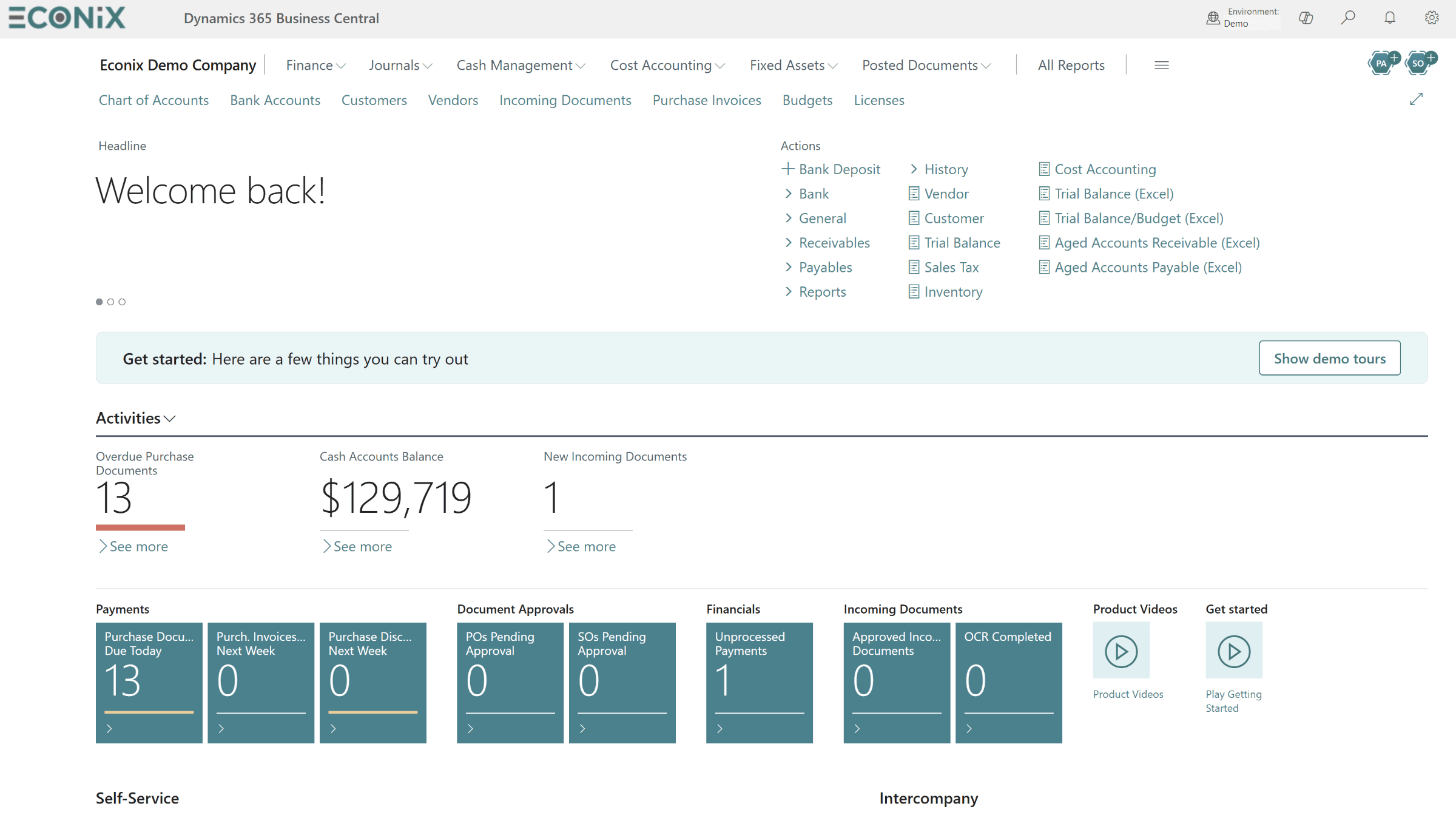
Stabilising a live system follows a repeatable cycle. Each issue is captured, triaged by business impact, fixed in a sandbox, tested by the users who raised it and then released in a controlled way. The flow below shows the cycle we use; it also forms the backbone of ongoing support once the rescue is complete.
- 1CaptureLog every issue with process, impact and evidence in one backlog
- 2PrioritiseRank by impact on cash, customers, compliance and close
- 3Fix in sandboxResolve in a sandbox copy of production, never directly in live
- 4User testKey users verify the fix in their own scenarios
- 5ReleaseDeploy in a planned window with a rollback plan
- 6MeasureTrack ticket volume, close duration and workaround removal
Once the system is stable, the conversation shifts from rescue to continuous improvement. Structured post-go-live support, such as Support 365, keeps the backlog moving, prepares for Microsoft's twice-yearly release waves and stops new problems from accumulating. Our article on what support after go-live should include explains what good looks like.
Governance That Keeps a Project Recovered
The technical fixes in a rescue matter, but most projects stall again for the same reason they stalled the first time: weak governance. A recovered project needs a sponsor who attends steering meetings and makes decisions, a design authority that approves any new customisation, and a change control process that weighs every request against its effect on the timeline and the upgrade path.
Reporting also needs to change. Status reports should show the same handful of measures every time, such as defects opened and closed, test scripts passed, data reconciliation status and readiness criteria met, so that trends are visible and nobody can hide a problem behind a green traffic light. When the numbers move the wrong way, the steering committee should hear about it in the same week, with options rather than excuses.
Make the definition of done explicit
Agree written go-live readiness criteria during the re-plan phase: data reconciled and signed off by finance, no open critical defects, integrations tested at realistic volume, users trained in their own processes and a support model in place. When everyone knows exactly what "ready" means, go-live debates become short and factual.
How Econix Helps
Econix Infotech is a Canadian Microsoft Dynamics partner focused on Business Central and Dynamics 365. Our ERP rescue service is designed for organizations whose Dynamics project is late, over budget or live but not delivering. We start with an evidence-based ERP health check or risk assessment, present the findings in business language, and then lead or support the 30-60-90 day recovery alongside your team and, where it makes sense, your existing partner.
Where a partner transition is needed, we manage the handover methodically so that the configuration, extensions, data work and documentation you have paid for are preserved. Once the project is stable, our implementation and Support 365 teams can carry it through go-live and beyond. We work with organizations across Canada and the United States; if you would like to talk through your situation confidentially, book a conversation using the link below.
Related Reading
- 7 Signs Your ERP Implementation Is Failing - a quick self-check before you commit to a rescue
- ERP Rescue Guide - the full recovery method, commercial options and what to expect
- ERP Data Migration Best Practices - the reconciliation standard a recovered project should meet
- How to Choose a Dynamics 365 Implementation Partner in Canada - what to look for in an incoming partner
- After Go-Live: What Business Central and Dynamics 365 Support Should Include - keeping a stabilised system healthy
Econix Infotech
Is your Dynamics project stalled or live but struggling?
Book a confidential conversation and get an evidence-based view of where your Business Central or Dynamics 365 project really stands.
Referenced In
- Dynamics SL to Business Central: The Migration Playbook for Project-Based Businesses
- Multi-Location Tire Inventory and DOT Tracking: How Distributors Sell More From the Stock They Already Have
- After Go-Live: What Business Central and Dynamics 365 Support Should Include
- Dynamics 365 Finance for Multi-Entity Organizations: Consolidation, Intercompany and Tax Done Right
- Copilot in Business Central: 12 Practical Use Cases for Finance, Sales and Operations