If your firm runs on Microsoft Dynamics SL, your ERP is really a project-accounting system. Every timesheet, purchase order and invoice is tied to a project and task. Your month-end close is a work-in-progress review. Your billing team lives inside Flexible Billings, and your controllers trust a set of subaccount segments that took years to get right.
That is exactly why generic ERP migration advice falls short for SL customers. Most migration guides are written for distributors and general-ledger shops coming from Dynamics GP or NAV. They talk about customers, vendors and items, and say very little about job costing, WIP, revenue recognition, indirect cost allocation or project billing — the things that actually keep an engineering, construction, professional-services or government-contracting firm profitable and audit-ready.
Microsoft has made it clear that Business Central is the path forward for Dynamics SL customers, and SL is in the later stages of its product lifecycle. The question for most SL firms is no longer whether to move, but how to move without losing project control along the way. This playbook answers that question.
What you will get from this guide
- A module-by-module map from Dynamics SL to Business Central Projects and Finance
- A clear split between what migrates as data and what must be redesigned as process
- A six-phase migration roadmap with the actions and deliverables for each phase
- Three cutover options for open projects, compared side by side, with a decision guide
- A project-accounting readiness checklist to run before you sign a statement of work
- The common traps SL firms hit — and how to avoid them
Why SL Migrations Are Different
A Dynamics SL database is shaped around projects in a way that most ERPs are not. In SL, the project and task are often the primary lens for cost, revenue and margin, with the general ledger as the summary. In Business Central, the general ledger and its dimensions are the backbone, and the Projects module (formerly called Jobs) sits on top, posting through to the ledger. Both approaches work well, but they are not the same shape — so a migration is partly a data exercise and partly a redesign of how project information flows.
That difference shows up in four places, summarized below. Each one needs a deliberate design decision rather than a straight data copy.
Subaccounts become dimensions
Department, branch or service-line segments become global and shortcut dimensions, designed before any data moves.
WIP and revenue recognition
SL revenue recognition is matched to a Business Central WIP method per project type, with a clear month-end routine.
Indirect costs and burdening
Overhead, fringe and G&A allocations rarely map one-to-one and must be redesigned.
Project billing rules
Flexible Billings rules are rebuilt as billable planning lines and invoice layouts.
The good news
Business Central is a strong home for most project-based firms. Projects supports project tasks with a work breakdown, budget and billable planning lines, resource and item costs, time sheets, a full project ledger, multiple WIP methods and invoicing directly from planning lines. It runs in the Microsoft cloud and connects natively to Microsoft 365 and Power BI. You can read more about the platform on our Business Central page and in the Business Central guide.
What Business Central is not is a resource-scheduling and professional-services automation suite. If your firm needs advanced resource management, multi-stage project approvals and complex contract revenue recognition across hundreds of concurrent projects, you may also want to evaluate Dynamics 365 Project Operations as a separate application. For most SL firms, Business Central Projects is the right fit — but that decision belongs in Phase 1, not after go-live.
The SL to Business Central Module Map
The table below maps the Dynamics SL modules most project-based firms use to their Business Central equivalents, with a plain-language note on what changes. Use it as the starting point for fit-gap workshops, not as a final answer: every firm configures SL differently, and the right mapping depends on how you actually use each module today.
| Dynamics SL module | Business Central equivalent | What changes |
|---|---|---|
| General Ledger and subaccounts | General ledger with global and shortcut dimensions | Subaccounts become dimensions; chart of accounts simplified |
| Accounts Payable | Purchasing and payables | Vendors and open invoices migrate; approvals reconfigured |
| Accounts Receivable | Sales and receivables | Customers and open items migrate; collections reconfigured |
| Cash Manager | Bank accounts, bank reconciliation and cash management | Bank reconciliation set up fresh; history archived |
| Project Controller | Projects (project card, project tasks, project ledger) | Projects and tasks migrate; posting redesigned around project posting groups |
| Project Budgeting | Project planning lines (budget and billable) | Remaining budget loaded as planning lines |
| Project Allocator | Resource and work type costing, general ledger allocations or an extension | Indirect rates redesigned, not copied |
| Flexible Billings | Invoicing from billable planning lines, invoice layouts | Billing rules rebuilt; complex formats may need an extension |
| Time and Expense for Projects | Time sheets for resources; project journals and purchase documents for expenses | Time approval moves to time sheets; expenses may use an add-on |
| Purchasing and Inventory | Purchasing, inventory and item tracking | Open orders and on-hand balances migrate |
| Payroll | External payroll provider or certified add-on, integrated by journal | No built-in North American payroll; plan an integration |
| Management Reporter and financial statements | Business Central financial reports and Power BI | Reports rebuilt on dimensions; dashboards in Power BI |
Two rows in that table cause the most surprises. Project Allocator is the first: firms with government contracts often depend on precise indirect rate calculations, and those need to be designed, tested and signed off by the controller long before cutover. Payroll is the second: Business Central does not include a built-in North American payroll, so payroll is typically handled by a dedicated provider or add-on and posted to Business Central by journal, with labour costs flowing to projects through time sheets or project journals.
What migrates and what is redesigned
A useful way to frame the whole programme is to separate data you move from processes you rebuild. Master data and open balances move. Posting logic, billing rules, approval workflows and reports are rebuilt in Business Central's own way. Trying to recreate SL screen-for-screen almost always produces an over-customized system that is harder to upgrade.
- Chart of accounts (remapped) and opening balances
- Customers, vendors, employees and resources
- Open receivables and payables at cutover
- Active projects, tasks and remaining budgets
- Open purchase orders and inventory on hand
- Summarized general ledger history for comparison
- Subaccount logic as dimensions and posting groups
- WIP methods and month-end WIP routine
- Indirect cost allocation and burden rates
- Billing rules, invoice layouts and approvals
- Time-sheet approval and expense capture
- Financial reports and project dashboards
The Six-Phase Migration Roadmap
The roadmap below is the structure we recommend for a typical mid-sized SL firm. Durations vary with the number of entities, integrations and the volume of open projects, so treat the week ranges as a planning guide rather than a commitment. The important point is the sequence: dimension design and project-accounting design come before configuration, and at least two full data migration rehearsals come before cutover.
- 1Phase 1 – Assess and decideWeeks 1–4
- SL inventory
- fit-gap against Business Central Projects
- platform fit confirmed
- cutover option chosen
- 2Phase 2 – Design finance and projectsWeeks 4–8
- Dimension design
- project types and WIP methods
- indirect cost and billing sign-off
- 3Phase 3 – Configure and extendWeeks 8–14
- Configuration
- time sheets, approvals and invoice layouts
- integrations built
- 4Phase 4 – Migrate and reconcileWeeks 10–18
- Cleansing
- two migration rehearsals
- balance and project-total reconciliation
- 5Phase 5 – Test and parallel closeWeeks 16–22
- Testing by project type
- user acceptance
- parallel close with WIP compared
- 6Phase 6 – Cut over and stabiliseWeeks 22–26
- Final migration
- go-live
- hypercare through two closes
Phase 1 – Assess and decide
Start by documenting what you really use in SL today: modules, customizations, reports, integrations and the volume of active projects. Then run fit-gap workshops against Business Central Projects with your controller, billing lead and project managers in the room. This is also where you confirm the platform choice and select your cutover option for open projects, because both decisions shape everything that follows. If you want a structured, independent view first, an ERP health check can frame the scope before you commit to a plan.
Phase 2 – Design finance and projects
This is the phase that makes or breaks an SL migration. Translate subaccount segments into a dimension model, decide which dimensions are global and which are shortcut, and design project types with their own posting groups. Choose a WIP method for each project type — Business Central supports Cost Value, Sales Value, Cost of Sales, Percentage of Completion and Completed Contract — and agree the month-end WIP routine. Finally, design indirect cost handling and billing rules, and have the controller sign them off in writing.
Phase 3 – Configure and extend
With the design agreed, configuration moves quickly. Set up the chart of accounts, dimensions, project posting groups, resources and work types, time sheets and approval workflows. Build invoice layouts and any extensions needed for billing or allocations, and develop integrations such as payroll journals, document management or industry systems. For integration patterns, our guide to Business Central integration with REST APIs and Logic Apps covers the options.
Phase 4 – Migrate and reconcile
Extract SL data, cleanse it and load it through repeatable migration scripts. Run at least two full rehearsals, and reconcile each one against SL: trial balance by dimension, open receivables and payables, inventory, and — most importantly — project totals for budget, actual cost, billed and unbilled amounts. Our article on ERP data migration best practices explains how to structure the rehearsal and reconciliation cycle.
Phase 5 – Test and parallel close
Test end to end by project type: a time-and-materials project, a fixed-fee project and a cost-plus or government project if you have them. Then run a parallel month-end close, posting the same month's activity in both systems and comparing WIP, revenue and margin. Every difference must be explained before go-live.
Phase 6 – Cut over and stabilise
Execute the final migration over a planned window, sign off balances and project totals, and go live. Plan hypercare through at least the first two month-end closes, because the first WIP run and the first billing cycle are where SL firms most need support.
Design and migration together take roughly 40 percent of that suggested effort. Firms that compress design to "get to the build" usually pay for it in rework during testing.
Cutover Options for Open Projects
The single biggest design decision in an SL migration is what to do with projects that are still running on cutover day. You have three realistic options, and many firms combine them — for example, migrating detail for large multi-year contracts and balances only for short projects.
| Consideration | Balances only | Open projects with summarized history | Full transaction history |
|---|---|---|---|
| Migration effort | Low | Medium | High |
| Project-to-date reporting in Business Central | Partial | Yes | Yes |
| Detail for audits and contract reviews | Kept in SL archive | Summarized by task and period | Full detail |
| Risk of reconciliation issues | Low | Medium | High |
| Suits long-running government contracts | No | Yes | Yes |
With balances only, each open project is created in Business Central with its tasks, remaining budget and an opening entry for cost and billing to date. With summarized history, cost and revenue are loaded by task and by period, so project-to-date reports and WIP calculations work properly in Business Central. Full transaction history loads every historical entry, which is rarely worth the effort and risk; most firms keep detailed history in a read-only archive or report on it in Power BI instead.
- 1List active projectsExport open projects with budget, cost, billed and unbilled
- 2Check remaining lifeProjects ending soon can often finish in SL
- 3Check contract termsCost-plus and government contracts need period history
- 4Check WIP positionLarge unbilled WIP needs detail to support revenue
- 5Assign an optionBalances only, summarized history or finish in SL
- 6Reconcile and sign offController agrees project totals before go-live
- IfProject ends within the next one or two monthsThenFinish and close it in SL
- IfShort time-and-materials project with little WIPThenMigrate balances only with remaining budget
- IfMulti-year or cost-plus contract with audit requirementsThenMigrate summarized history by task and period
- IfLarge unbilled WIP or disputed billingThenMigrate summarized history and reconcile WIP
- IfNeed for full historical detail on old projectsThenKeep a read-only SL archive
Do not migrate open projects without a WIP reconciliation
The first Business Central WIP calculation after go-live must match the position you closed in SL. If project cost, billed amounts and recognized revenue are not reconciled per project before cutover, your first month-end close will turn into an investigation. Make WIP reconciliation a formal sign-off gate in Phase 4 and Phase 5.
Running Projects in Business Central After Go-Live
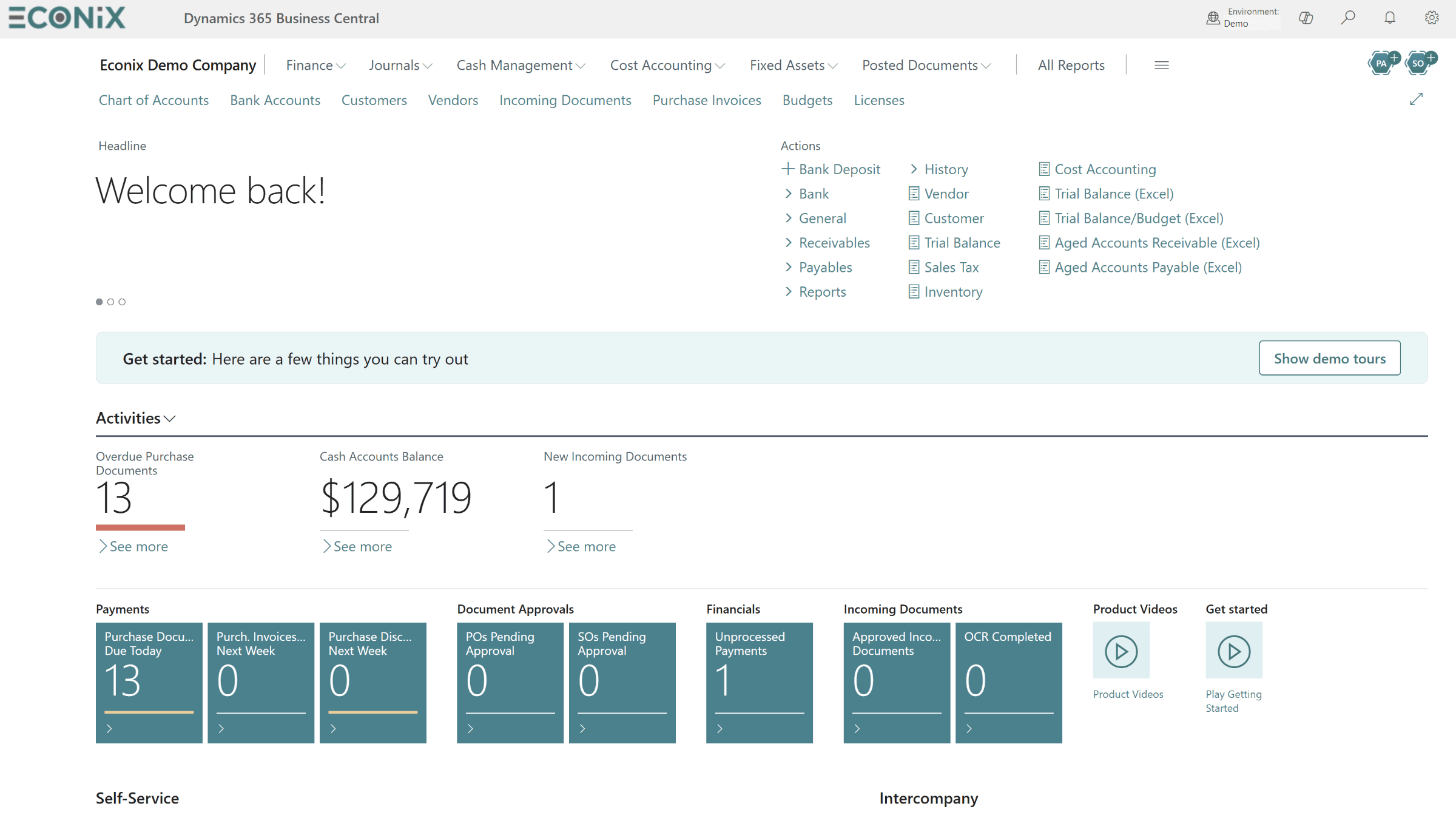
Once you are live, your project managers and billing team will work in Business Central's role-based interface. Project managers see their projects, open time sheets and approvals; the controller sees WIP, receivables and key financial indicators. The screenshot below shows a Business Central role centre with approvals, activity tiles and KPIs — the kind of starting page users land on each morning.
For portfolio-level reporting, most SL firms move their project dashboards to Power BI, connected to Business Central data. Typical first reports include project profitability, budget versus actual by task, unbilled WIP, utilization from time sheets and backlog. A shared Power BI data model helps you design them so that controllers and project managers see the same numbers.
Weekly time-sheet approval
Managers approve time sheets so cost reaches projects on time.
Billing from planning lines
Billable planning lines become draft invoices for review.
Month-end WIP
Calculate WIP, review exceptions, then post to the ledger.
Project reviews
Budget-versus-actual and margin by task drive reviews.
Resource utilization
Utilization reported from approved time sheets.
Controller sign-off
Close only after WIP, billing and accruals are reviewed.
Project-Accounting Readiness Checklist
Run this checklist before you sign a statement of work. Every "no" is a risk to price into the plan or resolve during Phase 1. It is deliberately focused on project accounting; for the broader programme, pair it with our ERP implementation checklist.
- Every SL module, customization and report in use is documented
- Subaccount meanings are documented and owned by finance
- A target dimension model has been drafted and reviewed by the controller
- Project types are defined with their billing method and WIP method
- Indirect cost and burden rate calculations are documented with worked examples
- Flexible Billings formats and contract-specific rules are catalogued
- A current list of active projects with budget, cost and billing positions exists
- A cutover option has been agreed for each group of open projects
- The payroll approach and its integration to Business Central are agreed
- All integrations are listed
- A data archive or reporting approach for SL history is chosen
- At least two migration rehearsals and one parallel close are in the plan
- Reconciliation sign-off owners are named for each balance type
- Hypercare covers the first two month-end closes and billing cycles
Confirm current Microsoft lifecycle dates before you set your deadline
Lifecycle and support dates for Dynamics SL vary by version and can change. Check the current Microsoft lifecycle policy for your SL version, then plan backwards from it — leaving room for a parallel close and at least one quarter-end on Business Central before any support deadline.
Common Traps and How to Avoid Them
Most SL migrations that struggle do so for predictable reasons. The good news is that each one has a straightforward countermeasure if you plan for it early.
- Copying subaccounts into the chart of accounts. It feels faster than designing dimensions, but it produces a bloated chart that is hard to report on. Design dimensions first and keep the chart lean.
- Treating WIP as a technical setting. WIP methods are finance policy. The controller should choose them per project type and sign them off.
- Leaving indirect rates to the end. Burden and allocation logic should be designed and tested in Phase 2 with worked examples, not discovered during testing.
- Rebuilding every SL report. Rationalize reports, rebuild the essentials on dimensions and move portfolio views to Power BI.
- Migrating all history. Archive old detail and migrate only what supports open work and comparison reporting.
- Skipping the parallel close. Make one parallel month-end close a formal go-live gate, even when timelines are under pressure.
The common thread is that an SL migration succeeds when finance owns the design. Your implementation partner should bring the Business Central expertise and the migration tooling, but the controller and billing lead must own the decisions about dimensions, WIP, allocations and billing. If those owners are named and engaged from week one, the rest of the plan becomes much more predictable. Naming those owners in the statement of work, with their sign-off responsibilities, is one of the simplest risk controls available.
How Econix Helps
Econix Infotech helps project-based firms across Canada and the USA move from Dynamics SL to Business Central with a migration approach built around project accounting, not just the general ledger. Our SL to Business Central upgrade service covers the full journey: SL assessment, dimension and project design, configuration, data migration with reconciliation at every rehearsal, a parallel month-end close and hypercare through your first closes.
We have done this work before. Read how we migrated an analytical services firm from Dynamics SL to Business Central, with financial data reconciled at every stage, project accounting workflows rebuilt and a parallel-run validation before go-live. If your firm is in engineering, consulting or other services, our professional services and government industry pages explain how we configure Business Central for project-driven work. After go-live, our Support 365 team keeps your system current and your month-end on track.
- Assessment first: a fixed-scope review of your SL environment, customizations and open projects
- Finance-led design: dimensions, project types, WIP methods and billing designed with your controller
- Reconciled migration: repeatable scripts with balance and project-total reconciliation each rehearsal
- Planned cutover: an open-project strategy per project group and a parallel close before go-live
- Ongoing support: release updates, enhancements and reporting after you go live
Related Reading
- Upgrade Dynamics SL to Business Central — our SL migration service, approach and scope
- ERP Data Migration Best Practices — how to plan rehearsals, cleansing and reconciliation
- Business Central or Dynamics 365 Finance: Which Fits? — choosing the right Microsoft ERP tier
- Project Accounting: Business Central vs Project Operations — fit by firm size and billing complexity
- RJ Lee Group: Dynamics SL to Business Central — a project-accounting migration in practice
Econix Infotech
Plan your Dynamics SL to Business Central migration
Book a working session to map your SL modules, open projects and cutover options to a realistic Business Central roadmap.