For an engineering, consulting, IT-services or architecture firm, the ERP is not a back-office ledger. It is the system that turns hours into invoices, tells partners which projects are making money and decides whether month-end takes three days or three weeks. Choosing the wrong platform shows up quickly: billing that depends on spreadsheets, resourcing done in someone's head and revenue numbers the controller does not trust.
Within the Microsoft ecosystem, most firms end up comparing two paths. The first is Business Central, the mid-market ERP whose built-in Projects functionality (formerly called Jobs) covers project budgeting, time sheets, WIP and invoicing in one application. The second is Dynamics 365 Project Operations, a separate Dynamics 365 application designed specifically for project-based businesses, with deeper capabilities for project sales, resource scheduling and project contracts, typically paired with an ERP as the financial backbone.
Both are credible. Neither is right for every firm. This guide compares them capability by capability, shows which billing models each supports well, gives you fit questions by firm profile and sets out an implementation roadmap for each path, so you can make the decision on substance rather than on a demo.
What you will get from this guide
- A clear explanation of what each platform is, and what it is not
- A capability comparison across resourcing, time and expense, billing, WIP and reporting
- A billing-model support matrix covering time and materials, fixed fee, milestones, retainers and more
- Fit questions and a decision guide by firm profile and complexity
- A quote-to-cash flow for professional services and the reporting that matters
- An implementation roadmap for each path, plus a selection checklist
Two different shapes of solution
The most common source of confusion is assuming these are two editions of the same product. They are not. Business Central is a complete ERP: general ledger, receivables, payables, purchasing, inventory, fixed assets and projects, all in one application. Project accounting in Business Central is one module within that ERP, tightly integrated with the ledger.
Dynamics 365 Project Operations is a project-centric application built on Microsoft Dataverse. It brings together project-based sales (opportunities, quotes and project contracts), planning, resource management, time and expense capture and project accounting. For full financial accounting it is typically deployed with an ERP as the financial backbone. Historically that backbone has most often been Dynamics 365 Finance. Microsoft and partners also offer integration options between Project Operations and Business Central, but the scope and maturity of those options vary by release and scenario, so validate the specific integration path for your processes before committing.
In short, Business Central is "an ERP with strong project accounting". Project Operations is "a project management and delivery platform with project accounting, connected to an ERP". That difference drives almost every other point in this guide.
Business Central Projects
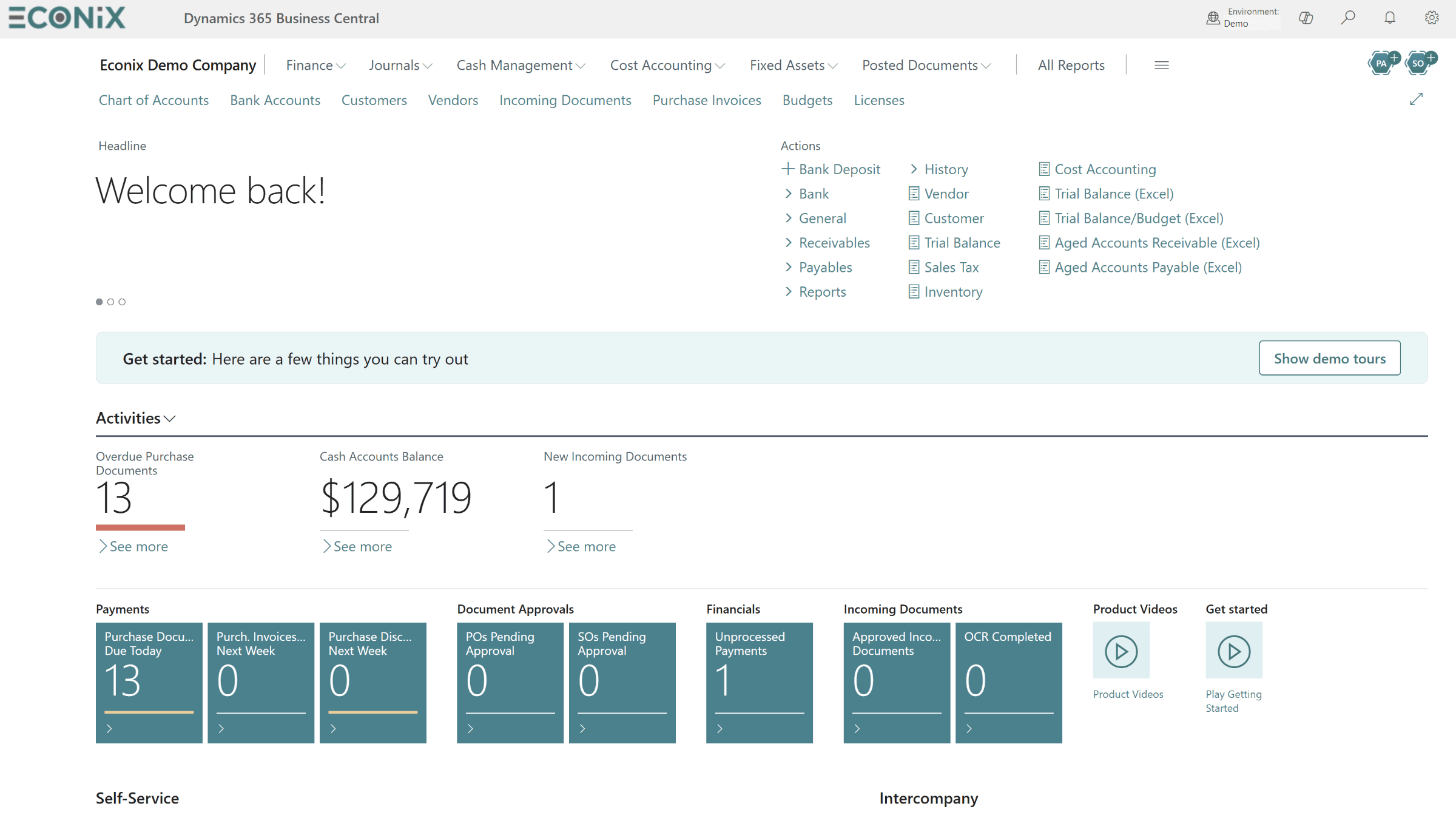
An all-in-one mid-market ERP with project tasks, planning lines, time sheets, WIP and invoicing native to the ledger.
Project Operations
A separate Dynamics 365 application for project sales, resource scheduling, time and expense, contracts and delivery.
Financial backbone
Project Operations relies on an ERP such as Dynamics 365 Finance, or a validated integration with Business Central, for full accounting.
Typical firm size
Business Central suits small to mid-sized firms; Project Operations suits firms with larger delivery teams and complex resourcing.
Business Central Projects: what you get
Business Central Projects gives firms a structured way to plan, cost and bill work without leaving the ERP. Each project is broken into project tasks, which can be organized into a hierarchy with headings and totals. Against each task, planning lines define what you expect to spend and what you expect to bill, and each line can be flagged as budget, billable or both. That simple distinction lets a project manager plan costs and the billing schedule in one place.
Time is captured through time sheets linked to resources and projects, with approval by a project manager or resource manager before posting. Resources carry unit costs and prices, can be grouped, and have capacity that can be compared against allocations. Expenses and purchased items post to projects through purchase documents and project journals, so actual costs build up alongside the plan.
On the financial side, Business Central supports several WIP methods, including cost value, sales value, cost of sales, percentage of completion and completed contract. Running WIP calculates and posts work-in-progress and recognition entries to the ledger. Invoicing creates sales invoices directly from billable planning lines, which supports time and materials as well as scheduled fixed-fee billing. Because it is all one database, project profitability, receivables and the general ledger always agree.
Where Business Central Projects is stretched
Business Central is not a professional services automation suite. Resource scheduling is capacity-based rather than a skills-driven scheduling board, and firms with hundreds of consultants usually want more sophisticated matching of people to roles. Complex contract structures, such as one contract funding many projects with different billing rules, take more configuration. Retainers, not-to-exceed limits and advanced revenue schedules can be handled, but often through configuration discipline, Power Platform workflows or extensions rather than out of the box. None of these are deal-breakers for a firm of moderate size; they are the signals to watch.
Dynamics 365 Project Operations: what you get
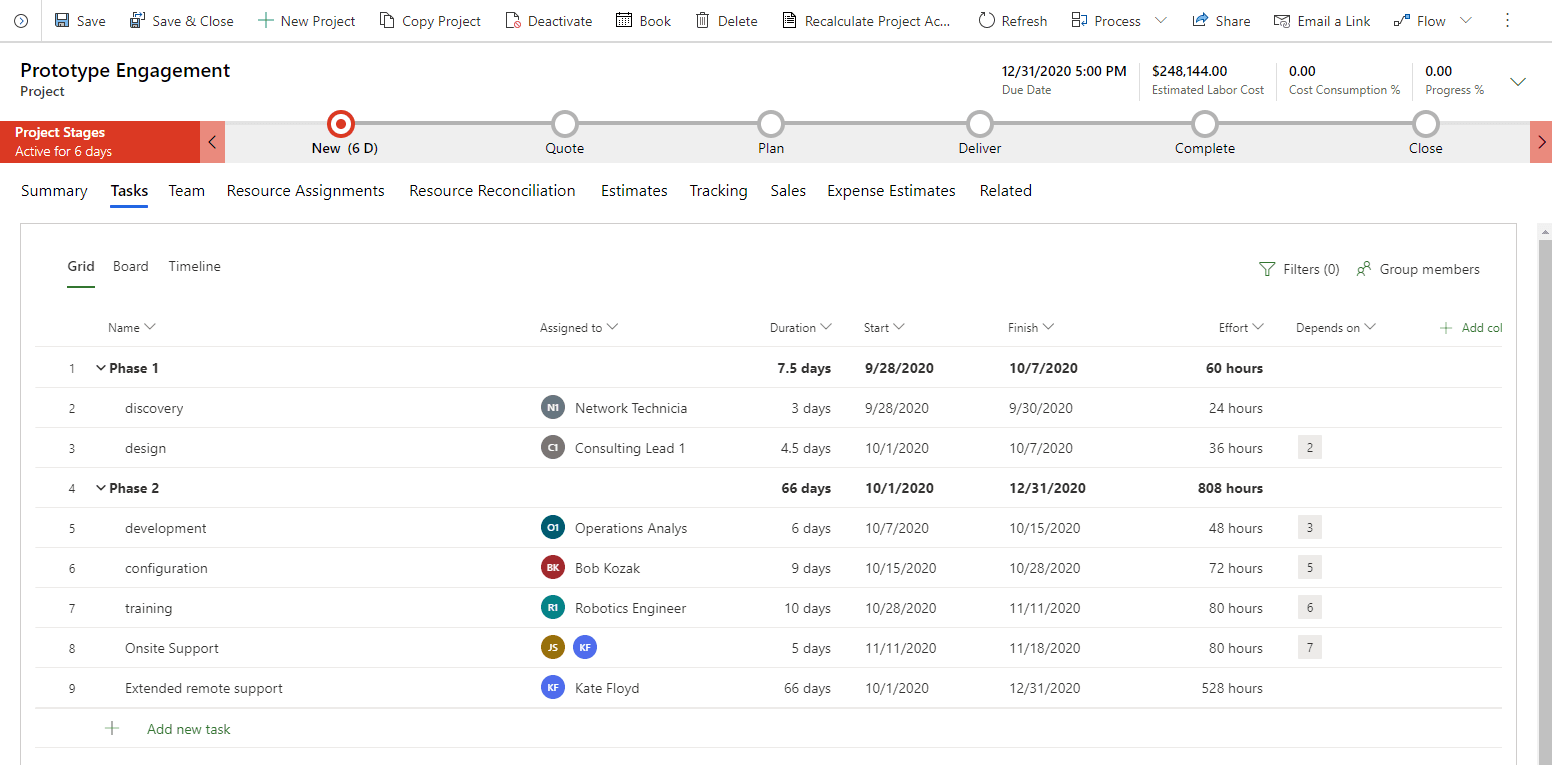
Project Operations starts earlier in the lifecycle. Opportunities and project-based quotes are built with roles, estimated hours and pricing, so the estimate that wins the work becomes the baseline for delivery. Once won, a quote becomes a project contract, with contract lines that can carry different billing methods, such as one line on time and materials and another on fixed price, and limits such as not-to-exceed amounts.
Planning uses a work breakdown structure with tasks, dependencies and effort, and the resource scheduling board lets resource managers match bookable resources to requirements by role, skills, availability and location. Consultants record time and expense through dedicated entry experiences, with approvals flowing back into project actuals and billing backlog. Because the estimate, the contract, the schedule and the actuals sit in the same data model, project managers can see how delivery is tracking against what was sold, and resource managers can see demand building before projects start. For firms where the main constraint is people rather than paperwork, that visibility is often the decisive argument.
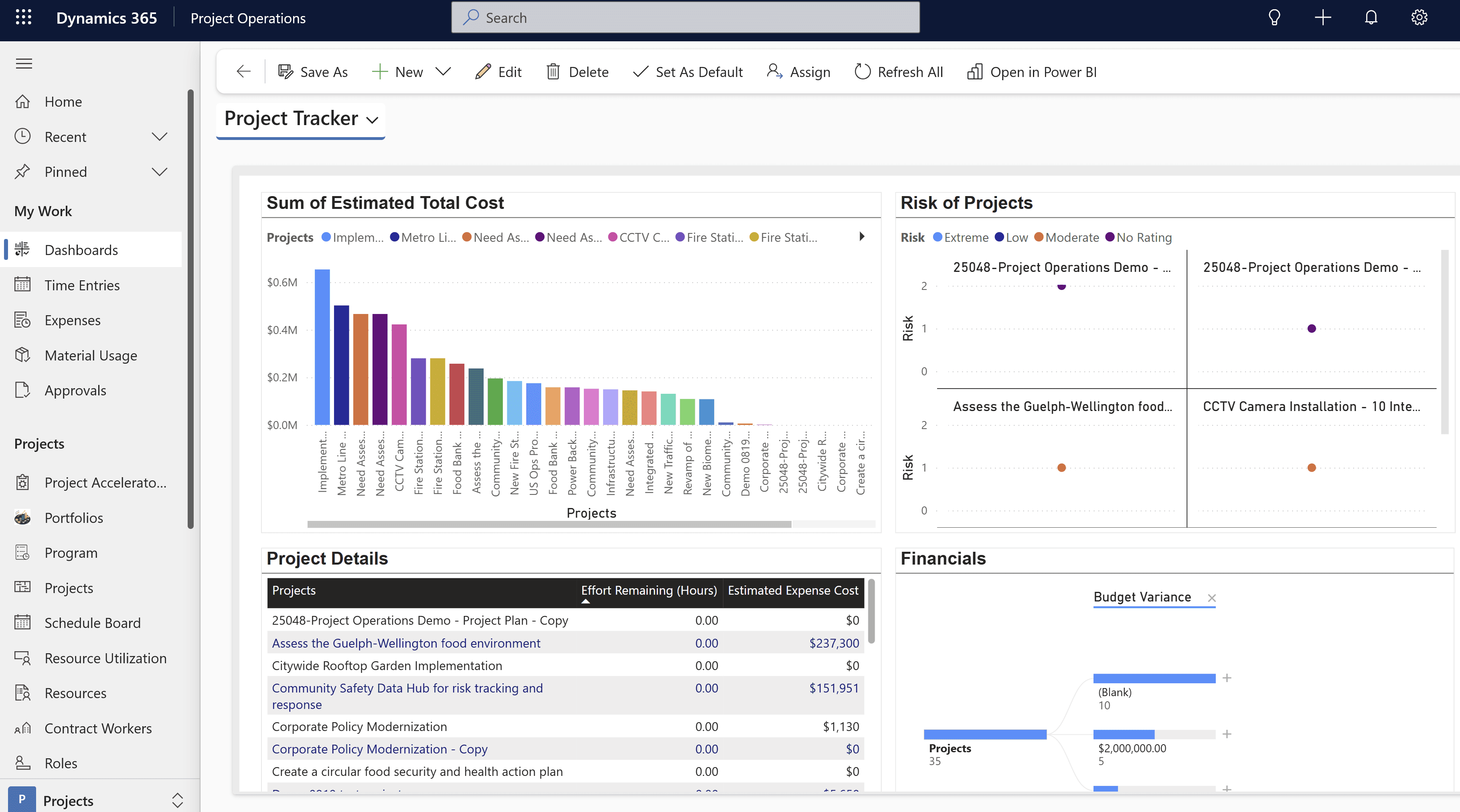
Project Operations also provides dashboards for project managers and leadership. With an ERP behind it, actuals, invoicing and revenue recognition are completed in the financial system. When paired with Dynamics 365 Finance, capabilities such as WIP, revenue recognition and advanced project accounting are handled in Finance, which also supports multi-entity and intercompany scenarios.
Capability comparison
The table below compares the two paths on the capabilities professional services firms ask about most. "Partial" means the capability exists but typically needs configuration, workarounds or extensions to match a complex requirement. Treat it as a starting point for your own fit-gap review rather than a final verdict, and confirm current functionality against the release your project will deploy.
| Capability | Business Central Projects | Project Operations (with ERP backbone) |
|---|---|---|
| Project tasks and hierarchy | Yes | Yes |
| Budget and billable planning | Yes | Yes |
| Project-based quotes and estimates | Partial | Yes |
| Project contracts with mixed billing lines | Partial | Yes |
| Skills-based resource scheduling board | No | Yes |
| Resource capacity and allocation | Yes | Yes |
| Time sheets with approvals | Yes | Yes |
| Expense capture for consultants | Partial | Yes |
| WIP calculation and posting | Yes | via Finance or ERP backbone |
| Revenue recognition | WIP methods, incl. percentage of completion | via Finance or ERP backbone |
| Native general ledger, AR and AP | Yes | via ERP backbone |
| Multi-entity and intercompany projects | Partial | yes with Finance |
Billing models: which platform supports what
For many firms, the billing model decides the platform. A firm billing nearly everything on time and materials has very different needs from one that mixes fixed-fee phases, milestone payments and monthly retainers within a single client relationship. List every billing model you actually use today, and the ones partners want to offer, before you look at software.
| Billing model | Business Central Projects | Project Operations |
|---|---|---|
| Time and materials | Supported natively from billable planning lines and posted time | Supported natively on contract lines |
| Fixed fee | Supported with billable planning lines scheduled across the project | Supported with fixed-price contract lines and billing schedules |
| Milestone billing | Workable by scheduling billable lines per milestone; manual discipline needed | Supported with contract line milestones |
| Not-to-exceed / capped | Monitored through budget versus actuals; enforcement is manual or via extension | Supported with not-to-exceed limits on contract lines |
| Retainers and advances | Usually handled with prepayments, configuration or extensions | Supported in deployments integrated with Dynamics 365 Finance |
| Mixed models in one contract | Possible with separate tasks or projects per model | Supported with multiple contract lines per contract |
Revenue recognition and WIP
Revenue recognition deserves its own conversation with your auditors. Business Central's WIP methods give a solid foundation: percentage of completion and completed contract are often used for fixed-fee work, while cost value or sales value methods suit other patterns. Firms with simpler contracts usually find this sufficient. Where contracts include multiple performance obligations, variable consideration or group-level reporting across entities, firms often look to Dynamics 365 Finance as the backbone behind Project Operations. Whatever the platform, agree your recognition policy before configuration starts, not during testing.
Do not let the demo define your billing policy
Both platforms can be configured in many ways. The risk is not missing functionality; it is configuring the system around a billing practice that partners have never formally agreed. Document your billing models, approval rules and recognition policy first, then evaluate the software against that document.
Quote-to-cash for a professional services firm
Whichever platform you choose, the core flow is the same. The difference is how much of it lives in one system, and how much depends on integration or manual steps. Map your current flow against the one below and mark where data is re-keyed today; those are the points a new platform must fix.
- 1Win the workOpportunity, estimate and quote by role and phase
- 2ContractAgree billing model, rates, limits and milestones
- 3Staff the projectAssign people by role, skills and availability
- 4Deliver and recordTime and expense entries with approvals
- 5BillInvoice from approved time, fixed-fee schedules or milestones
- 6Collect and recognizeReceivables, WIP and revenue recognition in the ledger
- 7ReportUtilization, realization and project margin
The reporting that matters
Professional services leadership tends to run the firm on a short list of measures: utilization (billable hours as a share of available hours), realization (billed value as a share of standard value), project margin, WIP and unbilled balances, and days sales outstanding. Both platforms hold the data for these measures; the question is how much shaping is required. Many firms use Power BI on top of either platform for partner-level dashboards, and our guide to Power BI finance dashboards includes a project profitability dashboard pattern.
Utilization
Billable hours against available capacity, by person, practice and office.
Realization
Value billed against value worked at standard rates, by client and project.
Project margin
Revenue less labour, expense and subcontract cost, tracked against estimate.
WIP and unbilled
Work performed but not yet invoiced, aged so nothing sits too long.
Days sales outstanding
How quickly invoices turn into cash, by client and partner.
Estimate accuracy
Actual effort against quoted effort, to improve future pricing.
Fit by firm profile
Size matters, but complexity matters more. A forty-person firm with intricate government contracts may need more than a two-hundred-person firm billing simple time and materials. Use the questions and the decision guide below together.
Fit questions to ask internally
- How many billable staff do we have today, and how many do we expect in three years?
- Do resource managers need to match people by skills, certifications or location, or is assignment mostly by team?
- How many billing models do we use, and do they mix within a single client contract?
- Do we operate multiple legal entities, currencies or intercompany resourcing?
- Do we sell physical products or inventory alongside services?
- Who owns quoting: partners in spreadsheets, or a defined sales process in CRM?
- How mature is our revenue recognition policy, and what do our auditors expect?
- IfUnder roughly 100 billable staff, mostly time and materials or simple fixed fee, single entityThenBusiness Central Projects as an all-in-one ERP, with Power BI for utilization and margin reporting
- IfSmall to mid-sized firm that also sells products, holds inventory or runs light manufacturingThenBusiness Central, since it covers projects, inventory and financials in one application
- IfLarge delivery team, skills-based resourcing and frequent staffing conflictsThenDynamics 365 Project Operations, with a validated financial backbone
- IfMultiple entities, currencies and intercompany resourcing with complex contractsThenProject Operations with Dynamics 365 Finance as the financial backbone
- IfFirm already on Business Central but outgrowing scheduling and quotingThenAssess Project Operations integration options with Business Central before considering an ERP change
- You want one application for projects, finance, purchasing and reporting
- Billing is mostly time and materials or scheduled fixed fee
- Resource assignment is manageable by team leads
- You want a faster, lower-complexity implementation
- You sell products or hold inventory alongside services
- Project sales and quoting need a structured, role-based process
- Resource managers need a skills-based scheduling board
- Contracts mix billing methods and carry limits or milestones
- You operate many entities and need Dynamics 365 Finance depth
- Delivery teams are large enough that utilization gains justify the scope
Implementation roadmaps for each path
The two paths differ in scope as much as in software. A Business Central Projects implementation is a single ERP project in which project accounting is a major workstream. A Project Operations implementation involves at least two applications, an integration or deployment model to decide, and usually a broader change-management effort across sales, resourcing and delivery. Timelines depend on scope, data and team availability, so the labels below are phases rather than promises.
- 1DiscoverPhase 1
- billing models and recognition policy documented
- project, task and resource structure agreed
- reporting KPIs defined
- 2Design and configurePhase 2
- chart of accounts and dimensions
- project templates and WIP methods
- time sheet and approval setup
- 3Migrate and testPhase 3
- open projects, balances and unbilled WIP migrated
- end-to-end quote-to-cash testing
- first WIP run reconciled
- 4Go live and stabilizePhase 4
- time entry training for all staff
- first billing cycle supported
- Power BI utilization and margin dashboards
Confirm the deployment model
Decide on the financial backbone, Dynamics 365 Finance or a validated Business Central integration, and document the integration scope.
Design the commercial model
Define roles, price lists, quote templates and contract line billing methods, including limits and milestones.
Configure resourcing
Set up bookable resources, skills, roles and organizational units, and agree how the scheduling board will be used.
Configure delivery and time
Build project templates, work breakdown structures, time and expense entry and approval routes.
Integrate and reconcile
Connect actuals, invoicing and recognition to the financial backbone and reconcile end to end.
Pilot, then roll out
Run a pilot practice or office through a full billing cycle before rolling out firm-wide.
Migrate open projects carefully
The hardest data in any professional services migration is the in-flight work: open projects, unbilled time, WIP balances and partially billed fixed-fee contracts. Decide early whether open projects move with full detail or as summarized balances, and reconcile WIP before and after cutover. Our SL to Business Central migration playbook covers open-project cutover options in detail.
What changes after go-live
The roadmaps end at stabilization, but the real return arrives in the following months. On the Business Central path, the first gains are usually faster billing cycles and a month-end close in which project WIP and the general ledger reconcile without spreadsheets. On the Project Operations path, the early gains tend to show up in resourcing: fewer staffing conflicts, better visibility of who is available next month, and estimates that are compared against actual effort. In both cases, plan a review roughly three months after go-live to tune approval routes, price lists and dashboards based on how people are actually working.
Common mistakes when choosing a project accounting platform
Most disappointing project accounting implementations do not fail because the software was wrong. They fail because the selection process skipped a question that mattered. These are the patterns we see most often when firms come to us part-way through a project.
Buying for the firm you hope to be in ten years
It is tempting to choose the most capable platform on the basis that the firm will grow into it. Sometimes that is right. More often, a fifty-person firm ends up paying for, configuring and training on capabilities it will not use for years, while the basics of time capture and billing take longer to stabilize. Plan for a realistic three-to-five-year horizon and make sure the chosen path has a credible growth route, rather than buying all of that route on day one.
Underestimating the change for consultants
Partners and consultants judge a new system by one thing: how easy it is to enter time and expenses. If time entry is slow, unclear or unavailable on the devices people actually use, utilization data degrades within weeks and billing slips. Whichever platform you choose, test time entry with real consultants early, design approval routes that do not create bottlenecks, and treat timesheet compliance as a leadership topic rather than an IT one.
Treating integration as a technical detail
On the Project Operations path, the boundary between the project application and the financial backbone is a design decision with real consequences. Which system owns the customer record? Where are invoices produced? How do adjustments flow back? These questions need answers from finance and delivery leaders, not only from developers. Our guide to ERP integration best practices covers the principles that keep a multi-application landscape reliable.
Ignoring reporting until the end
If utilization, realization and margin are not defined before configuration, the data needed to calculate them is often captured inconsistently or not at all. Agree the definitions, the dimensions and the owners of each measure during design, and build at least one partner-level dashboard before go-live so leaders see value from the first month.
Selection checklist
Before you sign off on either path, make sure your evaluation has covered the points below. They are the questions that most often surface late in an implementation when they should have been answered during selection.
- Billing models, approval rules and revenue recognition policy documented and agreed by partners
- Current and three-year billable headcount estimated
- Resourcing requirements defined: by team, by role, or by skills and availability
- Entity, currency and intercompany structure mapped
- Products, inventory or subcontracting requirements identified
- Financial backbone decision made for any Project Operations scenario
- Integration scope and ownership agreed where more than one application is involved
- Utilization, realization, margin and WIP measures defined
- Open project and WIP migration approach agreed
- Licensing position confirmed with Microsoft or your partner
- Fit-gap review completed against a realistic set of your own projects
- Implementation partner experience in professional services verified
How Econix helps
Econix Infotech helps professional services firms across Canada and the USA choose and implement the right project accounting platform. We start with your billing models, resourcing reality and reporting needs, then run a structured fit-gap review against both paths so the decision is grounded in your own projects. See our professional services industry page for the scenarios we support.
For firms that fit an all-in-one ERP, our Dynamics 365 Business Central team configures Projects, WIP and billing around your policy, and our professional services financial automation case study shows what that can look like in practice. For larger or more complex firms, our Dynamics 365 Project Operations practice designs the deployment model and financial backbone. If you are still weighing ERP options more broadly, our comparison of Business Central and Dynamics 365 Finance and our implementation approach are good next steps.
Related Reading
- Business Central or Dynamics 365 Finance: which fits? - choosing the right ERP backbone for your size and complexity
- Dynamics SL to Business Central migration playbook - project accounting migration, open projects and WIP cutover
- Power BI for finance leaders: 10 dashboards - including project profitability and utilization reporting
- RJ Lee Group: SL to Business Central - a project-based firm's move to Business Central
- ERP implementation cost in Canada - budgeting for either path
Econix Infotech
Not sure which project accounting path fits your firm?
Book a working session and we will map your billing models, resourcing and reporting to Business Central and Project Operations.
Referenced In
- Dynamics SL to Business Central: The Migration Playbook for Project-Based Businesses
- Rescuing a Stalled Dynamics 365 or Business Central Project: A 30-60-90 Day Recovery Playbook
- The Real Cost of Running Legacy Dynamics GP in 2026
- NetSuite vs Business Central: Which Fits Your Business Size and Industry?