Every ERP vendor will tell you their system handles distribution. Most of them do — for a generic SKU.
Tires are not generic SKUs. A tire has a size code, a load index, a speed rating, a season, a manufacture date moulded into the sidewall and a list of vehicles it is approved for. A wheel has a bolt pattern, an offset and a centre bore that must match the hub exactly. Your customers — dealers, retailers, fleets and installers — expect you to find the right one, in stock, at the nearest branch, in seconds.
That is why tire and wheel distributors need a sharper evaluation than the standard ERP scorecard. This checklist gives you one.
What you get in this guide
- A requirements checklist organized by the nine areas that decide margin and service in tire distribution
- Visual guides that show exactly which tire and wheel data your ERP must structure
- A suggested 100-point weighting to score vendors objectively
- A ten-scenario demo script to take control of every vendor presentation
- The red flags that signal a system will force your team into workarounds
- A requirement-by-requirement view of how Econix Tire & Automotive Distribution for Business Central delivers each area
Why the Standard ERP Scorecard Fails Tire Distributors
A generic ERP stores a tire as a line of description text: "MICHELIN Defender2 195/65R15 91H All Season". It looks fine on an invoice. It breaks everywhere else.
- Search depends on typing. If the rep types 195/65/15 instead of 195/65R15, the tire "is not in stock".
- Fitment lives in another tool. The vehicle lookup happens on a website or catalogue, then gets re-keyed into the quote.
- Tire age is invisible. The DOT date is not captured, so old stock ages quietly until a customer refuses it.
- Branch stock is a phone call. Availability at the next location is not on the order screen, so the sale walks.
- Recalls become investigations. Finding every customer who bought a recalled DOT lot takes days instead of minutes.
The fix starts with data. Every code on the sidewall should be a structured field your ERP can search, filter, report and control on.
- 225Section width225 mm across the treadERP field: Width
- 65Aspect ratioSidewall height = 65% of widthERP field: Aspect ratio
- RConstructionRadialERP field: Construction
- 17Rim diameterFits a 17-inch wheelERP field: Rim diameter
- 102Load index850 kg per tireERP field: Load index
- HSpeed ratingUp to 210 km/hERP field: Speed rating
- 2425DOT date codeMade in week 24 of 2025ERP field: DOT / manufacture date
Wheels need the same discipline. Diameter, width, bolt pattern, offset and centre bore decide whether a wheel fits — and whether it comes back as a return.
- 17×7.5Diameter × width17-inch wheel, 7.5 inches wide
- 5×112Bolt pattern (PCD)5 studs on a 112 mm circle
- ET42OffsetMounting face 42 mm from centreline
- CB 66.6Centre boreHub hole of 66.6 mm
The Moments That Decide Every Order
Before you look at features, map the flow your team runs dozens of times a day. A tire-ready ERP must support every step without leaving the system.
- 1Select vehicleYear, make, model and trim lookup
- 2Verify fitmentOE and alternate sizes, load and speed minimums
- 3Choose productTires and wheels that fit, with price and stock
- 4Quote / orderOne click from search to sales document
- 5AllocateReserve, transfer or backorder across branches
- 6Pick & shipRight size, right DOT, right location
- 7Invoice & analyzeMargin by brand, size and customer
Beware "we can customize that later"
Many distributors go live on a generic ERP and plan to add tire features in phase two. Phase two rarely arrives. Make every tire-specific requirement part of the selection and the contract — not a promise.
The Checklist
Score each requirement for your operation, then ask every vendor to demonstrate it live, with your data. If a capability is on a roadmap, score it as missing.
1. Tire and wheel product data
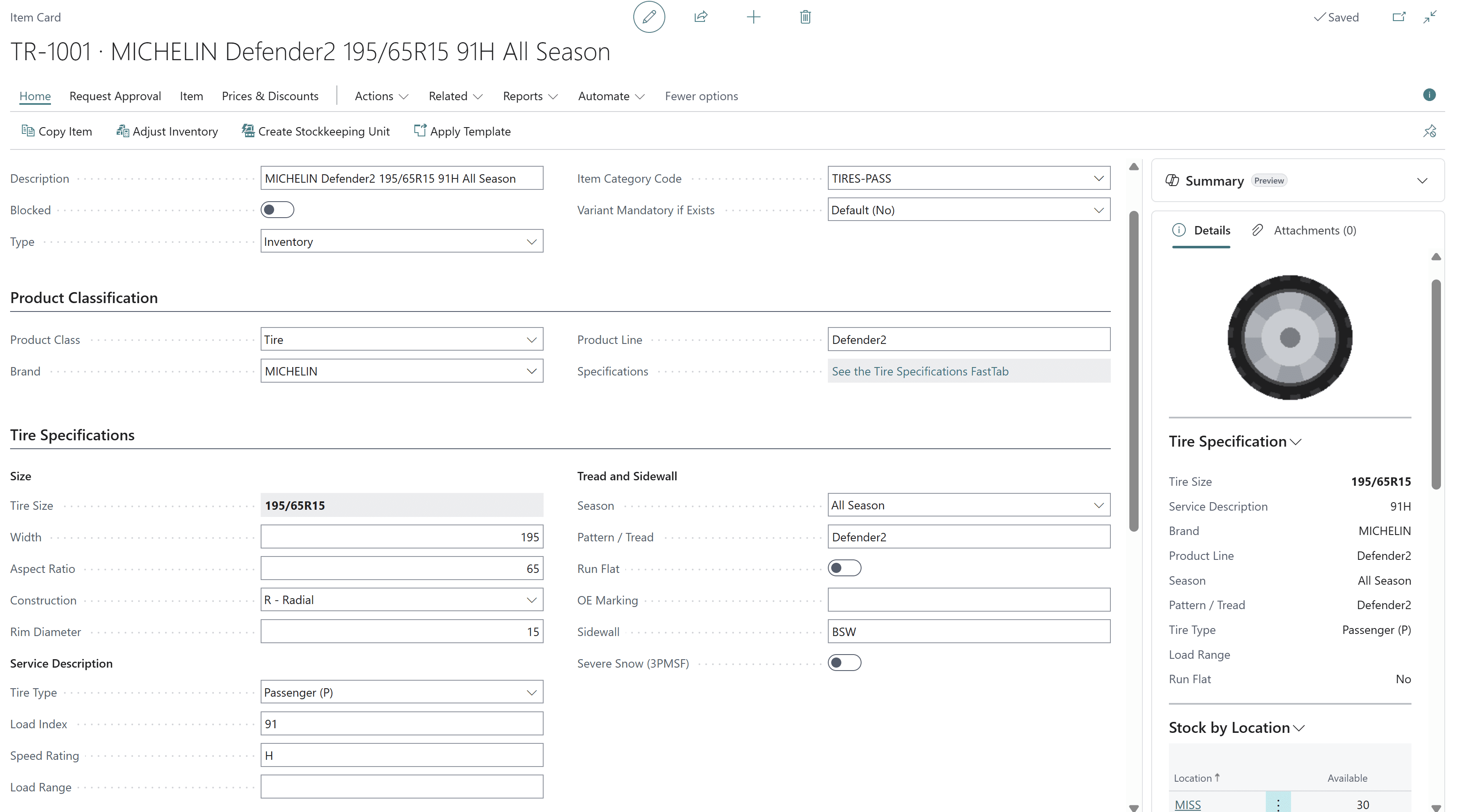
Structured product data is the foundation for everything else on this list — search, fitment, pricing, age control and analytics.
| Requirement | Priority | What to look for in the demo |
|---|---|---|
| Structured tire size | Must-have | Width, aspect ratio, construction and rim diameter as separate fields that build the size code |
| Service description | Must-have | Load index, speed rating and load range as searchable fields |
| Tire attributes | Must-have | Season, tire type, run-flat, 3PMSF severe-snow, OE marking, sidewall, pattern and product line |
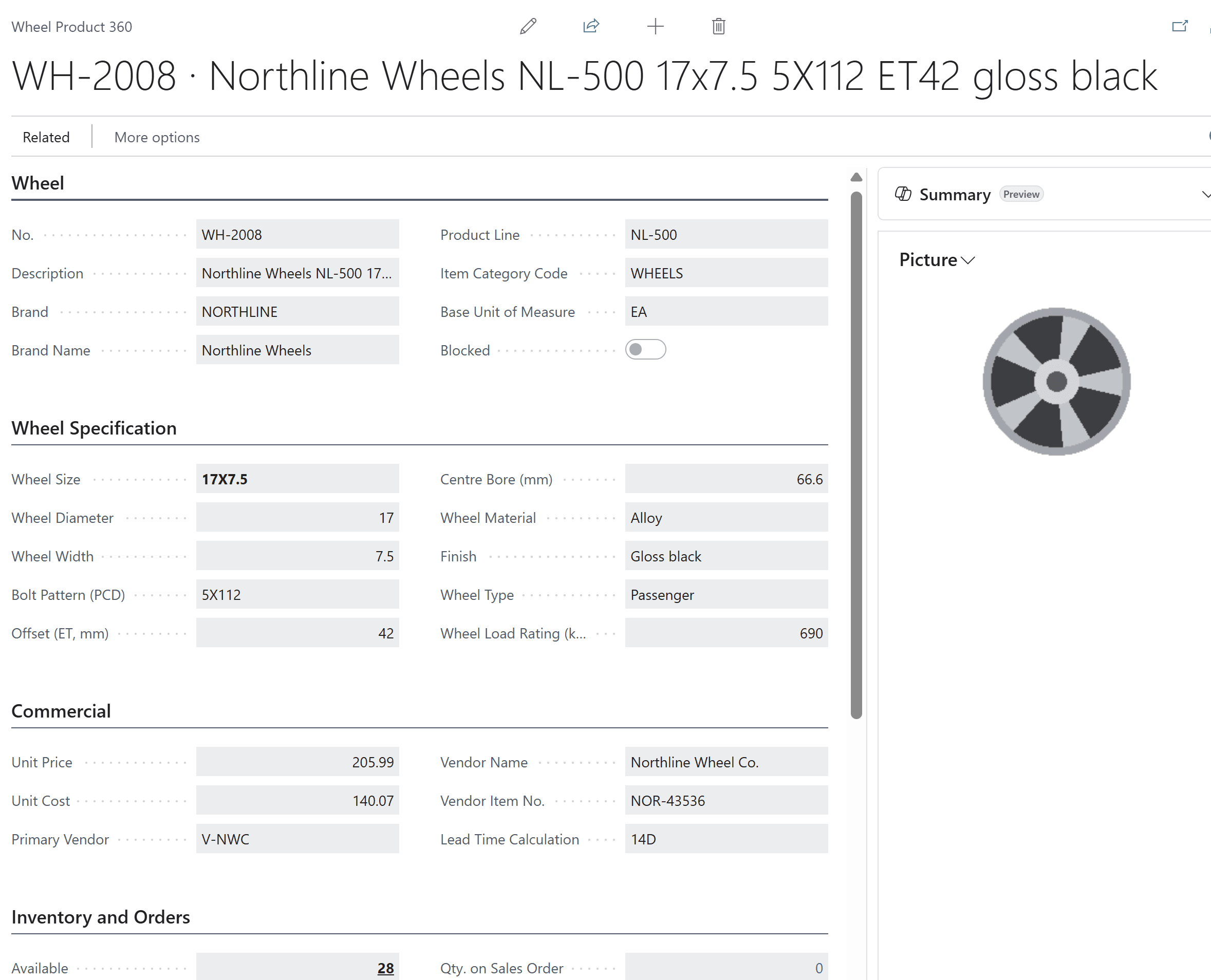
| Structured wheel data | Must-have | Diameter, width, bolt pattern (PCD), offset (ET), centre bore, material, finish and load rating |
| One item master | Must-have | Tire data extends the standard item — no second product database to reconcile |
| Mixed product classes | Important | Lubricants, accessories and services sold on the same order without forced tire fields |
| Product images | Nice-to-have | Tire and wheel pictures on the item card and in search results |
2. Search and selling
Speed at the counter is margin. The best systems let a rep go from a customer's question to a confirmed order in under a minute.
| Requirement | Priority | What to look for in the demo |
|---|---|---|
| Tire size search | Must-have | Type 225/65R17 or filter by brand, season, load index and speed rating; results show live stock |
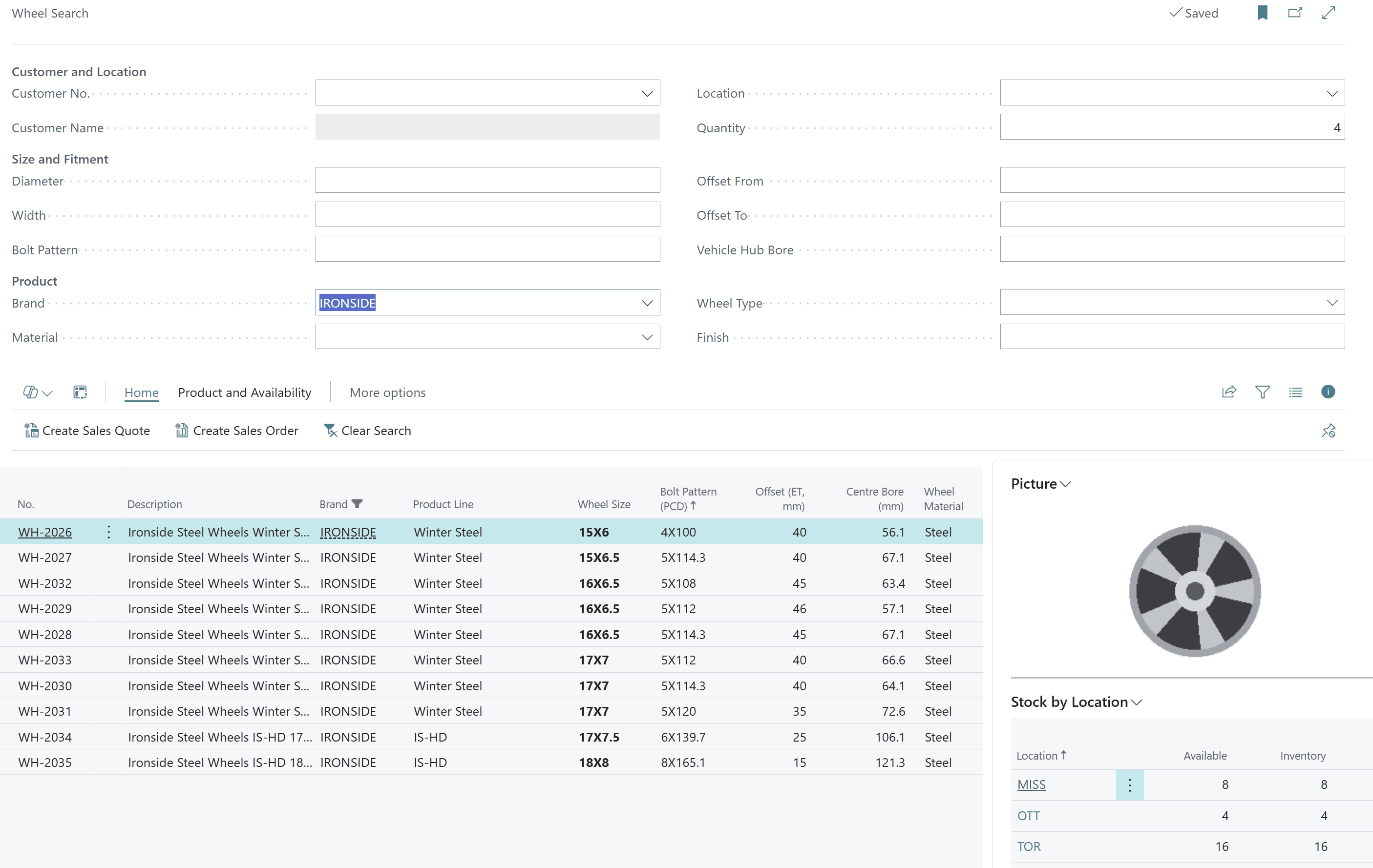
| Wheel search | Must-have | Filter by bolt pattern, offset range, hub bore, diameter, width, brand and finish |
| Availability in results | Must-have | Available quantity at the selected location and across the network, right in the search grid |
| Quote and order from search | Must-have | Create the sales quote or order directly from the selected results |
| Customer pricing | Must-have | Customer-specific prices and discounts applied automatically |
| Product 360 drill-down | Important | Specs, price, stock by location, open orders and incoming supply on one page |
| Packages and services | Important | Installation or service lines added to tire quotes |
3. Vehicle fitment
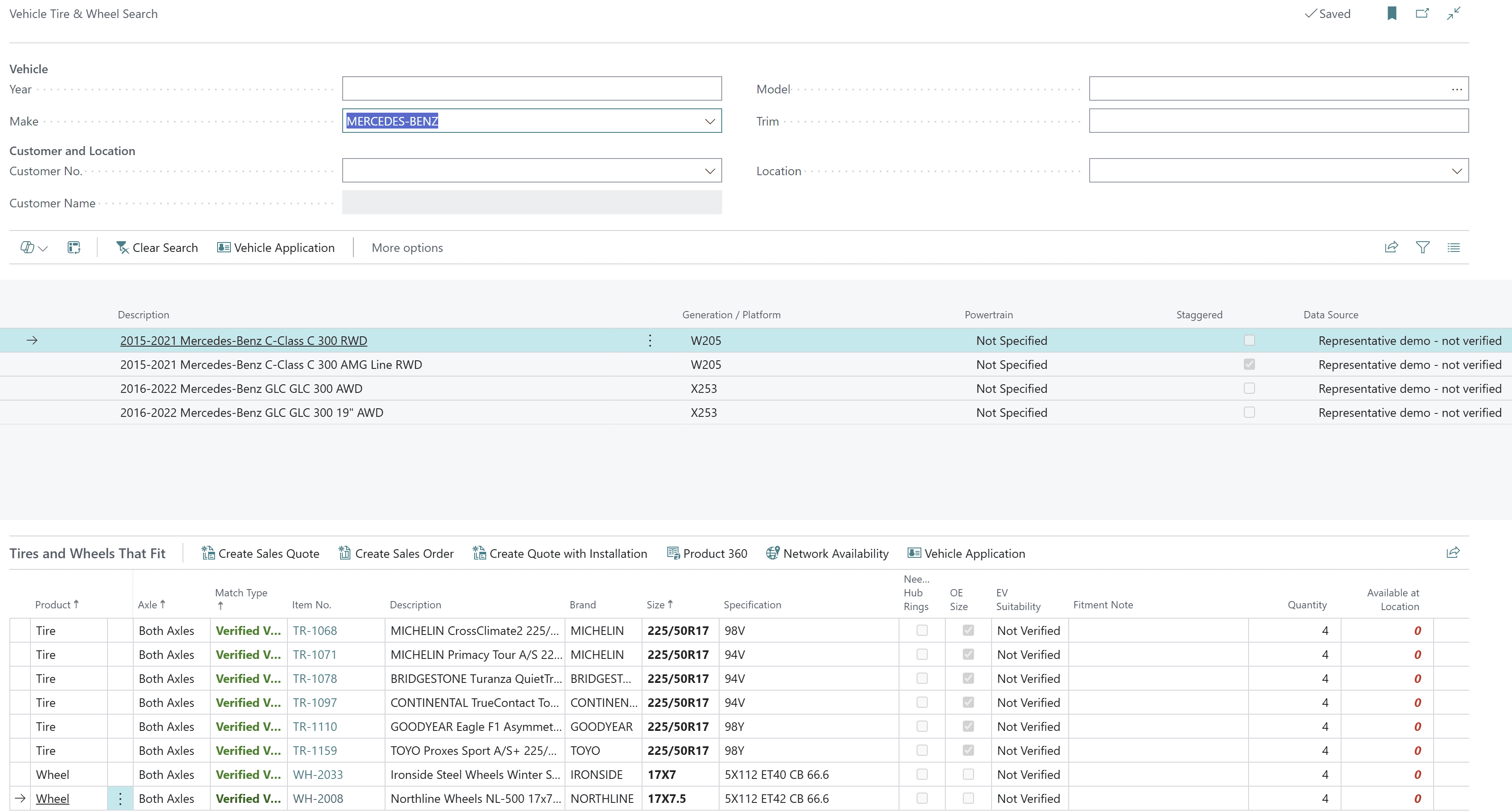
Fitment is where tire distribution software earns its keep. When the vehicle drives the search, wrong-fit returns fall and average order value rises.
| Requirement | Priority | What to look for in the demo |
|---|---|---|
| Vehicle search | Must-have | Year, make, model and trim lookup that returns the tires and wheels that fit |
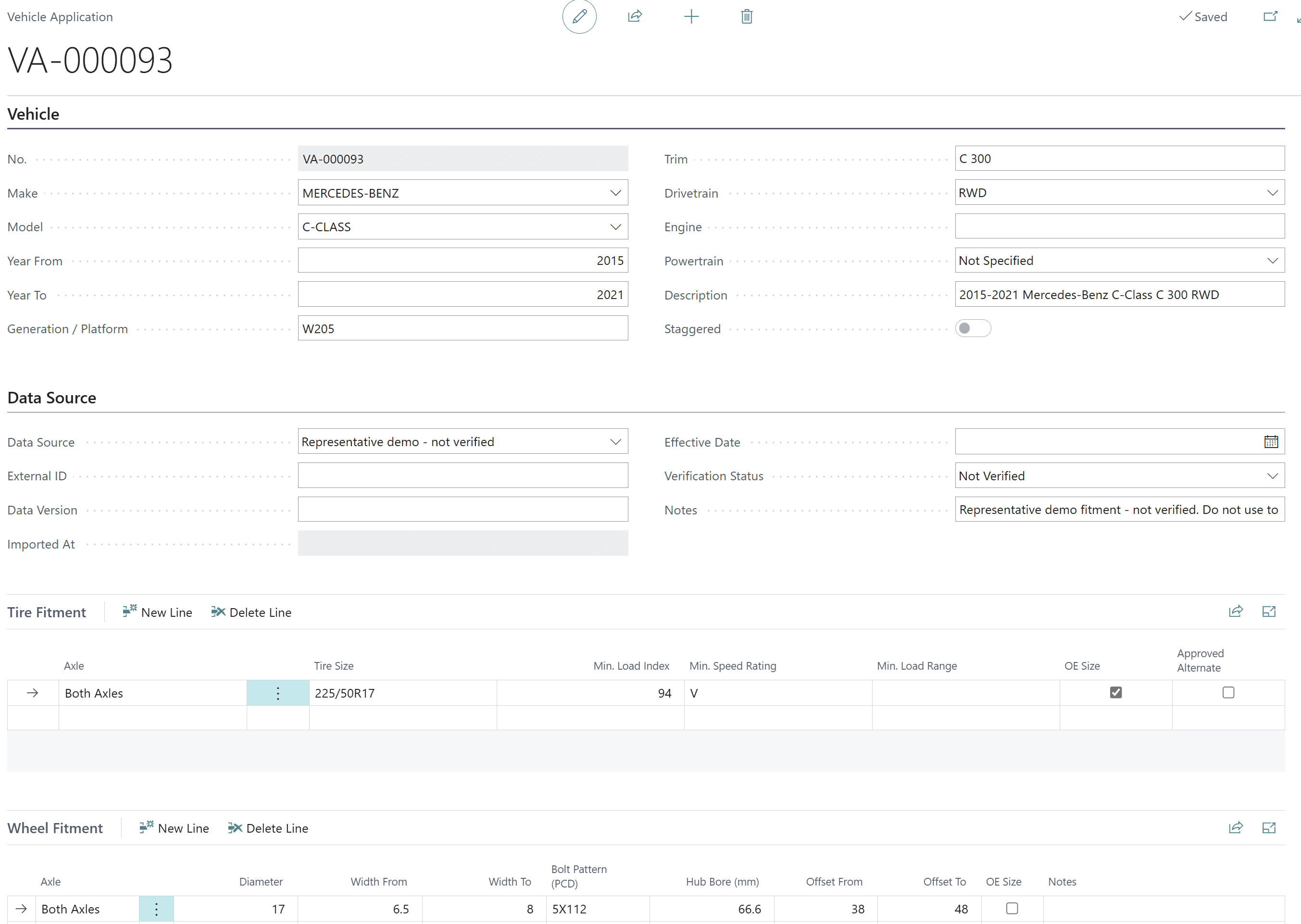
| Tire fitment rules | Must-have | OE and approved alternate sizes, minimum load index, speed rating and load range |
| Staggered fitments | Important | Different front and rear sizes handled correctly |
| Wheel fitment rules | Must-have | Diameter, width range, bolt pattern, hub bore and offset range per vehicle |
| Customer vehicles | Important | Vehicles saved against the customer for fast repeat orders |
| Fitment data management | Must-have | Import fitment catalogues with source, version and verification status on every record |
4. Multi-location inventory
Stock stranded in the wrong branch is the most expensive inventory you own. Your ERP should make the whole network sellable.
| Requirement | Priority | What to look for in the demo |
|---|---|---|
| Network availability | Must-have | On-hand, reserved, available and on-order quantities for every location, while entering the order |
| Transfer from shortage | Must-have | Cover a short line from another branch with a standard transfer order in a few clicks |
| Backorder and allocation workbench | Must-have | One view of short lines, incoming supply and allocation decisions |
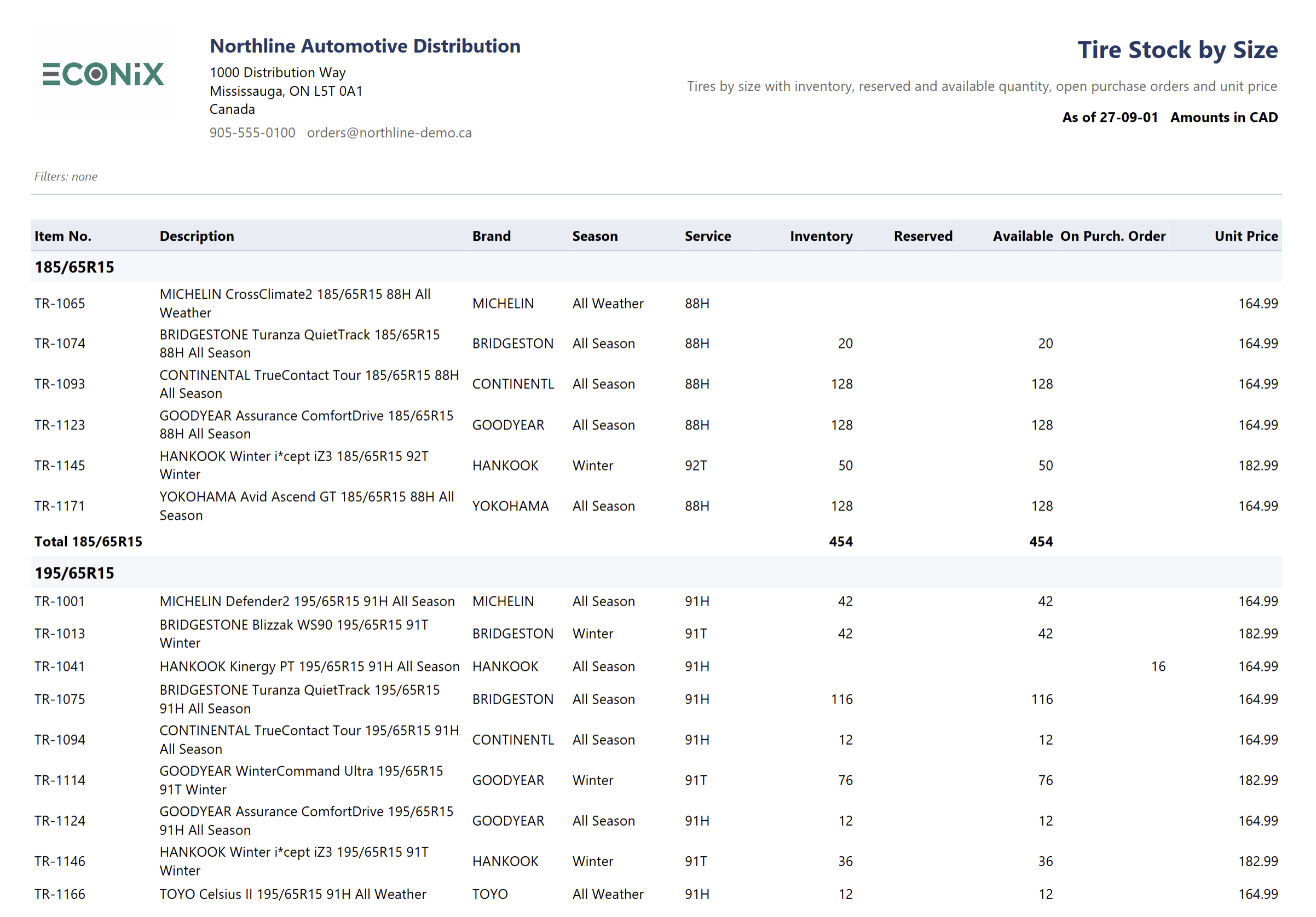
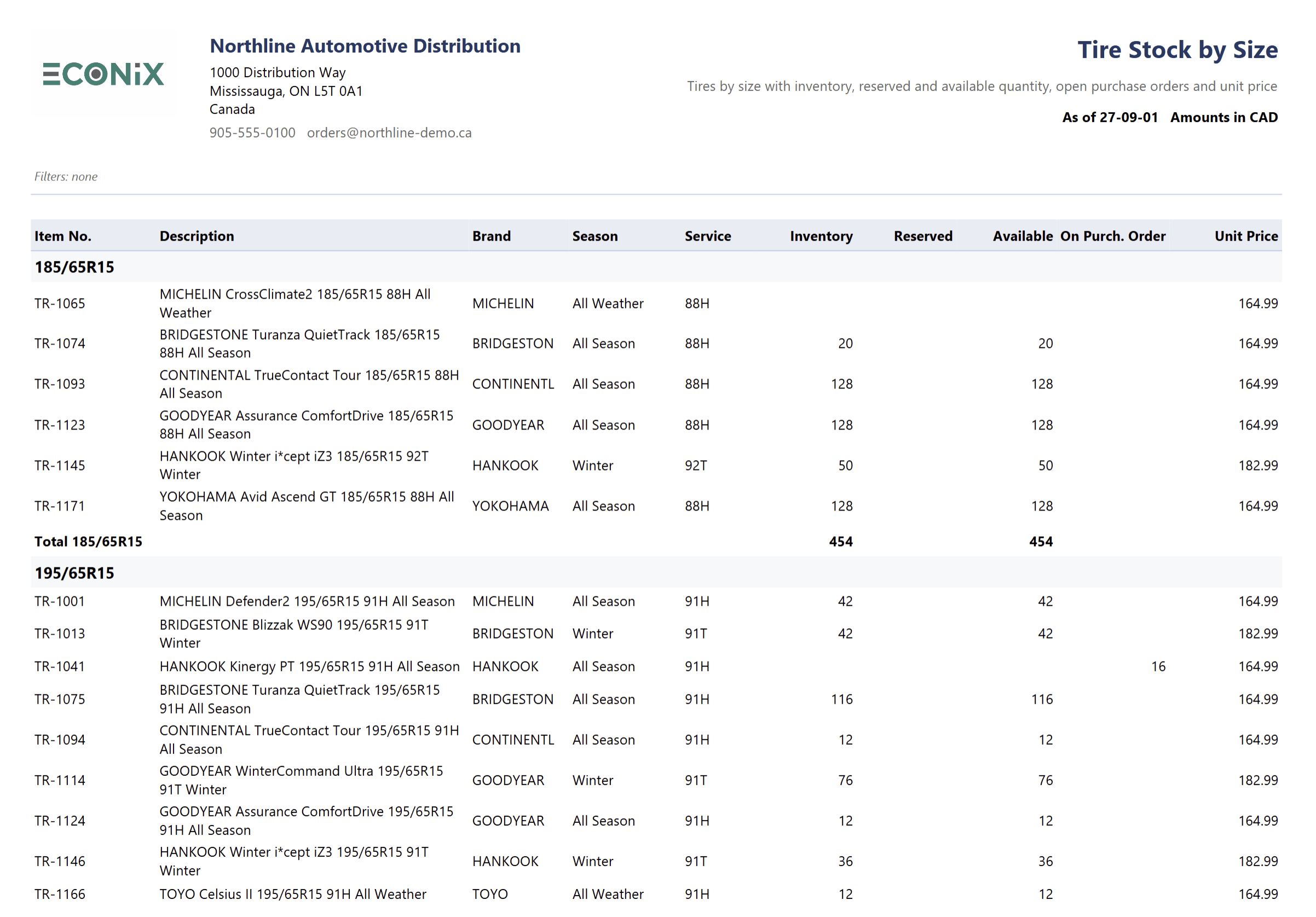
| Stock by size | Important | Inventory grouped by tire size with reserved and on-order quantities |
| Inventory by season | Important | Seasonal stock visibility for winter and summer changeovers |
| Transfers required | Important | Role-centre cue showing transfers needed across the network |
| No parallel ledger | Must-have | Availability calculated from the ERP's own inventory ledger |
5. DOT, tire age and recalls
This is the requirement set most generic ERPs cannot meet — and the one with the biggest downside when it is missing.
| Requirement | Priority | What to look for in the demo |
|---|---|---|
| DOT/TIN capture | Must-have | DOT recorded at receiving through standard lot or item tracking |
| DOT age inventory | Must-have | Stock by manufacture-date age band, by size and location |
| Age policies | Important | Warnings when outbound stock exceeds customer or company age rules |
| Quality holds | Must-have | Block outbound use of a held or recalled lot |
| Forward and backward trace | Must-have | From supplier receipt to every customer shipment and back |
| Recall exposure | Must-have | For a DOT lot: on-hand by location, shipments, affected customers and invoices |
| Recall impact export | Important | Export the impact list for customer notification |
Units on hand by manufacture-date age band
6. Warehouse operations
| Requirement | Priority | What to look for in the demo |
|---|---|---|
| Standard warehouse flow | Must-have | Receipt, put-away, pick, shipment and count on standard documents |
| Tire context on documents | Must-have | Tire size and DOT visible to receivers and pickers |
| Barcode labels | Important | Labels for tire and wheel stock |
| Transfers between branches | Must-have | Standard transfer documents with tire context preserved |
| Upgrade path | Important | Room to add advanced WMS or mobile scanning later without rework |
7. Warranty, returns and landed cost
| Requirement | Priority | What to look for in the demo |
|---|---|---|
| Warranty claims | Must-have | Claims linked to the original sale with decide and hand-off queues |
| Claim history | Important | Decision and resolution recorded against customer and product |
| Customer and vendor returns | Must-have | Returns that retain lot and DOT traceability |
| Landed cost | Must-have | Freight, duty and charges applied to inventory cost so margin is real |
| Vendor performance | Important | On-time receipts and overdue supply by vendor |
8. Analytics and KPIs
If margin by brand and stock by size still come from spreadsheets, the ERP is not finished.
| Requirement | Priority | What to look for in the demo |
|---|---|---|
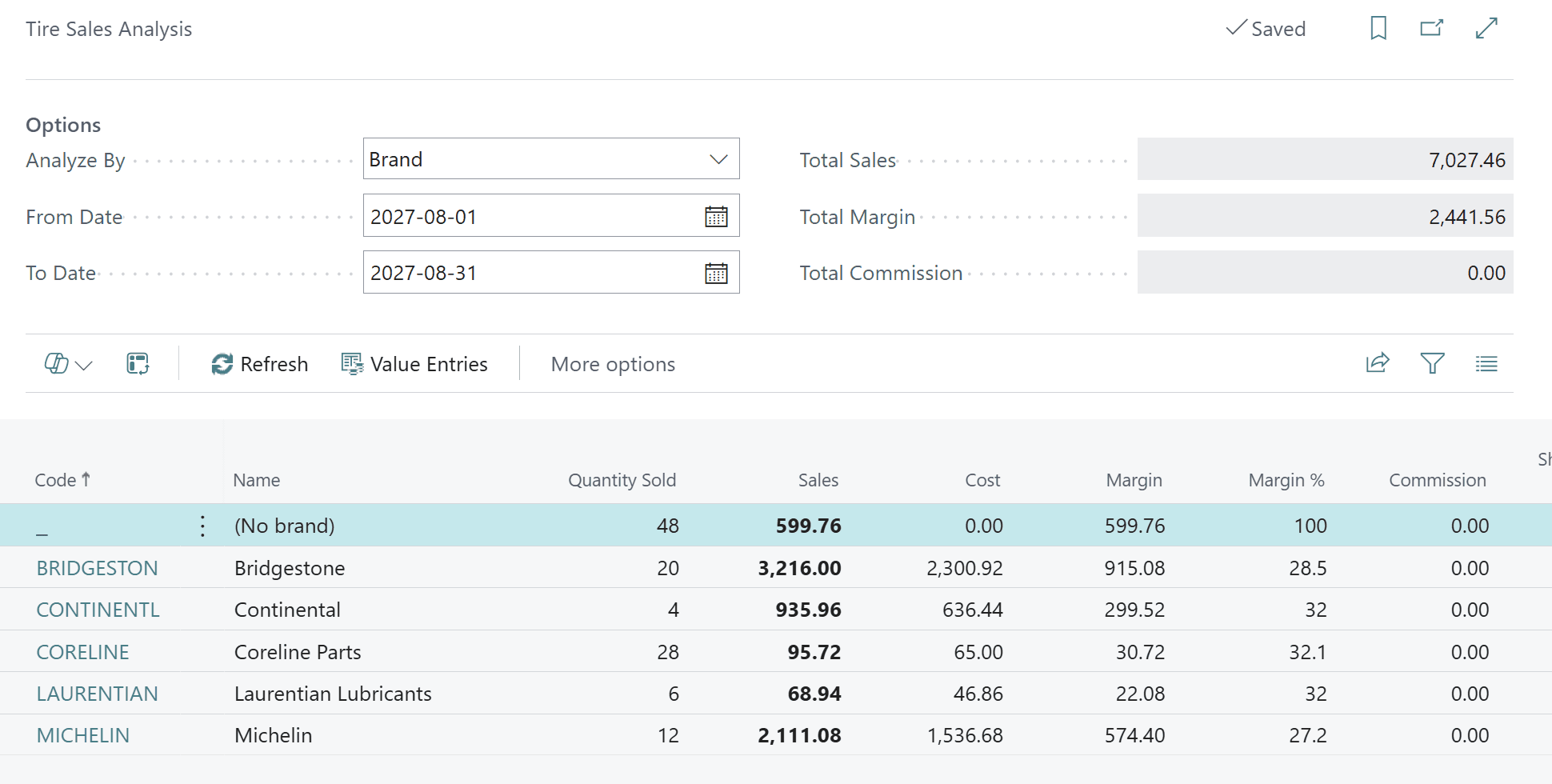
| Sales and margin by brand | Must-have | Sales, cost, gross margin and share by brand, product line, customer or period |
| Salesperson and commission | Important | Sales and commission basis by salesperson |
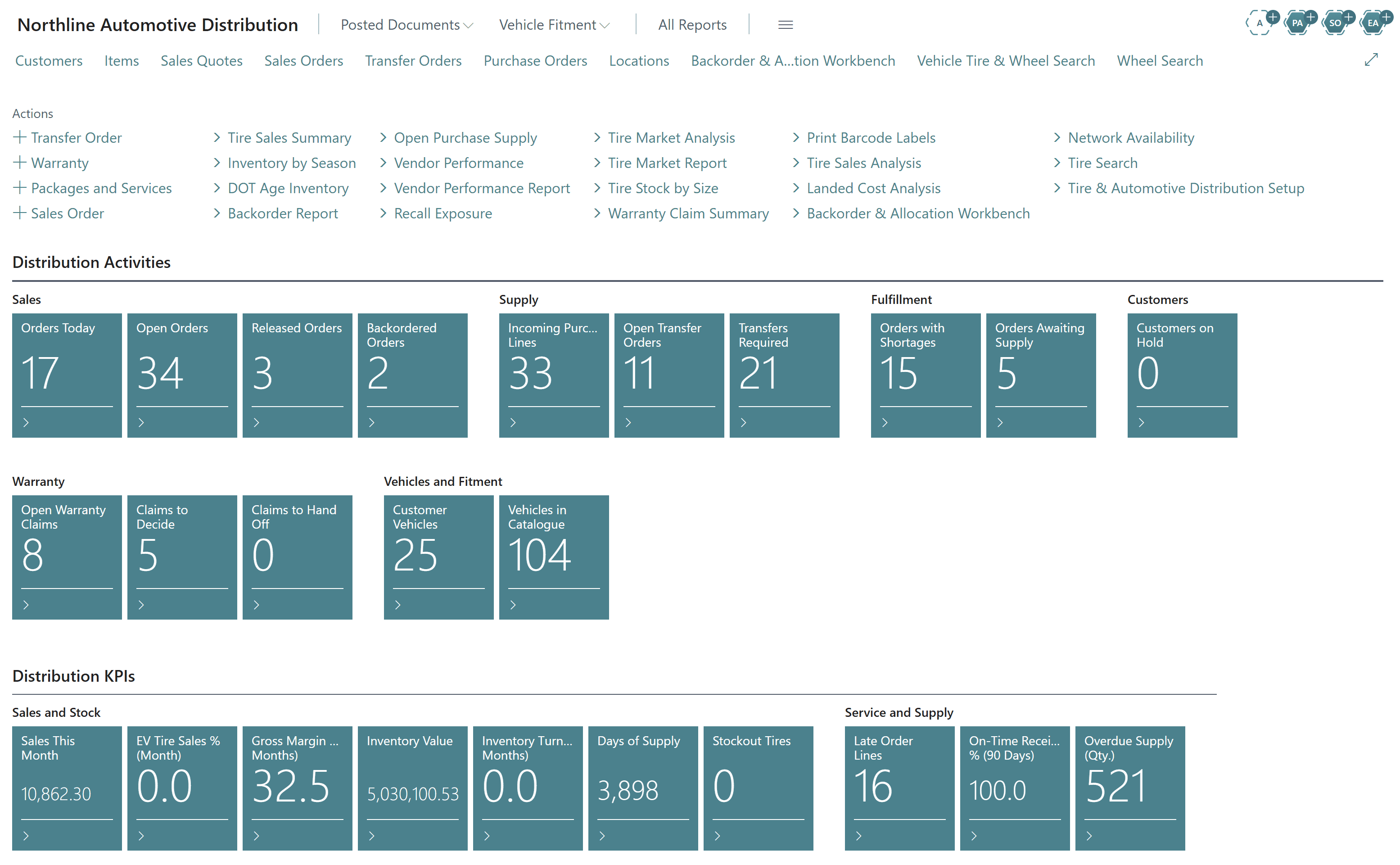
| Inventory KPIs | Must-have | Inventory value, turns, days of supply, stock-outs |
| Service KPIs | Important | Late order lines, on-time receipt percentage, overdue supply |
| Role centres | Must-have | Home pages for managers and inside sales that surface the day's exceptions |
| Power BI ready | Important | Posted data available for management dashboards |
9. Platform, integration and migration
| Requirement | Priority | What to look for in the demo |
|---|---|---|
| Native to the ERP | Must-have | Tire functions inside the ERP, not a bolted-on web application |
| Upgrade-safe | Must-have | Delivered as supported extensions that follow the vendor's release cadence |
| Strong core ERP | Must-have | Finance, tax, purchasing and reporting as strong as the tire features |
| Integration | Important | Documented APIs for eCommerce, B2B portals, EDI and fitment feeds — see ERP integration best practices |
| Security | Must-have | Role-based permissions, with cost and margin visible only to the right people |
| Migration | Must-have | A plan to move items, customers, vendors and balances, and to map tire attributes out of old descriptions |
Score Vendors With a Weighted Scorecard
A flat checklist treats "product images" the same as "recall exposure". Weight the areas instead, score each vendor 0–5 per requirement, and multiply through.
- Search & selling15
- Vehicle fitment15
- Multi-location inventory15
- DOT, age & recalls12
- Tire & wheel product data10
- Analytics & KPIs9
- Warehouse operations8
- Warranty, returns & landed cost8
- Platform, integration & migration8
Take Control of the Demo: Ten Scenarios to Script
Send these scenarios to every vendor before the demo and insist on seeing them in order, with your data.
The counter call
A customer asks for four tires for a specific year, make and model. Show the tires that fit, stock by branch and the quote.
The size search
Find every 225/65R17 all-season with load index 102 or higher, sorted by availability.
The wheel match
Find a 17-inch wheel with a 5x112 bolt pattern, offset between 38 and 48 and the right hub bore.
The branch shortage
The order is short at the requested location. Cover it from another branch with a transfer.
The backorder decision
Show every short line across the network with incoming supply and decide what ships first.
Receiving with DOT
Receive a purchase order, capture DOT codes and show the stock in age bands.
The recall notice
A manufacturer recalls a DOT lot. Show on-hand stock by location, every customer who bought it, and place the rest on hold.
The warranty claim
Log a claim against the original invoice, decide it and record the outcome.
The mixed basket
Sell tires, wheels, lubricant and installation on one order.
The margin review
Show last month's sales, cost and margin by brand, then drill to the invoices behind one number.
One end-to-end scenario tells you more than twenty feature slides
Ask the vendor to run scenario 1 through to scenario 10 without leaving the system. Every time they switch applications, export to Excel or say "we would configure that", you have found a gap.
Red Flags to Watch For
If you see these, keep looking
Tire size, load and speed stored only in the item description. Fitment available only on a separate website. DOT captured on paper or not at all. A separate "tire database" that syncs to the ERP overnight. Recall reporting that requires a custom query. Branch availability that needs a second screen.
Questions to Ask Every Vendor
- 1Which tire and wheel fields are structured, and can we search and report on each one?
- 2Where does vehicle fitment data come from, how is it loaded, and how do we know which records are verified?
- 3Is availability calculated from the ERP's own ledger, or from a separate database?
- 4How is the DOT captured at receiving, and how quickly can we produce a recall impact list?
- 5What happens to your extension when the ERP vendor releases an update?
- 6Can we see a live customer environment or reference call with a tire or automotive distributor?
- 7How will you migrate our item data and split tire attributes out of existing descriptions?
How Econix Tire & Automotive Distribution Meets the Checklist
Econix Tire & Automotive Distribution is a fully functional ISV solution for Microsoft Dynamics 365 Business Central, available now. It was designed around the requirements in this guide.
| Checklist area | What Econix delivers in Business Central |
|---|---|
| Tire & wheel product data | Structured tire and wheel specifications on the standard item, with Tire and Wheel Product 360 |
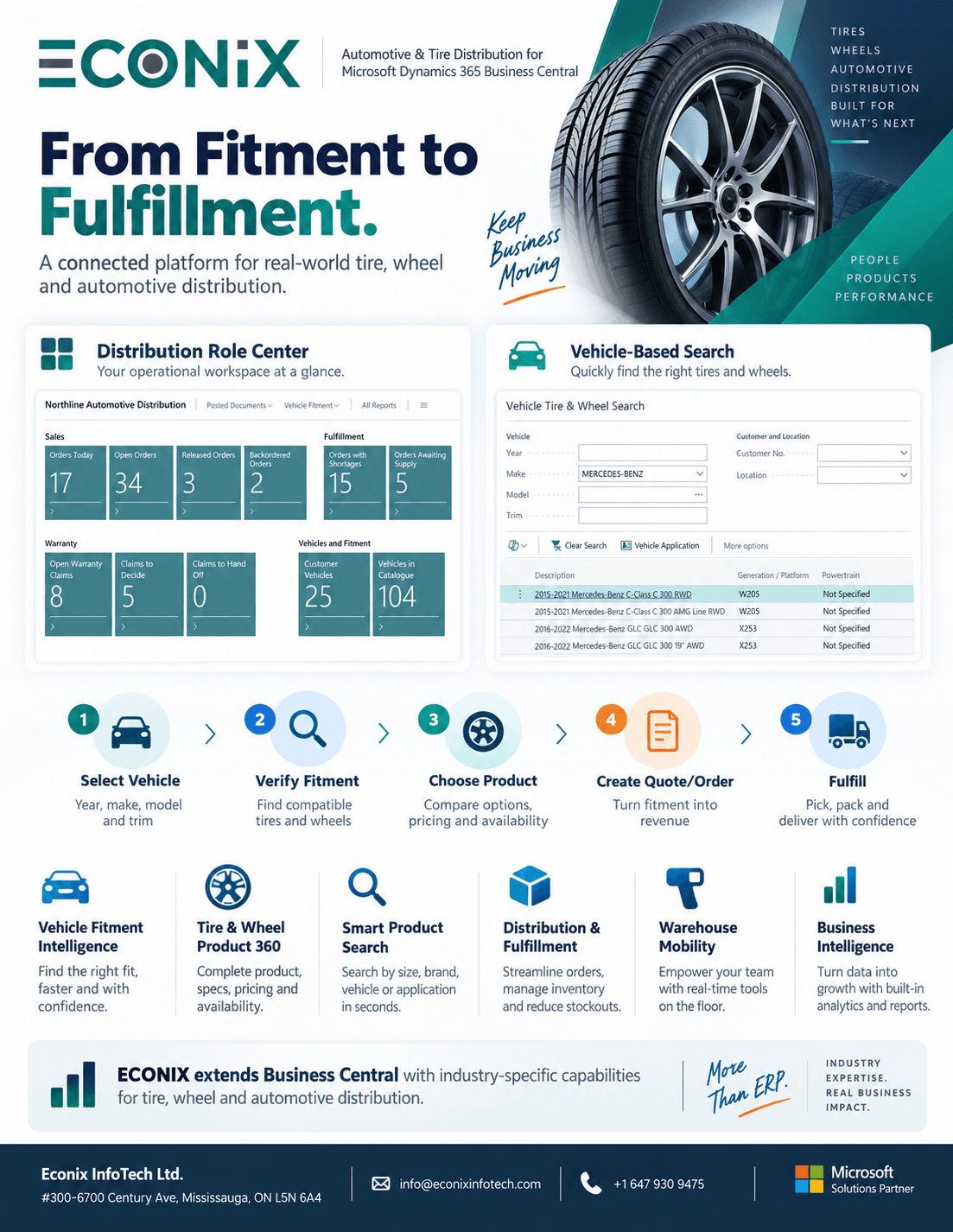
| Search & selling | Tire search, wheel search and vehicle search with stock by location and one-click quote or order |
| Vehicle fitment | Vehicle applications with tire and wheel fitment rules, staggered setups and customer vehicles |
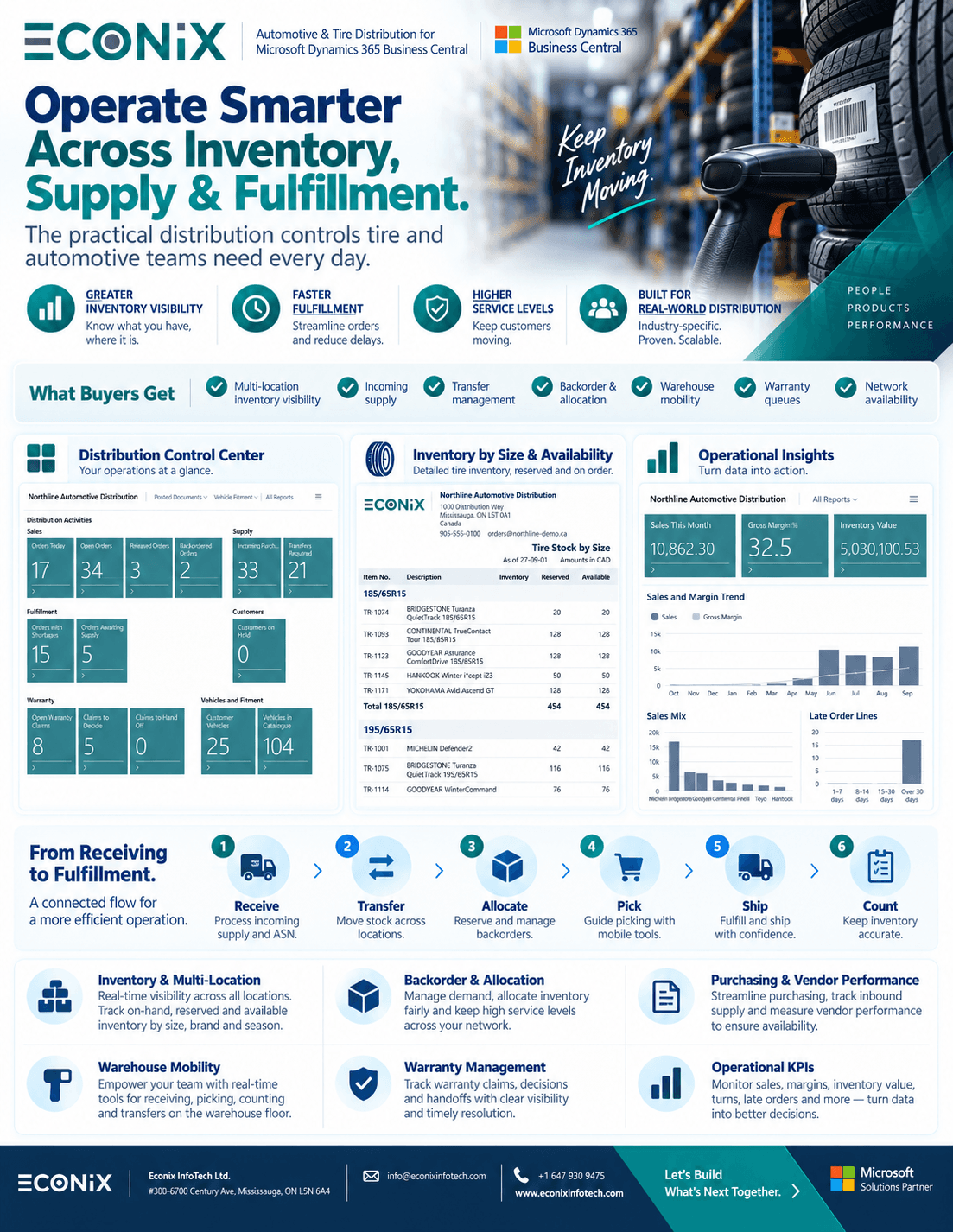
| Multi-location inventory | Network availability, transfers required, backorder and allocation workbench, stock by size and season |
| DOT, age & recalls | DOT/TIN capture, DOT age inventory, quality holds, traceability and recall exposure |
| Warehouse | Tire and DOT context on standard Business Central warehouse documents, barcode labels |
| Warranty & returns | Warranty claim queues, claim summary, returns with lot/DOT trace, landed cost analysis |
| Analytics | Tire sales analysis, sales by brand, market analysis, commission and role-centre KPIs |
| Platform | Native Business Central extensions — one system of record, upgrade-safe, Power BI ready |
Moving from an older Dynamics system? See our GP to Business Central and NAV to Business Central upgrade paths — tire attributes are mapped into structured fields as part of the migration.
Related Reading
- Tire & Automotive Distribution ERP — Econix Tire & Automotive Distribution for Business Central
- Business Central for Tire and Automotive Distributors — fit, gaps and how Econix closes them
- Dynamics 365 for Distribution & Wholesale — distribution ERP across every product category
- ERP Implementation Checklist 2026 — planning the project once you have chosen
Run This Checklist Against Econix
Send us your ten scenarios and we will run them live in Business Central — vehicle to fitment to order to margin. Book a 30-minute walkthrough or explore the Tire & Automotive Distribution solution.